
Quick Summary
- The two categories overlap: A client management system and CRM are not always separate software types. CRM is the broader, established category, while client management software often emphasizes ongoing client work after a sale.
- CRM usually leads with sales workflows: Traditional CRM systems focus heavily on leads, opportunities, deal stages, follow-ups, pipelines, and forecasting, making them especially useful when customer acquisition and sales visibility are the main priorities.
- Client management usually goes deeper after the sale: Client-focused platforms commonly support onboarding, service or project delivery, files, approvals, billing, client portals, renewals, and other workflows tied to managing active relationships.
- Modern platforms can often do both: A CRM may include post-sale features, while client management software may include pipelines and lead tracking, so product labels alone are unreliable. The better comparison is which lifecycle stages and workflows each system actually supports.
- Choose based on where your complexity lives: If the biggest challenge is managing prospects and deals, favor a sales-focused CRM. If complexity starts after conversion, prioritize client management features; businesses needing both may benefit from one integrated platform.
Client Management System vs CRM at a Glance
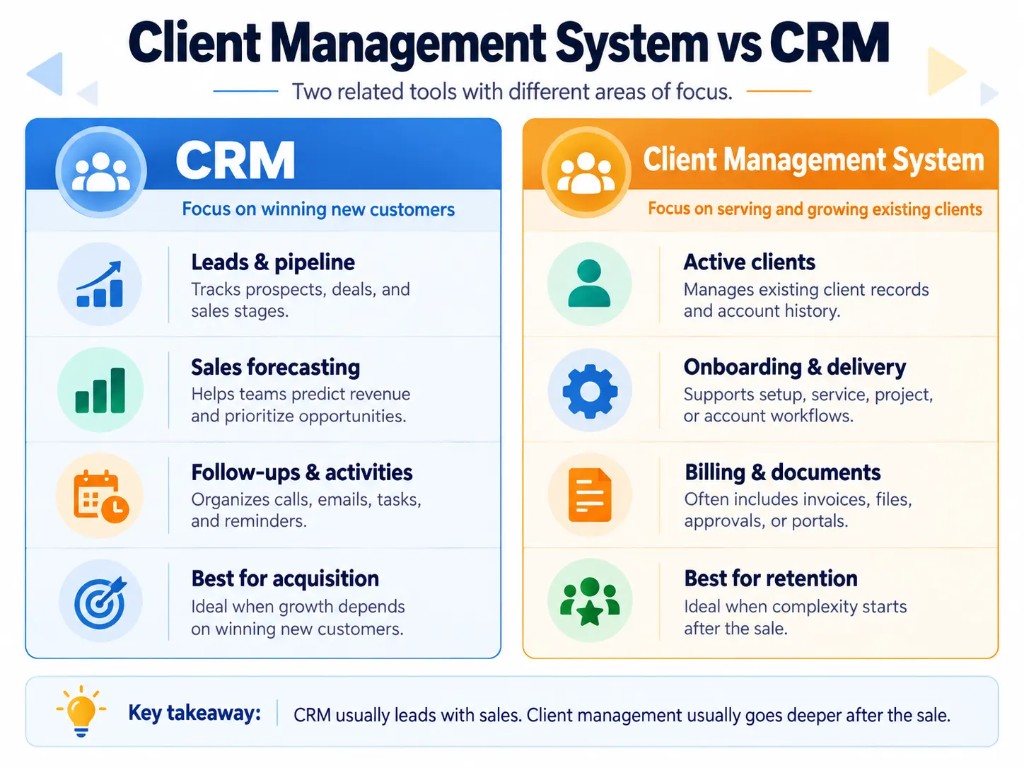
| Area | CRM | Client Management System |
|---|---|---|
| Primary focus | Building and managing customer relationships, often with a strong sales focus | Managing active clients and ongoing client work |
| Prospects and leads | Core function | May be included |
| Sales pipeline | Usually core | May be included |
| Deal tracking | Usually core | Often included |
| Sales forecasting | Common | Less central |
| Client records | Yes | Yes |
| Communication history | Yes | Yes |
| Client onboarding | May be available | Common focus |
| Projects or service delivery | Varies by platform | Common in broader client-management platforms |
| Client portal | Varies | More common |
| Documents and approvals | Varies | Often emphasized |
| Invoicing and payments | Varies | Often included or integrated |
| Renewals and retention | Often supported | Common focus |
| Main users | Sales, marketing, account and service teams | Account managers, client-service teams, agencies, consultants and service businesses |
These are typical patterns rather than strict definitions. Modern software increasingly combines both sides of the table.
What Is a Client Management System?
A client management system is software used to organize client information, interactions and workflows in one central place.
At the basic level, it can store:
- contact information;
- communication history;
- notes;
- appointments;
- account information;
- documents;
- tasks.
More comprehensive client management software can also manage the work surrounding an active client, including onboarding, projects, approvals, invoicing, payments, portals and renewals.
This is why the term can become confusing. Some companies use “client management system” almost synonymously with CRM. Others use it for an all-in-one platform that extends beyond the traditional sales pipeline.
Zapier, for example, notes that client-management applications and CRMs are often treated as synonymous while describing client management as having a somewhat stronger emphasis on client-facing processes.
What Is a CRM?
CRM stands for customer relationship management.
CRM software centralizes information about prospects and customers and helps teams manage their interactions throughout the relationship.
Its strongest traditional capabilities include:
- contact management;
- lead management;
- opportunity and deal tracking;
- sales pipelines;
- follow-up activities;
- communication history;
- sales automation;
- forecasting and reporting.
A CRM does not necessarily stop working once a deal closes. Modern CRMs may also support customer service, account management, onboarding, renewals and other post-sale processes.
That is one reason the boundary between CRM and client management software has become increasingly blurred.
Key Differences Between a Client Management System and CRM
1. Sales Acquisition vs Ongoing Client Management
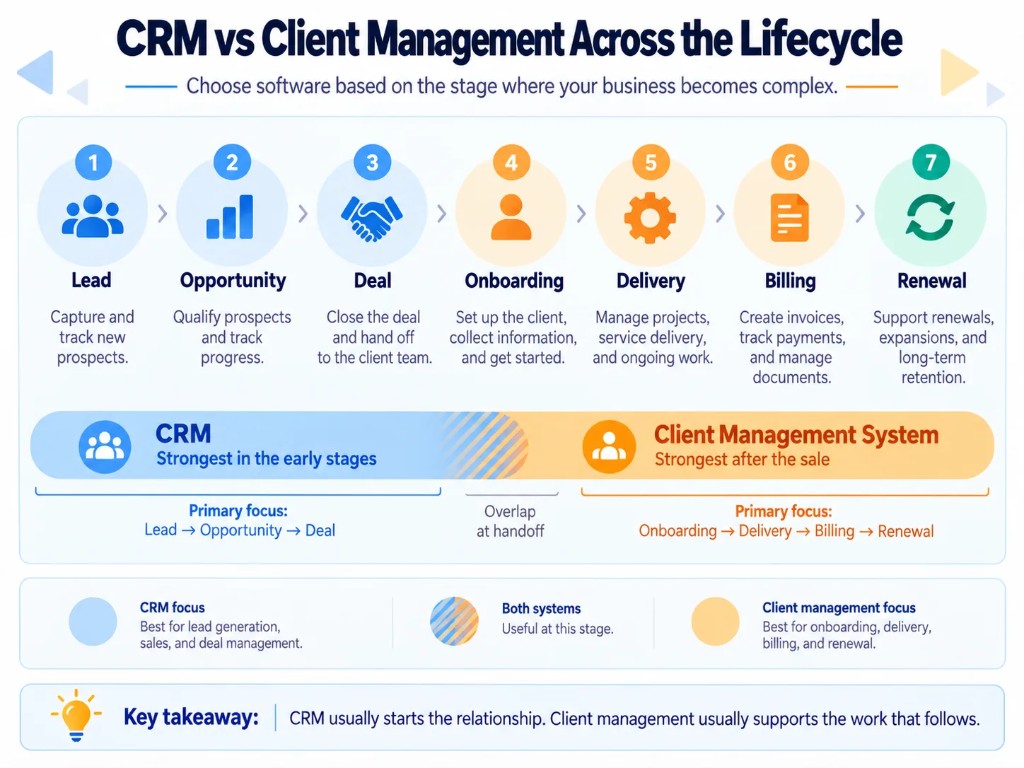
The clearest practical distinction is where each system places most of its attention.
A sales-oriented CRM typically helps move someone through stages such as:
Prospect → Lead → Opportunity → Deal
Client-management software often becomes most valuable during:
- Client → Onboarding → Delivery → Billing → Renewal
- monday, for example, describes CRM as primarily supporting customer acquisition while client management concentrates more heavily on nurturing the relationship after the sale.
This does not mean a CRM cannot manage existing clients. It means the product may have been designed primarily around a sales workflow rather than around delivering ongoing client work.
2. Pipeline Management vs Client Delivery
A CRM normally gives sales teams a structured pipeline showing which opportunities are new, qualified, negotiating or ready to close.
That is particularly useful when a business has many potential customers and needs to know:
- which opportunities deserve attention;
- when the next follow-up is due;
- how much revenue is in the pipeline;
- which deals are likely to close.
A broader client management system may instead organize work around an active engagement.
For example:
Deal won → onboarding form → contract → project → approval → invoice → renewal
Stelaah's comparison illustrates this distinction well: its CRM side includes leads, opportunities, activities and forecasts, while its client-management side includes onboarding, projects, documents, invoices, payments, portals and renewals.
3. Sales Forecasting vs Client Operations
Forecasting and pipeline analytics are usually more important in a sales-focused CRM.
Sales managers may want to know:
- expected revenue;
- conversion rates;
- open opportunities;
- deal value;
- deal stage;
- sales activity.
A service business managing existing clients may care more about:
- onboarding status;
- outstanding client requests;
- project milestones;
- deliverables;
- unpaid invoices;
- contract dates;
- upcoming renewals.
The underlying customer information may be similar, but the operational questions are different.
4. Internal Sales Tools vs Client-Facing Features
Most CRM interfaces are primarily built for internal teams.
The customer generally does not log into your sales pipeline.
Client-management platforms are more likely to emphasize client-facing functionality such as:
- portals;
- document sharing;
- approval requests;
- forms;
- project status;
- invoices;
- messages.
This distinction matters particularly for agencies, consultants and other service businesses where collaboration continues long after the sale.
Real-world discussions reflect this need. Small businesses and agencies frequently look for software combining project management, invoicing, communication and client portals rather than simply another contact database.
5. The Two Systems Share Many Features
The overlap is substantial.
Both can provide:
- client records;
- contact information;
- communication history;
- notes;
- tasks;
- reminders;
- automation;
- reporting;
- account history.
And modern platforms increasingly cross the traditional boundary.
A CRM may add projects, invoicing and portals. A client-management platform may add lead capture, pipelines and sales automation.
For that reason, product names alone are a poor way to evaluate software.
Can a CRM Also Be a Client Management System?
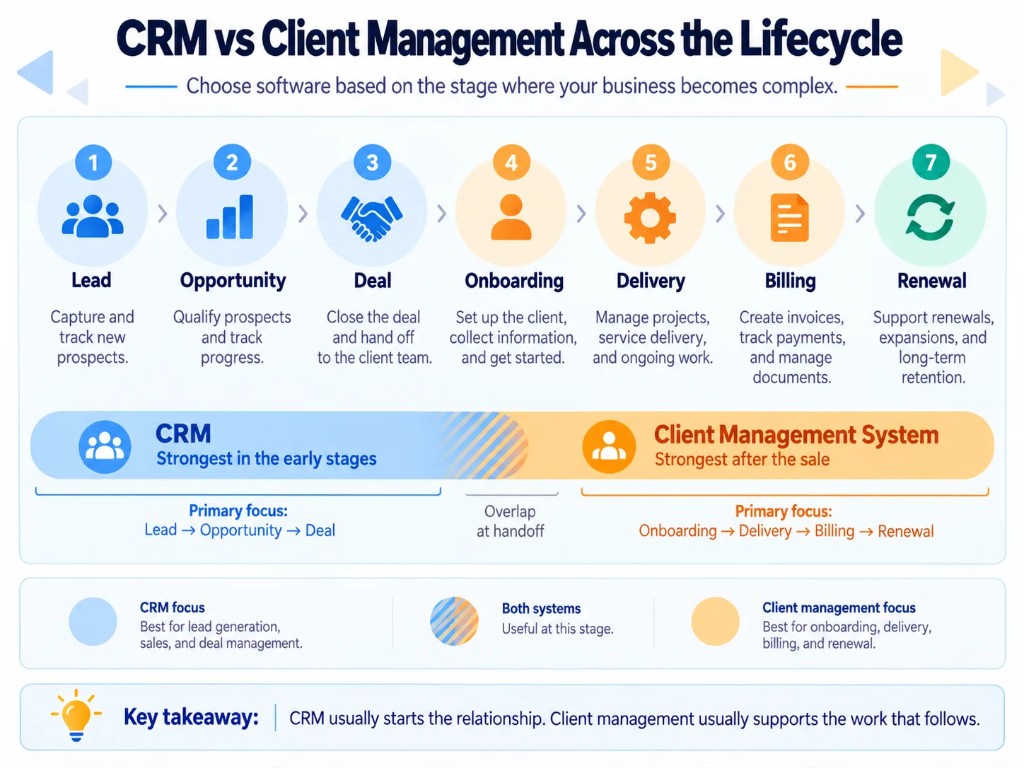
Yes.
A CRM can work perfectly well as a client management system if it supports the workflows your business needs.
Salesforce explicitly describes client management as a form of CRM, and Zapier's current list of client-management applications consists largely of products marketed as CRMs.
For example, suppose your business only needs to:
- store client details;
- log emails and calls;
- create follow-up tasks;
- track account history;
- manage renewals.
A CRM may already cover everything.
But suppose your workflow also requires:
- client onboarding;
- project milestones;
- document approvals;
- a client portal;
- recurring invoices;
- payment status;
- service requests.
Then you need to verify whether the CRM handles those processes natively, through additional modules, or through integrations.
The important distinction is therefore workflow coverage, not whether the product calls itself CRM or client management software.
Which One Do You Need?
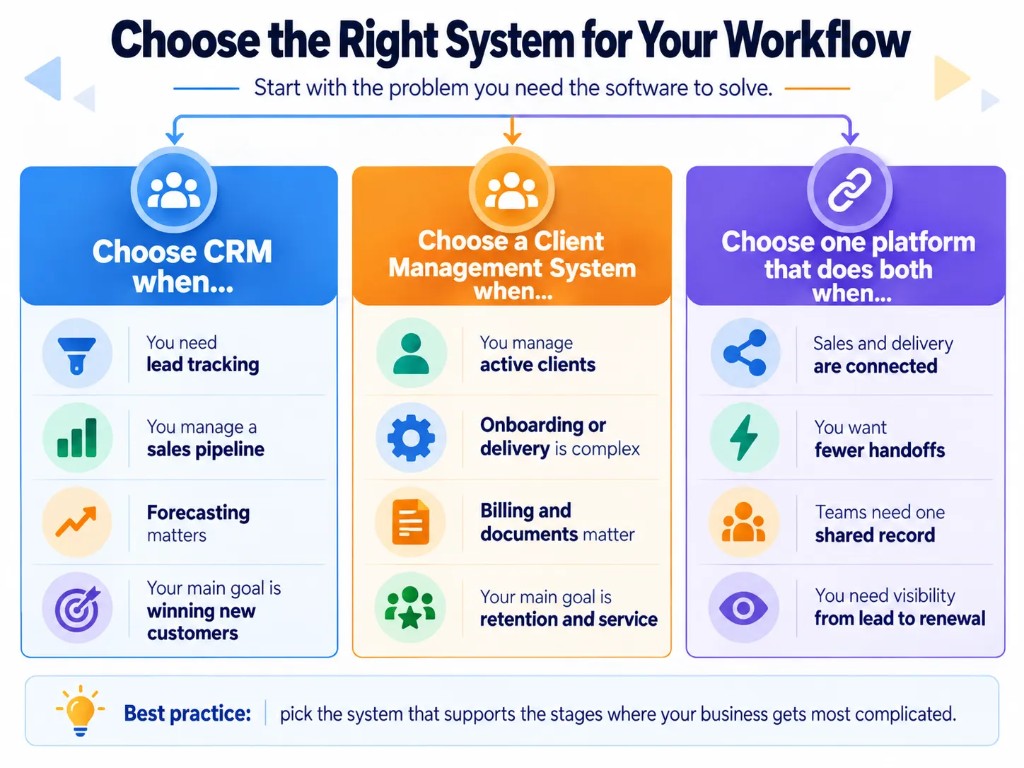
Choose a Sales-Focused CRM When…
A traditional CRM is usually the better starting point when your main challenge is acquiring customers.
For example:
- leads are being lost;
- follow-ups are inconsistent;
- several salespeople manage opportunities;
- you need pipeline visibility;
- you need sales forecasting;
- you want to automate prospect follow-up.
In that situation, strong sales functionality matters more than portals, invoicing or project delivery.
Choose Client-Management Software When…
A client-management-focused system makes more sense when most of your complexity begins after the sale.
For example:
- clients go through structured onboarding;
- work is delivered through projects or recurring services;
- clients need access to documents;
- approvals must be tracked;
- invoices and payments are closely tied to client work;
- your team manages recurring engagements;
- client renewals are important.
This is particularly common among agencies, consultancies, professional services businesses, coaches and other businesses that maintain ongoing relationships with a relatively defined group of clients.
Choose One Platform That Does Both When…
Many businesses need both.
Consider an agency that needs to:
- capture a lead;
- track the opportunity;
- send a proposal;
- close the deal;
- onboard the client;
- manage deliverables;
- communicate with the client;
- invoice the account;
- renew the contract.
Using separate systems can work, but it creates handoffs and integrations between the sales and delivery processes.
An all-in-one platform may therefore be useful if it genuinely handles both workflows well.
The key word is genuinely. More features do not automatically make software better. A smaller business may be better served by a simple CRM plus one specialized tool than by an enormous platform that nobody wants to use.
Three Simple Examples
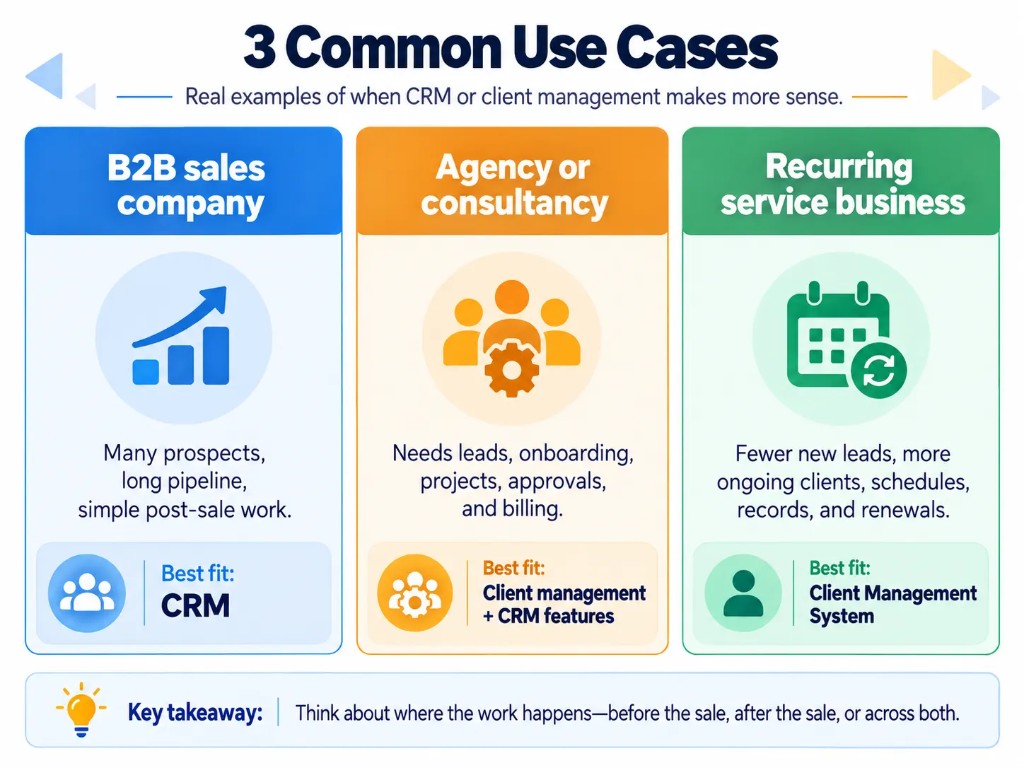
B2B Sales Company
A software company has hundreds of prospects but relatively simple post-sale account management.
Its biggest priorities are:
- lead qualification;
- opportunity tracking;
- sales automation;
- deal forecasting.
Best fit: sales-focused CRM.
Marketing Agency
An agency generates leads but also has to manage months of client work after each deal closes.
It needs:
- leads and proposals;
- onboarding;
- projects;
- client communication;
- approvals;
- files;
- billing;
- renewals.
Best fit: a client-management platform with CRM capabilities, or a CRM connected closely to project/client-delivery software.
Recurring Service Business
A business has relatively few new leads but hundreds of existing clients requiring appointments, records, recurring services and payments.
Its sales pipeline is less important than the active-client workflow.
Best fit: client-management or industry-specific service software.
Client Management System vs CRM: The Bottom Line
A client management system and CRM are not mutually exclusive software categories.
CRM is the more established term and commonly emphasizes customer data, leads, opportunities and sales pipelines. “Client management system” is a looser label that often describes software optimized for managing active clients, service delivery and post-sale relationships.
Instead of choosing based on the name, map your workflow:
- Prospect → Lead → Deal → Onboarding → Delivery → Billing → Renewal
- Then choose the system that manages the stages your business actually needs.
Is a client management system the same as a CRM?
Sometimes. Some vendors use the terms almost interchangeably, while others use “client management system” for software focused more heavily on active clients and post-sale workflows.
Can a CRM be used for client management?
Yes. If the CRM provides the client records, communication tracking, tasks, account management and post-sale functionality you need, a separate client management platform may be unnecessary.
Do I need both CRM and client management software?
Not necessarily. Many platforms cover both. Separate systems make sense when your sales process and client-delivery process have substantially different requirements that one product cannot handle well.
What is the difference between customer management and customer relationship management?
There is no consistently enforced software-category distinction. Customer or client management generally describes organizing and serving customers, while customer relationship management is the established CRM category covering the processes and technology used to manage customer relationships.
Frequently Asked Questions (FAQs)
Can client management software replace a CRM?
Yes, if it also handles the sales workflows your business needs. Some client management platforms include lead tracking, pipelines and follow-ups, while others focus mainly on onboarding, project delivery, billing and existing-client relationships, so the feature set matters more than the label.
Does a client management system usually include a client portal?
Many client management platforms include a portal where clients can access files, messages, project updates, approvals or invoices. However, a client portal is not guaranteed, so businesses that need client-facing collaboration should verify that capability before choosing a system.
Can a client management system manage leads as well as existing clients?
Yes. Some client management systems track both prospective and existing clients, including leads, communications and follow-ups, while others concentrate primarily on work after a deal closes. This is another reason to compare workflows rather than assuming every client management platform works the same way.
Should sales and client delivery be managed in one system?
Using one system can reduce handoffs and keep sales, onboarding and ongoing client information connected, but only if the platform handles each workflow well. Businesses with more specialized delivery requirements may prefer a CRM for sales connected to separate project or client-management software.
Is a client management system useful for a small business?
Yes, particularly when client information, follow-ups, files or ongoing work are becoming difficult to manage through spreadsheets and email. A small business does not necessarily need a complex platform; the better choice is the simplest system that reliably covers its sales and client-management workflow.