
Quick Summary
- Inside sales CRM is an execution system, not just a database: It should give reps one place to see lead ownership, customer history, current deal stage, and the next action required across phone, email, and video-based selling.
- Fast lead handling is critical: A strong inside sales CRM should route leads quickly, prioritize who needs attention, capture call and email activity, and turn every meaningful interaction into a clear follow-up so opportunities do not stall.
- Automation should remove admin, not rep judgment: Routine tasks such as activity logging, reminders, lead assignment, and follow-up creation can be automated, while qualification, objections, deal context, and next-step decisions still require human input.
- The best CRM matches the team’s actual sales motion: Phone-heavy teams need strong telephony integration, email-driven teams benefit from sequencing and inbox sync, and every setup should be tested for ease of use, pipeline flexibility, and rep adoption.
- CRM adoption depends on reducing friction: Community discussions repeatedly show that reps fall back to spreadsheets when CRM updates require too many fields or clicks; the system should make common sales actions faster than the manual alternatives.
What Does a CRM Do for Inside Sales?
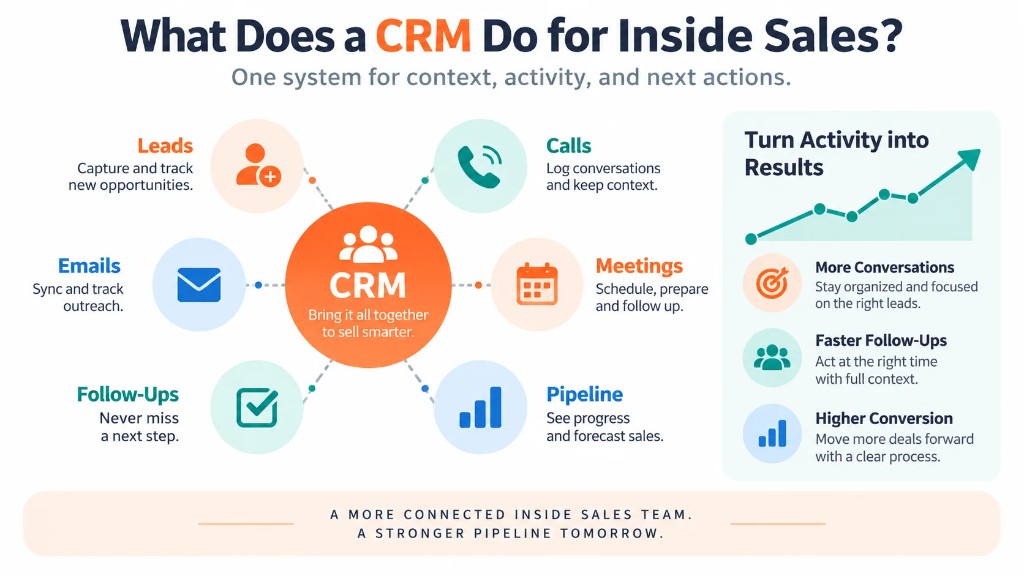
Inside sales is conducted remotely through channels such as phone, email and video rather than primarily through in-person meetings.
CRM provides the operational structure behind those conversations.
Inside-sales task
What the CRM should do
A new lead arrives
Assign an owner and create the first action
A rep prepares to call
Show previous activity, notes and account context
A call or email happens
Record the interaction against the correct contact
A prospect needs follow-up
Schedule or automatically trigger the next action
A lead becomes qualified
Move it into the appropriate opportunity stage
A deal progresses
Keep stage, value, stakeholders and next step current
A manager reviews pipeline
Show activity, stalled opportunities and progression
HubSpot's inside-sales material follows the same pattern, connecting CRM with centralized prospect history, automatic activity logging, reminders, deal tracking and manager visibility.
The important distinction is that CRM should support execution, not merely record what eventually happened.
What an Inside Sales CRM Needs to Do?
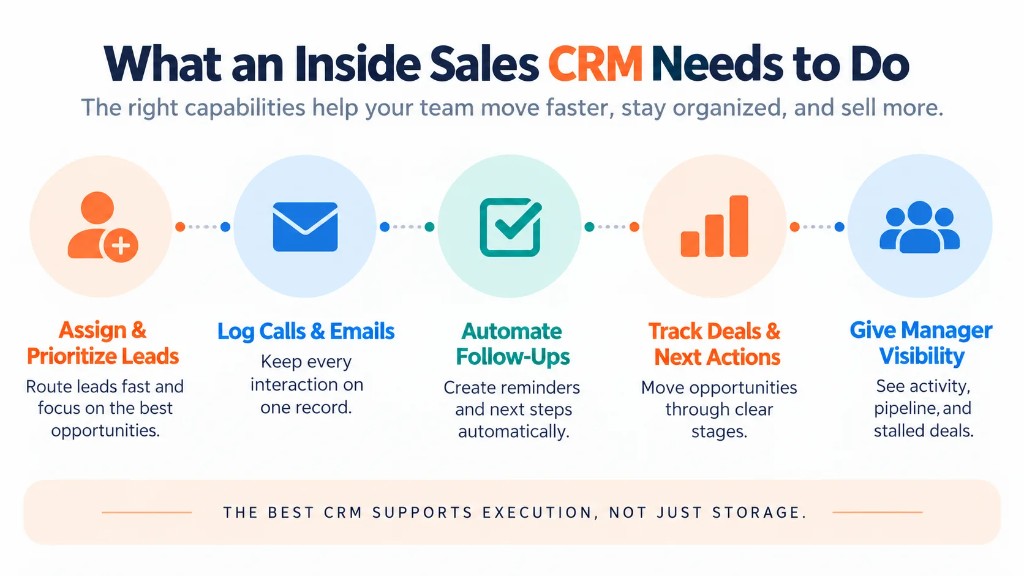
Assign and Prioritize Leads
A lead sitting unassigned in a database is not being managed.
An inside-sales CRM should establish:
- who owns the lead;
- its current status;
- when it should be contacted;
- which action comes next.
Assignment can be manual for small teams or automated using rules such as territory, product, account segment, lead source or workload.
Prioritization can then help reps decide which records deserve attention first. Depending on the system, this may use lead status, engagement, qualification information, due tasks or lead-scoring models.
The goal is not to generate a mysterious score. It is to give reps a workable queue instead of forcing them to decide what to do next from a large contact list.
Keep Calls, Emails and Meetings on One Record
Inside-sales conversations often move across channels.
A prospect might:
- receive an email;
- answer a phone call;
- attend a video demo;
- reply to another email;
- speak with a different rep later.
Those interactions should remain attached to the same CRM history.
That lets the next person opening the record understand what has already happened without searching separate inboxes or asking another rep for context.
For this reason, integrations with email, telephony, calendars and video-conferencing tools are particularly important for inside sales. Dedicated inside-sales software pages from Pipedrive, for example, emphasize keeping phone and email activity connected to the corresponding customer and deal record.
Automate Routine Follow-Up
Inside sales generates repetitive administrative work:
- creating follow-up tasks;
- recording emails;
- updating contact attempts;
- scheduling reminders;
- assigning new leads;
- moving records after predictable outcomes.
CRM automation can handle many of these actions.
For example:
A rep finishes a call and marks the result as “call back next week.” The CRM creates the next task for that rep automatically.
Automation is particularly valuable when it removes an administrative step without removing the rep's judgment.
Information that requires interpretation—such as the prospect's objection, decision process or agreed next step—may still need human confirmation.
Routine evidence of activity should be captured automatically wherever the technology reliably allows it.
Track Every Deal and Its Next Action
A pipeline stage should describe where a genuine sales opportunity stands.
But stage alone is not enough.
A record marked Proposal Sent is far more useful when the CRM also shows:
- who owns it;
- when the proposal was sent;
- expected value;
- buyer contacts;
- latest conversation;
- next action;
- next-action date.
Inside-sales pipeline management therefore works best when stages have clear meanings and active opportunities always have a defined next step.
This keeps a sales pipeline from becoming a static collection of deals that reps occasionally update before a forecast meeting.
Give Managers Visibility Into Execution
Inside-sales managers need to understand both activity and movement.
CRM can show information such as:
- calls and emails;
- meetings booked;
- lead response;
- qualified opportunities;
- conversion between stages;
- overdue follow-ups;
- stalled deals;
- pipeline value.
Detailed KPI design belongs in a broader CRM metrics and analytics framework. For an inside-sales CRM, the important principle is simpler:
- Activity should be connected to an outcome.
- A high number of calls means little if the team cannot see whether they produced conversations, qualified opportunities or pipeline movement.
A Practical Inside Sales CRM Workflow
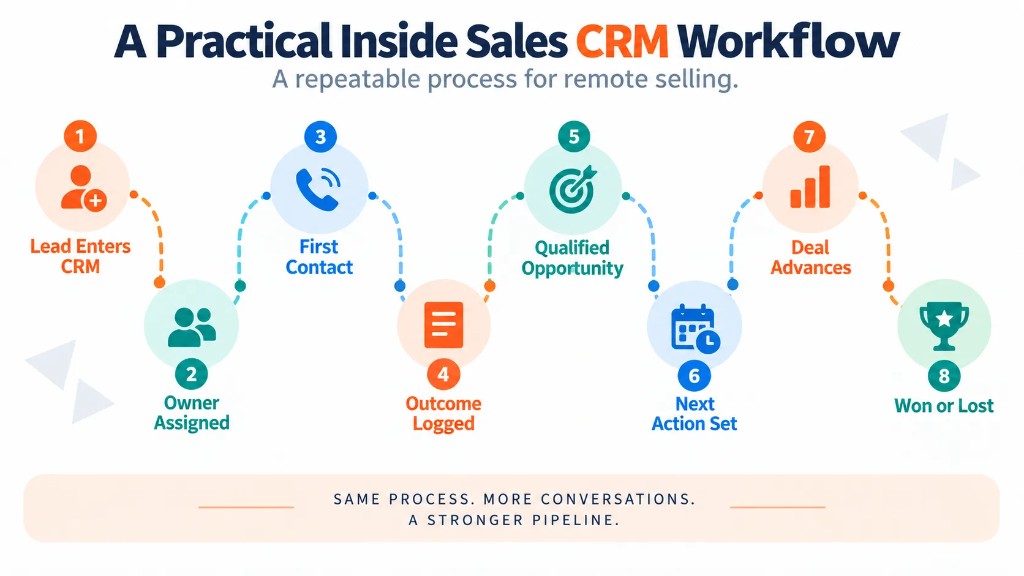
A simple workflow can look like this:
1. A lead enters the CRM
The record may arrive from a website form, marketing campaign, referral, prospecting activity or imported list.
2. The CRM assigns an owner
Routing rules or a manager determine which rep is responsible.
The lead should not remain in an unowned queue indefinitely.
3. The rep receives the necessary context
The record contains the contact information, lead source, company information and any previous interactions the rep needs before outreach.
4. The first contact occurs
The rep calls, emails or uses another approved channel.
Whenever possible, the activity is logged automatically.
5. The outcome determines the next action
For example:
No answer
→ schedule another attempt.
Interested but unavailable
→ schedule a callback.
Not a fit
→ record disqualification reason.
Qualified
→ create or advance the opportunity.
The CRM therefore turns a conversation outcome into an executable next step.
6. The opportunity progresses through defined stages
The team tracks meaningful stages such as:
- Qualified → Discovery → Demo → Proposal → Negotiation → Won/Lost
- The exact stages should reflect how the business actually sells rather than copying another company's pipeline.
7. Follow-up remains attached to the deal
Calls, emails, notes, meetings and next steps accumulate on the same record.
The rep can therefore resume the conversation with context even after days or weeks.
8. The final outcome is recorded
Won and lost opportunities should both be closed properly.
That gives managers a more accurate view of what is actually entering, advancing through and leaving the pipeline.
Inside Sales CRM vs. a Generic CRM
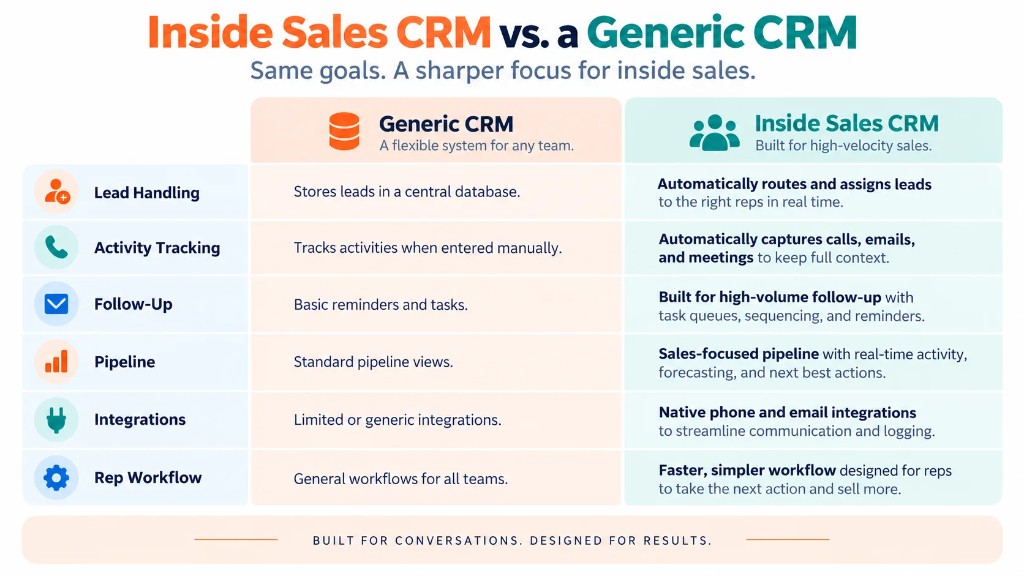
Almost any sales CRM can store contacts and opportunities.
Inside-sales teams place greater pressure on specific capabilities because their work is remote and often high volume.
| Generic CRM capability | Inside-sales requirement |
|---|---|
| Contact storage | Immediate interaction history |
| Deal stages | Fast stage and next-action updates |
| Tasks | High-volume follow-up queues |
| Email integration | Reliable communication capture |
| Lead management | Fast routing and prioritization |
| Reporting | Activity plus conversion visibility |
| Automation | Reduced repetitive administrative work |
| Integrations | Dialer, inbox, calendar and video workflow |
This does not mean a company must buy software explicitly branded “inside-sales CRM.”
It means the CRM must support the way the inside-sales team actually works.
CRM vs. Sales Engagement Software
CRM and sales-engagement software overlap, but they are not always the same thing.
CRM is normally the system of record for:
- contacts;
- accounts;
- opportunities;
- customer history;
- pipeline.
A sales-engagement platform is more focused on executing outbound communication through features such as:
- email sequences;
- call cadences;
- dialers;
- task queues;
- multichannel outreach.
Modern CRM platforms increasingly include some of these capabilities themselves. Other companies connect their CRM to dedicated sales-engagement software.
The practical question is therefore not simply:
Do we need both?
Ask:
Can our current CRM execute the volume and type of outreach our team needs without forcing reps to manage two disconnected versions of the customer?
If the CRM provides sufficient calling, sequencing and automation, another platform may be unnecessary. If it does not, an integrated engagement layer may be useful.
How to Choose a CRM for Inside Sales?
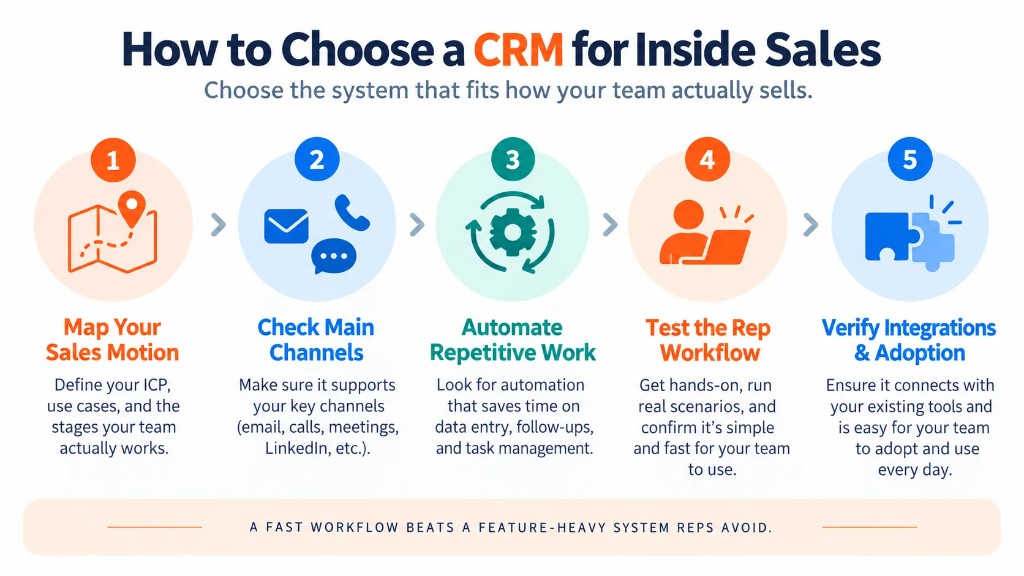
Start with the team's workflow rather than a list of software features.
1. Map how leads actually move
Document:
Lead source → assignment → first contact → qualification → opportunity → follow-up → close
A CRM should make those transitions easier, not force the team into an artificial process.
2. Identify the channels reps use most
A phone-heavy team should examine calling integration closely.
An email-heavy team may care more about inbox synchronization and sequences.
Teams conducting frequent virtual demos may prioritize calendar and meeting integrations.
There is no universally best configuration because different inside-sales teams execute different sales motions.
3. Determine what must happen automatically
Look for repetitive tasks such as:
- assigning incoming leads;
- logging messages;
- creating follow-up tasks;
- scheduling reminders;
- updating routine statuses.
Automating these tasks reduces the amount of CRM maintenance required from reps.
4. Test how quickly a rep can update a real deal
This is one of the most overlooked evaluation criteria.
Recent CRM community discussions show a recurring frustration: when simple updates require too many fields or clicks, reps may fall back to spreadsheets and update CRM only when management requires it.
During a CRM trial, test actual actions:
- log a call;
- change a stage;
- record an objection;
- schedule a follow-up;
- create an opportunity;
- find yesterday's conversation.
A powerful platform that makes frequent actions painful can still be a poor inside-sales CRM.
5. Decide which tools should be native and which can be integrated
Your CRM does not necessarily need to build everything itself.
But critical data should flow back to the CRM reliably.
Check integrations for:
- email;
- telephony;
- calendar;
- video meetings;
- sales engagement;
- quoting or e-signature tools when required.
6. Evaluate rep usefulness, not only management reporting
Managers need pipeline and activity data.
Reps need something more immediate:
What should I do next?
The strongest inside-sales CRM serves both needs.
If reps see the CRM purely as a reporting system they maintain for management, adoption becomes harder. If it saves them from searching for information, remembering every follow-up and re-entering routine activity, they have a reason to keep it current.
Common Inside Sales CRM Mistakes
Requiring too much manual data entry.
Capture the information the business genuinely needs and automate routine activity where practical.
Leaving leads without clear ownership.
Every actionable lead should have someone responsible for the next step.
Tracking activity without tracking outcomes.
Calls and emails are inputs. Qualification, meetings, pipeline progression and revenue are outcomes.
Building vague pipeline stages.
Reps should know what must be true before an opportunity advances.
Separating communication from CRM.
Disconnected phone, email and meeting histories make it harder to understand the customer.
Over-customizing the system.
More fields and automation do not automatically create a better CRM. Every addition should make selling, decision-making or required record keeping meaningfully better.
Is CRM Necessary for Inside Sales?
A very small operation may initially manage contacts and follow-ups without dedicated CRM software.
As lead volume, interactions or team size grows, CRM becomes increasingly useful because individual inboxes and spreadsheets provide weak shared visibility into customer history, ownership and next actions.
What Is the Best CRM for Inside Sales?
There is no single best CRM for every inside-sales team.
Choose based on the team's actual sales motion, especially:
- lead routing;
- calling and email workflow;
- follow-up automation;
- pipeline management;
- integrations;
- reporting;
- usability.
A CRM with fewer features but a faster daily workflow can be more effective than a technically more powerful platform that reps avoid using.
Do Inside-Sales Teams Need Both CRM and Sales-Engagement Software?
Not necessarily.
If the CRM already provides the sequencing, calling, task management and automation the team needs, a separate engagement platform may add unnecessary complexity.
If those capabilities are limited, an integrated sales-engagement platform can provide the execution layer while CRM remains the central system of record.
Frequently Asked Questions (FAQs) CRM Inside Sales
1. Is inside sales software the same as a CRM?
Not necessarily. A CRM primarily stores customer, activity, opportunity, and pipeline data, while inside sales software may also include dialers, outreach sequences, lead routing, and rep task queues. Many modern platforms combine both, so the distinction depends on the specific features included.
2. What is sales force automation in an inside sales CRM?
Sales force automation uses CRM rules and workflows to handle repetitive sales tasks such as assigning leads, creating follow-up tasks, sending reminders, recording activities, and updating records. It reduces administrative work while leaving qualification, negotiation, and other judgment-based decisions to the sales rep.
3. Can an inside sales CRM send emails and log calls automatically?
Yes, many CRMs can send or synchronize emails and automatically record calls when connected to the appropriate email and telephony tools. Automatic activity capture is especially useful for inside sales because it keeps communication history current without requiring reps to manually enter every interaction.
4. Can a CRM automatically assign leads to inside sales reps?
Yes. CRM lead-routing rules can automatically assign incoming leads based on criteria such as territory, product, account type, lead source, rep availability, or round-robin distribution. The strongest workflows also create an immediate next action so an assigned lead does not simply sit untouched in the CRM.
5. Does an inside sales CRM need a built-in dialer?
No, but phone-heavy inside sales teams need reliable CRM-to-telephony integration. A separate dialer can work well if calls, outcomes, recordings, and follow-up tasks synchronize with the correct CRM records; a built-in dialer mainly reduces tool switching and workflow friction.
6. What should you do if inside sales reps keep using spreadsheets instead of the CRM?
First identify what makes the spreadsheet easier, then simplify the CRM workflow rather than adding more mandatory fields or training around unnecessary steps. Automate routine activity capture, keep required inputs limited to information the business actually uses, and make common tasks such as updating a stage or scheduling a follow-up faster to complete.