
Quick Summary
- CRM development means building or extending software around real business workflows: It can involve creating a custom CRM from scratch or customizing an existing platform with tailored data structures, permissions, automations, interfaces, and integrations. A well-designed CRM database and structured CRM data management practices form the technical backbone of both operational CRM workflows and downstream analytical CRM reporting.
- Building from scratch is not always the best option: Businesses should first determine whether they can buy, configure, or extend an existing CRM. Custom development is most justified when workflows, data relationships, access rules, or integrations cannot be handled cleanly by standard platforms.
- Successful CRM development starts before coding: Teams need to define users, workflows, data models, permissions, integrations, MVP scope, and acceptance criteria first. Clear requirements reduce scope creep, rework, and costly technical decisions later.
- Testing must cover more than basic functionality: A production CRM should be tested for workflow accuracy, data integrity, integrations, permissions, security, performance, and real-user acceptance before migration and deployment.
- Cost and timeline depend on complexity, not the term “CRM”: Integrations, data migration, custom permissions, automation, security, interfaces, testing, and maintenance can dramatically affect development effort. A reliable estimate requires a clearly defined scope.
CRM development is the process of designing, building, customizing, testing, deploying, and maintaining software used to manage customer relationships and related workflows. It can involve developing a completely custom CRM or extending an existing CRM platform when standard functionality does not fit the business.
The most important decision comes before coding: determine whether you actually need to build a CRM, customize an existing platform, or simply connect the systems you already use.
What Does CRM Development Actually Mean?
CRM development turns business requirements into working CRM software.
The work can include defining customer and account data structures, building workflows, setting user permissions, creating interfaces, developing automations, connecting external systems through APIs, migrating existing data, testing the system, and maintaining it after launch.
Not every CRM project requires software to be built from scratch. There are four practical routes:
| Route | Best fit |
|---|---|
| Buy | Standard customer and sales workflows already fit an existing CRM |
| Configure | An existing CRM fits the underlying process but needs custom fields, objects, rules or screens |
| Integrate/extend | The platform covers the core CRM but requires custom workflows, applications or connections to other systems |
| Build | The business has a genuinely unusual data model, workflow, permission structure or product requirement that existing platforms cannot support cleanly |
This distinction matters because a company can spend months rebuilding capabilities that mature CRM platforms already provide.
Current CRM-development guidance increasingly treats customization as a genuine middle route rather than forcing the decision into “buy versus build.”
For a broader explanation of CRM architectures, explore how operational execution differs in our operational CRM and analytical CRM guide.
When Is Custom CRM Development the Right Choice?
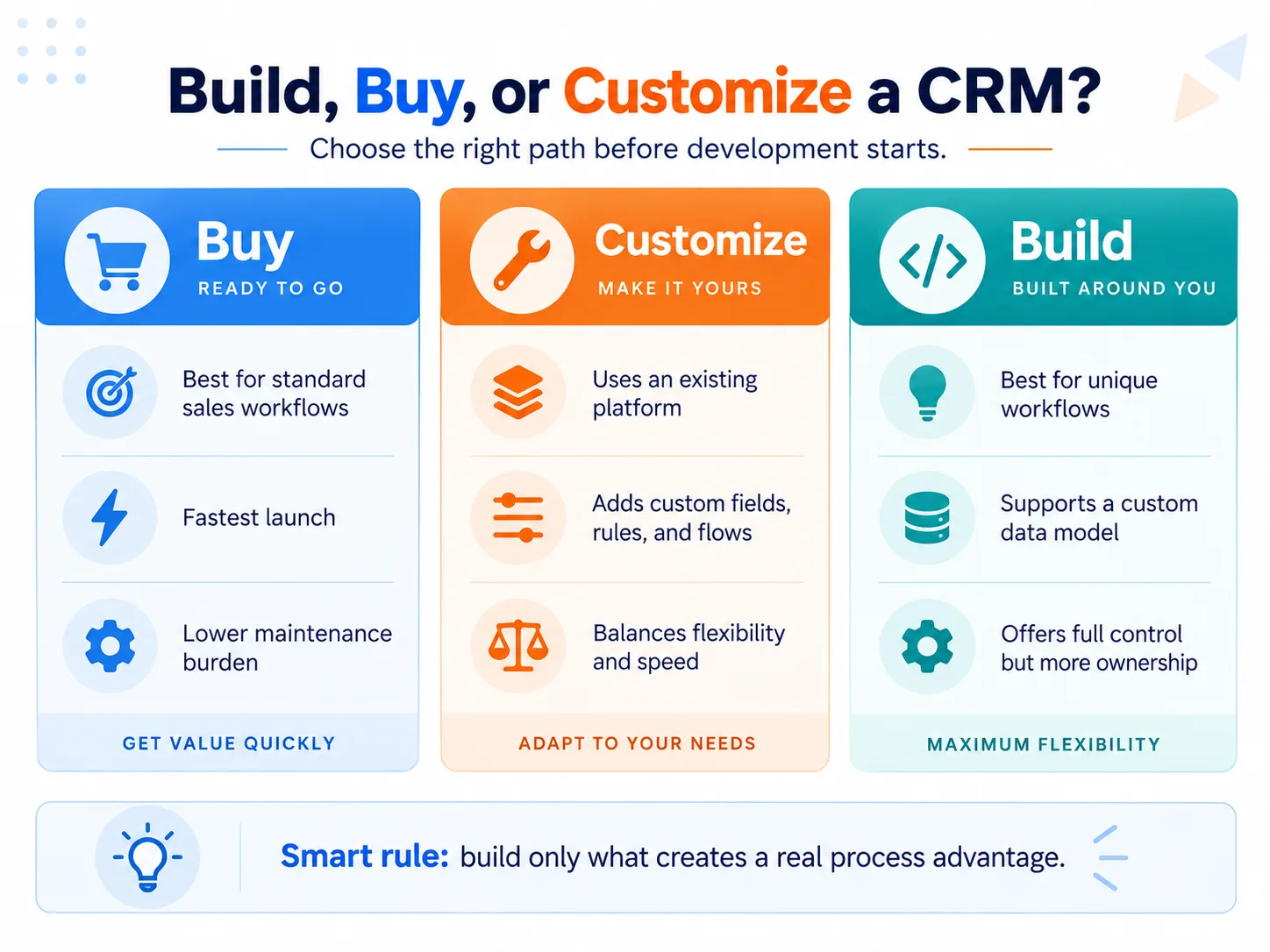
Custom development becomes reasonable when the way your business manages customer relationships is meaningfully different from what existing platforms can represent.
For example, the deciding factor may not be whether a platform has “contact management” or “automation.” It may be whether it can represent your actual relationships between customers, properties, subscriptions, cases, locations, contracts or other business records without fragile workarounds. Whether evaluating an off-the-shelf client management system or designing proprietary software, alignment with core workflows is paramount.
Consider custom development when:
- your core workflows cannot be represented cleanly in available CRM platforms;
- the business requires unusual relationships between records or specialized business rules;
- permission requirements go beyond what existing platforms can reasonably provide;
- proprietary workflows are part of the company's competitive advantage;
- extensive integrations or embedded CRM functionality are required;
- platform restrictions would force the business to redesign important processes around the software.
Otherwise, configuring or extending a mature CRM may be the more efficient option.
The better question is therefore not “Can we build our own CRM?”
It is:
Which part of our customer-management process is genuinely unique enough to justify custom software?
CRM Development Process
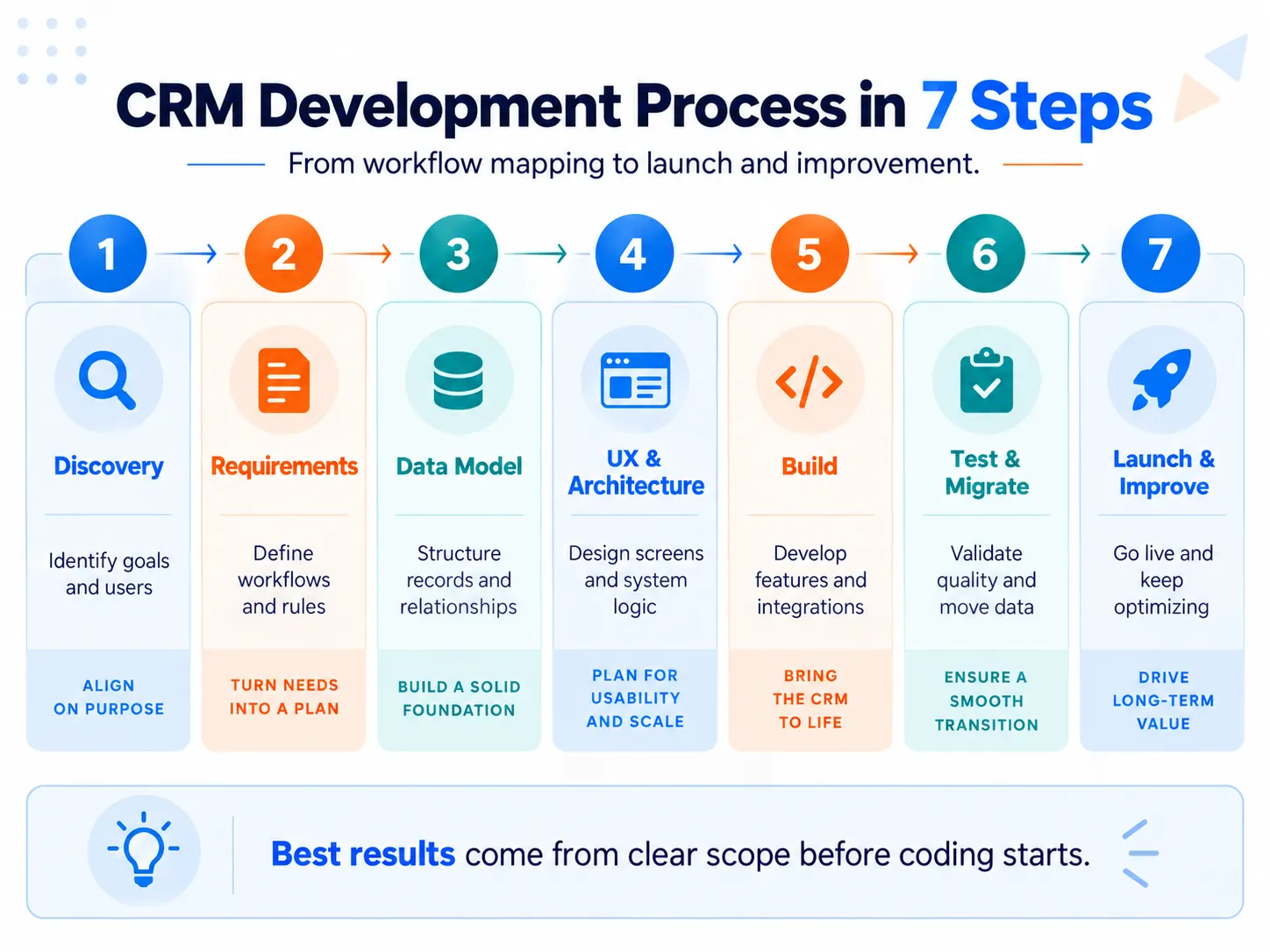
1. Map Goals, Users and Workflows
Start with the work the CRM must support, not a list of features.
Identify:
- who will use the system;
- what each user needs to accomplish;
- how customers, leads, accounts or cases move through the business;
- which decisions happen at each stage;
- which activities are currently manual;
- where information enters the process;
- where handoffs or errors commonly occur;
- what outcome will indicate that the new CRM is working.
In high-velocity environments such as inside sales, managing an active sales pipeline requires rapid lead qualification, seamless rep handoffs, and clear activity tracking.
A requirement such as “we need lead management” is too vague for development.
A useful workflow is more concrete:
Lead received → duplicate checked → owner assigned → qualification completed → opportunity created → next action scheduled.
Once the real workflow is understood, software requirements become much easier to define.
Discovery and workflow analysis are among the most consistent first steps across strong CRM-development competitors.
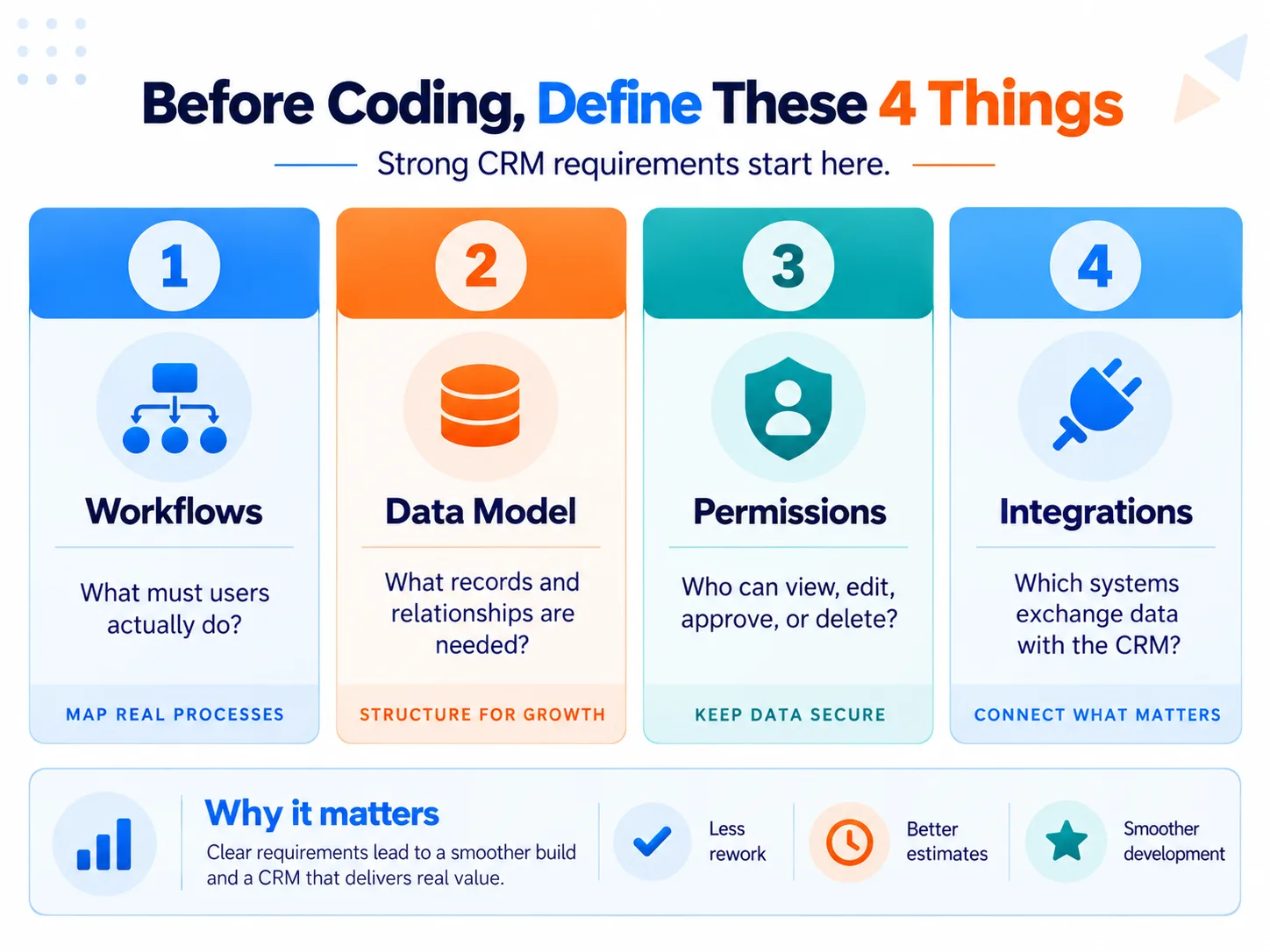
2. Define the Data Model, Permissions and Integrations
This is one of the most important parts of CRM development and one of the easiest to underestimate.
Before designing screens, decide what information the CRM actually needs to represent. Designing a robust CRM database requires establishing clean record hierarchies, relational schemas, and comprehensive CRM data management governance.
A CRM may contain objects such as:
- contacts,
- companies or accounts,
- leads,
- opportunities,
- activities,
- cases,
- contracts,
- subscriptions,
- locations.
The important part is not the names of those objects. It is their relationships.
For example:
one account → multiple contacts → multiple opportunities → multiple activities.
A specialized business may need completely different relationships.
You also need to define the system of record for each important piece of data. If billing information belongs in an accounting platform, for example, the CRM may only need to display or synchronize it rather than recreate the accounting system. For specialized verticals like automotive retail, integrating with a dealer management system ensures inventory and finance records synchronize accurately.
Permissions should be designed at the same stage.
Specify:
- which roles exist;
- which records each role can view;
- which fields they can change;
- which actions require approval;
- what should be logged;
- whether sensitive records require additional restrictions.
Recent CRM community discussions repeatedly identify permissions, reporting, integration maintenance and data quality as areas that make homegrown systems much more complicated after the initial build.
Finally, map every integration:
- CRM → email
- CRM → accounting
- CRM → ERP
- CRM → website/forms
- CRM → telephony
- CRM → marketing platforms
For each connection, define which system owns the data, what moves in each direction, how frequently it synchronizes, and what should happen when synchronization fails.
For more detail, see our guide to CRM integrations.
3. Prioritize the MVP and Write Acceptance Criteria
The first release should solve the smallest complete set of important workflows.
That does not necessarily mean building the fewest screens. It means delivering a usable end-to-end process without adding secondary functionality simply because it might be useful later.
Separate requirements into:
- Must have — required for the workflow to operate.
- Should have — valuable but not required for the initial release.
- Later — useful enhancements that should not delay the first working version.
Then convert important requirements into acceptance criteria.
Instead of:
The CRM should assign leads automatically.
Use something testable:
When a new qualified website lead is created, the system assigns it according to the defined territory rule, records the assignment, notifies the owner, and does not create a duplicate when a matching contact already exists.
Now developers, testers and stakeholders share the same definition of “working.”
This is more useful than a large feature checklist because it reduces ambiguity before development begins.
For a complete discussion of CRM functionality, see our CRM software features guide.
4. Design the Architecture and User Experience
Once requirements are stable enough, decide how the CRM will be constructed.
Architecture decisions can include:
- custom application vs platform extension;
- hosting model;
- database structure;
- API design;
- authentication;
- integration architecture;
- expected data volume;
- expected user volume;
- backup and recovery requirements;
- logging and monitoring;
- performance requirements.
The technology stack should follow these requirements rather than being chosen because a particular framework is fashionable.
At the same time, designers can create wireframes or prototypes for important workflows.
A prototype is especially useful for discovering that a technically correct workflow is frustrating for the people who will use it every day.
5. Build the CRM in Testable Increments
Development normally includes some combination of:
- frontend interfaces;
- backend business logic;
- CRM configuration;
- custom objects and fields;
- workflow automation;
- API integrations;
- reporting logic;
- permission controls;
- notifications;
- import/export functions.
Building in small, testable increments makes it easier to validate assumptions before the entire system depends on them.
A workflow should ideally be demonstrable from beginning to end before a large set of secondary features is added. Building reporting views to track core CRM metrics and CRM analytics early helps validate that underlying event logging and calculations produce accurate data.
6. Test the CRM Beyond Basic Functionality
Testing should answer more than:
“Does the button work?”
A production CRM should be tested for:
- Functional behavior: Does each workflow produce the expected result?
- Data integrity: Are records created, updated, related and synchronized correctly?
- Permissions: Can users see and change only what their roles permit?
- Integrations: What happens when an external API is slow, unavailable or returns unexpected data?
- Performance: Does the system remain usable with realistic data and concurrent users?
- Security: Are authentication, access control, APIs, logging and sensitive data handled appropriately?
- Regression: Did a new change break an existing workflow?
- User acceptance: Can actual users complete the real business process successfully?
Security should not be postponed until the end. NIST's Secure Software Development Framework recommends integrating secure-development practices throughout the software development lifecycle.
For web applications, OWASP ASVS can provide testable security requirements covering areas such as authentication, access control, data protection, logging and API security.
7. Migrate Data and Launch
Before launch, existing customer information may need to be:
- cleaned,
- deduplicated,
- mapped to the new data model,
- transformed,
- imported,
- validated.
Migration should be tested before the final cutover. A successful import is not enough; relationships, ownership, historical records and critical totals should also be validated.
Deployment then moves the approved CRM into production.
Training, adoption planning and organizational rollout continue from here, but those belong primarily to CRM implementation, which deserves separate coverage.
8. Maintain and Improve the CRM
A custom CRM is not finished when version one goes live.
Someone remains responsible for:
- bugs,
- security updates,
- infrastructure,
- integration changes,
- backups,
- performance,
- user requests,
- business-rule changes,
- browser/platform changes,
- monitoring,
- future development.
This long-term obligation is one of the biggest differences between buying software and owning software. Fostering team-wide CRM system proficiency ensures sustained user adoption, consistent data entry, and dependable long-term ROI.
Community discussions around custom CRMs repeatedly describe this maintenance layer as the part that is easiest to underestimate.
What Determines CRM Development Cost and Timeline?
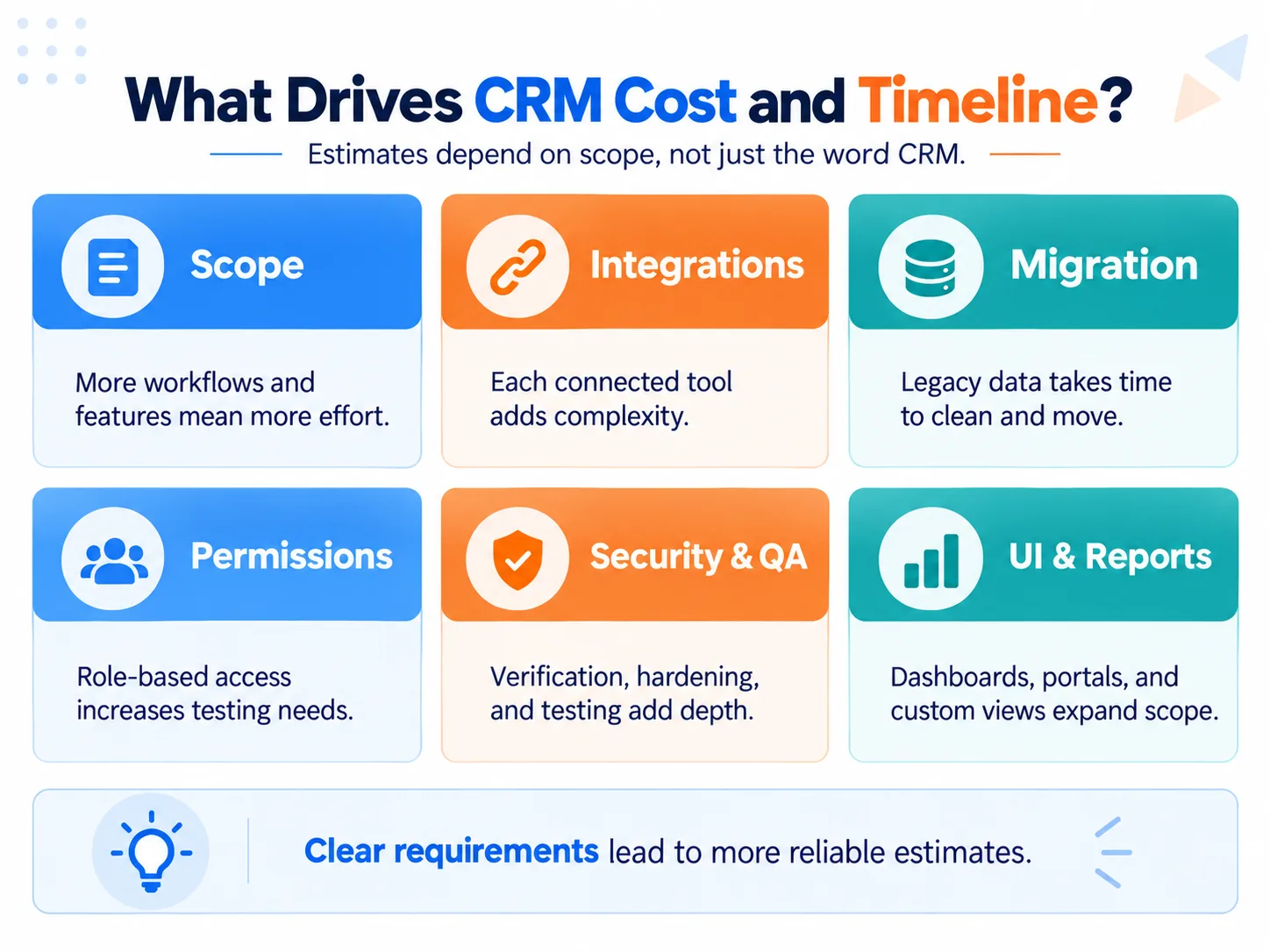
There is no reliable universal price for CRM development.
Current published estimates illustrate the problem. One development company publishes approximately $90,000–$300,000+ for custom CRM projects, another discusses builds starting around $50,000 and exceeding $150,000, while another publishes a range extending from $10,000 to $500,000+.
Those figures are not directly comparable.
A useful estimate must start with scope.
| Cost/timeline factor | Why it matters |
|---|---|
| Workflows | More rules, exceptions and approval paths require more development and testing |
| Data model | Complex relationships increase backend and migration work |
| Roles and permissions | Fine-grained access rules add development and QA |
| Integrations | Every external system introduces development, authentication, mapping and failure handling |
| Migration | Poor or fragmented legacy data increases preparation and validation work |
| Interfaces | Multiple portals, mobile apps or specialized dashboards increase scope |
| Automation | Complex business rules require implementation and edge-case testing |
| Security/compliance | Higher assurance requirements increase architecture, implementation and verification work |
| Scale/performance | Large datasets or concurrent usage can require different architecture |
| QA/UAT | Greater workflow complexity creates more scenarios to validate |
| Team | Experience, location and delivery model affect rate and throughput |
| Maintenance | Custom software creates ongoing operational costs after launch |
A development estimate is therefore far more meaningful after workflows, integrations, roles, migration requirements and acceptance criteria have been documented.
Common CRM Development Mistakes
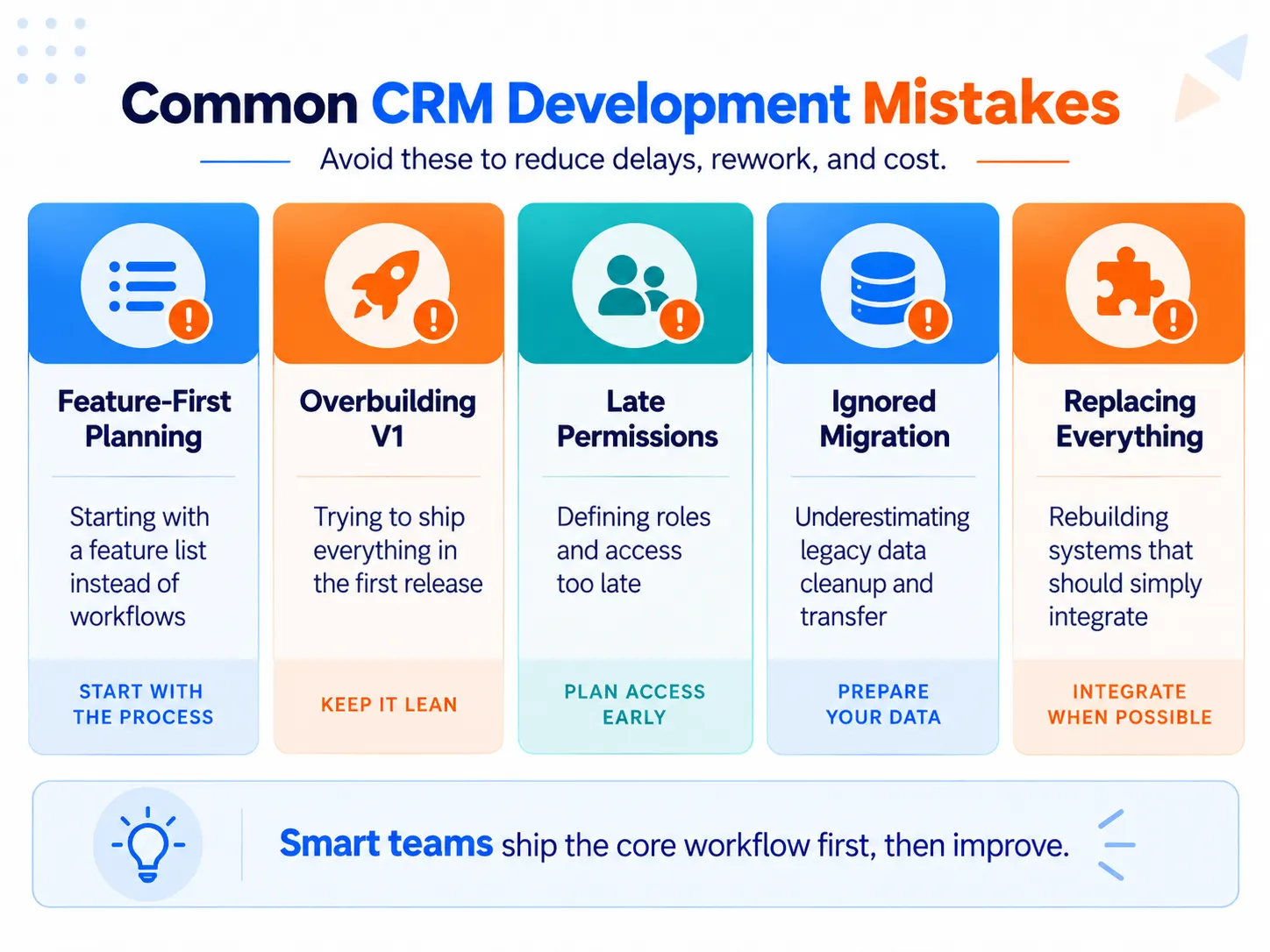
Starting with a feature list
“Contacts, dashboards, automation and reporting” does not describe how the business operates. Start with workflows and decisions.
Designing screens before the data model
A polished interface cannot compensate for incorrect relationships between customers, accounts, transactions and activities.
Adding permissions later
Access control affects architecture, data retrieval, workflows, reporting and testing. Treat it as a requirement from the beginning.
Building too much in version one
Every additional feature creates development, testing and maintenance work. Prioritize the smallest complete workflow first.
Rebuilding systems that should be integrated
A CRM does not automatically need to become accounting software, ERP, project management, document storage and every other operational system.
Keep specialized systems where they make sense and integrate the customer information the CRM actually needs.
Underestimating migration
Legacy data rarely maps perfectly into a new structure. Cleaning, deduplication, ownership mapping and historical relationships can require substantial work.
Skipping real-user UAT
Developers can verify whether the software behaves according to specifications. Users must verify whether those specifications actually support the job.
Assuming AI Removes the Engineering Work
AI-assisted coding and low-code tools can make prototypes and routine development faster.
They do not eliminate responsibility for:
- the data model,
- permissions,
- security,
- integration failures,
- testing,
- migration,
- backups,
- infrastructure,
- documentation,
- long-term maintenance.
That distinction is becoming increasingly important as more companies consider AI-assisted internal CRMs. Recent community discussions show enthusiasm for much faster initial builds alongside the same recurring concerns about security, integrations, permissions and ongoing ownership.
CRM Development Readiness Checklist
Before serious development begins, you should be able to answer:
- What exact business problem should the CRM solve?
- Which users and workflows must version one support?
- What are the core records and relationships in the data model?
- Which roles can view, create, change or approve each type of information?
- Which external systems must connect to the CRM?
- Which system owns each important piece of data?
- What existing data must be migrated?
- What belongs in the MVP and what can wait?
- What acceptance criteria define a successful workflow?
- What security and performance requirements apply?
- Who will approve the system through UAT?
- Who will maintain the CRM after launch?
If these questions do not yet have clear answers, more discovery is usually more valuable than more coding.
Frequently Asked Questions
What is CRM development?
CRM development is the process of creating or extending CRM software to support specific customer-management workflows. It can include requirements analysis, data modeling, interface design, programming or platform customization, integrations, testing, migration, deployment and maintenance.
How long does CRM development take?
There is no reliable universal timeline. A focused internal workflow built on an existing platform is fundamentally different from a multi-team custom CRM with migrations, integrations, complex permissions and multiple interfaces. Scope the workflows, data model, integrations, migration and acceptance criteria before estimating the schedule.
Can AI or no-code tools be used to build a CRM?
Yes. They can significantly accelerate prototypes and some production development. They do not remove the need for sound data architecture, permissions, security, testing, migration planning and ongoing maintenance. The appropriate approach depends on the system's complexity and the consequences of failure.
Is it better to build a CRM from scratch or customize an existing platform?
Customizing an existing platform is usually better when standard CRM capabilities already fit most of your workflow. Building from scratch makes more sense when your data model, permissions, business rules, or integrations are genuinely unusual enough that customization would create persistent workarounds.
How much does custom CRM development cost?
There is no meaningful fixed price because CRM development scope varies widely. Cost is driven mainly by workflow complexity, integrations, data migration, permissions, security requirements, interfaces, testing, and ongoing maintenance; estimates are most useful only after those requirements have been defined.
How long does it take to build a custom CRM?
A focused CRM MVP can be developed much faster than a complex production system, but there is no reliable universal timeline. Integrations, migration, custom permissions, automation, security requirements, testing, and changing requirements can extend development substantially, so the schedule should follow the defined scope rather than a generic CRM benchmark.
Is custom CRM development worth it for a small business?
Usually only when the business has a workflow that existing CRM platforms cannot support economically or cleanly. For standard contact, pipeline, task, and communication needs, purchasing or customizing an established CRM generally avoids the development and maintenance burden of owning custom software.
Can AI or no-code tools build a production-ready CRM?
AI and no-code tools can accelerate prototyping and development, but they do not automatically make a CRM production-ready. Permissions, data integrity, integrations, security, testing, migration, monitoring, and long-term maintenance still need deliberate engineering and ownership.
What is usually harder than expected when building your own CRM?
The difficult part is often not creating contacts, pipelines, or screens but maintaining everything around them. User discussions repeatedly highlight fine-grained permissions, integration failures, reporting, data quality, audit history, migrations, and ongoing maintenance as complexity that becomes more visible after the first version works.