
Quick Summary
- Manufacturing CRM manages the customer-facing side of production: It tracks leads, RFQs, quotations, accounts, distributors, communication, service history, and repeat opportunities while connecting sales teams with operational information held in ERP, MRP, or MES systems.
- CRM should complement ERP, not replace it: CRM typically owns prospects, opportunities, customer interactions, and quote follow-up, while ERP manages inventory, BOMs, purchasing, production, accounting, and fulfillment. Integration prevents duplicate data and improves sales-to-operations handoffs.
- RFQ and quotation management are central manufacturing use cases: A useful manufacturing CRM should track technical requirements, files, quote revisions, approvals, expected lead times, and customer feedback so teams know exactly what was requested, promised, and finally accepted.
- Manufacturing CRM improves visibility across long, complex sales cycles: Centralized pipelines, account histories, distributor relationships, forecasting, and automated follow-ups help teams reduce missed opportunities, coordinate customer commitments, and give operations better signals about potential future demand.
- The strongest value appears where sales complexity is high: Manufacturers with custom products, multiple decision-makers, dealer networks, repeat orders, long sales cycles, or substantial after-sales service benefit most because CRM keeps commercial relationships organized without turning into a second production system.
- The key distinction is simple: CRM manages the commercial relationship around manufacturing; it normally does not replace the systems that run production.
What Is CRM in Manufacturing?
Customer relationship management in the manufacturing industry means using CRM to manage the customer-facing side of the manufacturing lifecycle.
A manufacturing CRM can give sales, account management and service teams one place to see:
- contacts and decision-makers;
- enquiries and RFQs;
- opportunities and pipeline stages;
- quotation activity;
- communication history;
- distributors and dealers;
- previous purchases;
- service cases;
- warranties or installed assets;
- expected future opportunities.
Unlike consumer environments where a purchase might be quick and simple, manufacturing adds complexity that a simple contact database may not handle well. Deals can involve several stakeholders, technical specifications, multiple quote revisions, distributors, long lead times and coordination with production.
That is why useful manufacturing CRM systems often connect with ERP or other operational software rather than operating as an isolated sales database. NetSuite, for example, describes manufacturing CRM as combining customer-facing information with ERP and MRP data such as inventory, lead times and production schedules.
How Does Manufacturing CRM Work?
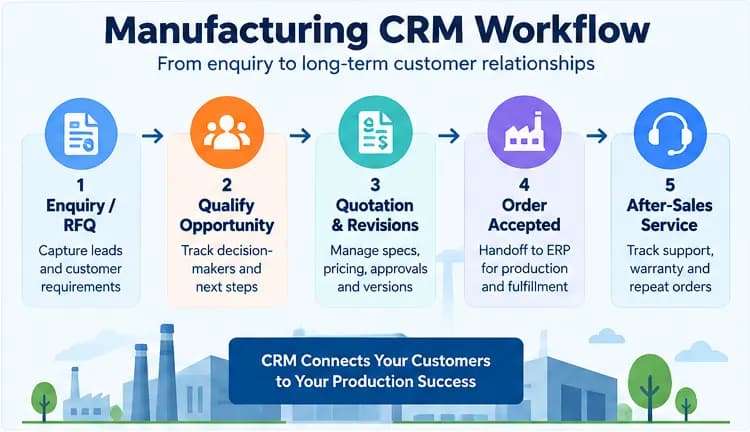
A useful way to understand manufacturing CRM is to follow a customer request through the sales process.
| Stage | What the CRM can manage |
|---|---|
| Enquiry or RFQ | Customer, source, requirements, products and responsible salesperson |
| Qualification | Opportunity value, buying organization, decision-makers and next actions |
| Technical review | Specifications, files, notes and communication with engineering or estimating |
| Quotation | Price proposal, quote status, revisions, approvals and follow-up |
| Negotiation | Changes, communication history, expected close date and probability |
| Order accepted | Commercial handoff to ERP or order-management system |
| Production/delivery | Customer-facing visibility into status where integrated |
| After sale | Support, warranty, service history and account follow-up |
| Reorder | New opportunity based on previous purchases or expected buying patterns |
This workflow is more useful than treating every manufacturing sale as a simple "lead → deal → closed" pipeline.
For a custom manufacturer, for example, the same RFQ may change several times before the customer places a purchase order. The CRM should preserve the customer relationship, activity history, requirements and quotation process while the ERP or production system remains responsible for executing the accepted order.
From the manufacturing CRM workflows I've reviewed, CRM works best when it becomes part of the daily sales and operational process rather than just a reporting tool.
I've seen the strongest setups connect quoting, customer follow-ups, order status, credit information, and inventory visibility in one workflow.
The real value comes when CRM works alongside ERP and order-management systems, so customer activity can trigger real operational actions. This is similar to how CRM implementation success depends on aligning the tool with existing business processes rather than forcing teams into unfamiliar workflows.
Key CRM Use Cases in Manufacturing
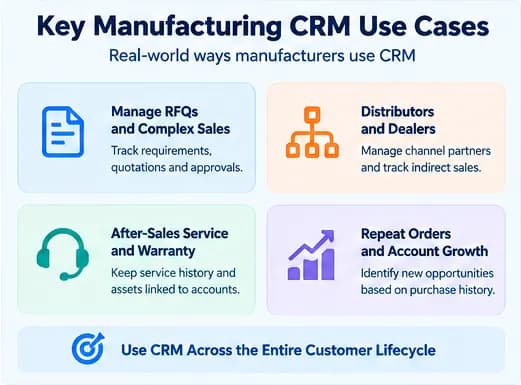
From the manufacturing CRM discussions I've reviewed, the most practical use cases are customer management, quoting, approvals, follow-ups, reporting, and sales workflow automation.
I've also found that manufacturers get more value when CRM connects with inventory, production, fulfillment, and existing ERP or accounting systems.
This allows the CRM to strengthen sales and customer processes without trying to replace the operational software already running the business.
Manage Long Sales Cycles and RFQs
Manufacturing deals often involve more than one meeting or inside sales representative.
An opportunity may include:
- a procurement contact;
- an engineer;
- an operations manager;
- a distributor;
- a finance approver;
- several technical discussions;
- multiple quotations.
CRM keeps those interactions attached to the same account and opportunity instead of scattering them across inboxes, spreadsheets and individual employees' notes.
A salesperson can see what has already happened, what the buyer requested and which action is due next. Strong CRM system proficiency across the sales team ensures everyone follows the same process and keeps records consistent.
Manage Quotations and Revisions
Quoting is particularly important for make-to-order, engineer-to-order and configurable products.
The CRM can record:
- the original RFQ;
- required product or configuration;
- requested quantities;
- drawings or specifications;
- quotation versions;
- discount approvals;
- expected lead time;
- customer feedback;
- final accepted proposal.
The costing logic itself may still come from ERP, CPQ or another manufacturing system.
The important part is maintaining a traceable commercial record so sales and operations know which version the customer actually approved.
Connect Sales With Production Information
Sales teams regularly need information that lives outside CRM.
Before promising a delivery date, they may need to know:
- available inventory;
- material availability;
- expected production capacity;
- current lead time;
- existing orders;
- product cost;
- shipment status.
Rather than reproducing the entire ERP inside CRM, the two systems can exchange the information each team needs. This reduces the risk of sales making commitments without current operational information.
Manage Dealers and Distributors
Manufacturers frequently sell indirectly through distributors, dealers, agents or resellers.
CRM can preserve relationships between manufacturer → channel partner → end customer instead of treating every company as an unrelated account.
Useful channel information can include:
- partner contacts;
- territories;
- leads assigned to a distributor;
- partner-generated opportunities;
- order history;
- product interests;
- follow-up activity;
- partner performance.
Research on industrial channels has long recognized that distributors participate in a network of relationships between manufacturers and end customers rather than functioning as a simple one-to-one sales channel.
Support After-Sales Service and Warranty Work
For many manufacturers, the customer relationship continues for years after the first sale.
Research involving 216 managers at large U.S. manufacturing firms found that CRM technology had a positive effect on new-service-development performance and strengthened the performance impact of customer participation, with the strongest benefit appearing in technical aspects of service development.
CRM can connect an account with:
- products or equipment purchased;
- serial or asset records;
- warranty information;
- service requests;
- previous repairs;
- replacement opportunities;
- maintenance communication.
This is particularly valuable for machinery, equipment and other products with significant service lifecycles. A well-maintained CRM database with proper CRM data management ensures that service history, asset records, and warranty details remain accurate and accessible across teams.
Identify Repeat-Order Opportunities
A manufacturing CRM can also help account managers see when existing customers may be ready to buy again.
For example, order history may show that a customer normally buys a particular component every three months.
CRM can generate a follow-up opportunity before the expected reorder period.
The operational order itself does not necessarily need to be created in CRM. In manufacturing community discussions, practitioners describe using CRM for new opportunities while established repeat production orders remain in ERP, with sales or revenue information synchronized back to CRM.
That distinction prevents the CRM from becoming a second, conflicting order-management system. This separation is similar to understanding the differences between CMS and CRM: each system has a specific purpose, and forcing one to do the other's job creates unnecessary complexity.
Essential Manufacturing CRM Features
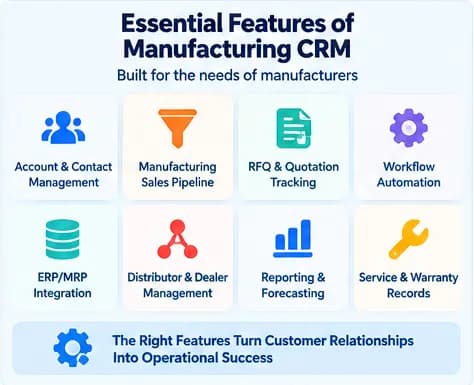
Manufacturers do not need every CRM feature available. They need capabilities that support the commercial processes surrounding production.
| Feature | Why It Matters in Manufacturing |
|---|---|
| Account and contact management | Keeps multiple contacts and stakeholders connected to the same customer |
| Sales pipeline | Tracks long opportunities and next actions |
| RFQ and quotation tracking | Organizes requests, proposals and revisions |
| Workflow automation | Creates follow-ups, approvals and handoff tasks automatically |
| ERP/MRP integration | Gives sales access to relevant operational information |
| Distributor/dealer management | Tracks indirect selling relationships and channel opportunities |
| Product and order history | Gives account teams context for future sales and service |
| Reporting and forecasting | Converts pipeline activity into useful commercial forecasts |
| Service and warranty records | Maintains the customer relationship after delivery |
| Product or asset tracking | Links customer accounts to equipment or products they own |
Some manufacturers may also need CPQ capabilities for complex product configurations or pricing. Others may keep CPQ separate and simply synchronize its approved quotations with CRM. The right feature set depends on your CRM development approach: whether you build custom, configure an existing platform, or combine multiple tools.
The correct architecture depends on which system is intended to remain the source of truth.
Benefits of CRM for Manufacturers
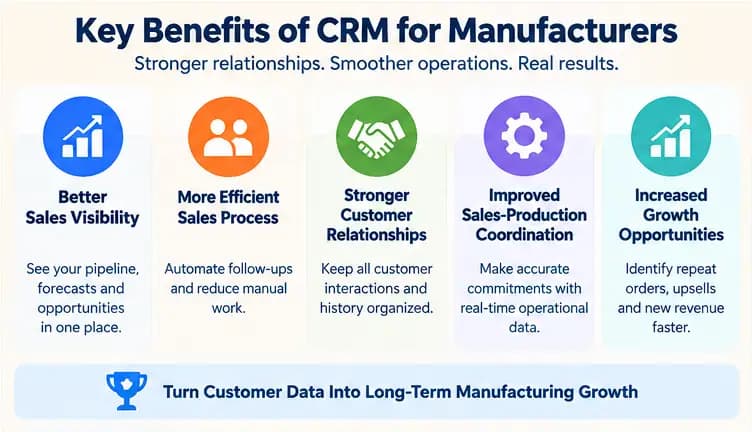
From what I've observed, the biggest benefit of CRM is giving manufacturers one reliable place for customer, lead, quotation, and sales information instead of spreading it across emails and spreadsheets.
This makes it easier for sales teams to follow up, prioritize opportunities, and understand what is happening across the pipeline.
It also gives managers better visibility while reducing the time employees spend searching for customer information.
A 2026 study based on 200 automotive-industry respondents found an overall CRM performance score of 0.78 among higher-digital-maturity firms versus 0.73 among lower-maturity firms; customer-satisfaction scores were 0.81 and 0.72 respectively.
Fewer Missed Opportunities
Centralizing enquiries, activities and next steps reduces dependence on individual inboxes, spreadsheets or memory.
If a salesperson leaves or an account moves between representatives, the relationship history remains available.
Better Sales Visibility
Managers can see:
- active opportunities;
- stalled quotations;
- expected close dates;
- pipeline by product;
- pipeline by distributor;
- reasons deals are being lost.
That provides a clearer picture of future commercial activity than relying only on confirmed orders.
In a study of 211 Iranian manufacturing firms, CRM practices had a positive and significant—although weak—effect on both organizational performance and innovation capability; the authors cautioned that the findings should not be generalized to other markets without further validation.
More Consistent Customer Communication
Sales, account management and customer service can work from the same relationship history.
A customer does not need to repeatedly explain an earlier conversation because the relevant information can follow the account. This is especially important for manufacturers managing CRM for call centers where inbound service and sales calls need immediate access to the full account context.
Better Coordination Between Sales and Operations
An integrated CRM can expose the production information needed for customer conversations without forcing salespeople to navigate an entire operational system.
Likewise, confirmed commercial information can be passed to the operational system when an opportunity becomes an order.
Better Demand Signals
A confirmed order tells production what has already been sold.
The CRM pipeline can add another layer: what customers may buy in the future.
Opportunities are not guaranteed demand, so they should not be treated like confirmed production orders. However, structured pipeline information can provide an additional signal for forecasting and capacity discussions.
Stronger Distributor and Account Management
Manufacturers selling through intermediaries can keep partner activity, opportunities and customer history together rather than losing visibility once a lead passes to a distributor.
Better After-Sales Continuity
Connecting product history, service communication and account information can make it easier to manage warranties, replacement products, spare parts and future sales opportunities. This is similar to the value CRM brings to service businesses, where ongoing relationships and service history drive repeat revenue.
Research has found positive relationships between CRM practices and performance in manufacturing contexts, although results should not be treated as proof that purchasing CRM automatically improves performance. One study of 211 Iranian manufacturing firms, for example, reported a positive but weak significant relationship and explicitly cautioned about applying the findings to other markets.
The software creates the information structure; results still depend on processes, data quality, integration and user adoption.
Manufacturing CRM vs ERP: What Should Each System Manage?
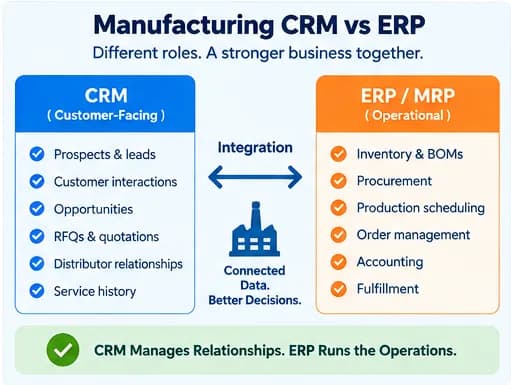
CRM and ERP solve different parts of the manufacturing problem.
| CRM typically owns | ERP/MRP typically owns |
|---|---|
| Prospects | Inventory |
| Contacts | Materials |
| Opportunities | BOMs |
| Sales activities | Procurement |
| RFQs | Production orders |
| Quote follow-up | Production scheduling |
| Customer communication | Accounting |
| Distributor relationships | Fulfillment |
| Service interactions | Operational costing |
Some information needs to flow between both systems.
Examples include:
- customer accounts;
- products;
- accepted quotations;
- sales orders;
- prices;
- inventory availability;
- expected lead times;
- order status.
Genius ERP describes the distinction clearly: CRM manages leads, customer communication and opportunities, while ERP manages areas such as estimating, inventory, purchasing, production, scheduling and fulfillment. Connecting them improves the flow of information and reduces duplicate data entry.
This is why the answer to "Do we still need CRM if we have ERP?" is often yes. This distinction is similar to the CRM vs DMS comparison in automotive dealerships, where each system handles a different part of the business workflow.
ERP tells the business how an order will be produced and fulfilled.
CRM tells the business what happened before the order, what is happening with the customer relationship and what may happen next.
Where Manufacturing CRM Adds the Most Value
Manufacturing CRM becomes particularly useful when a business has:
- long B2B sales cycles;
- multiple people involved in each buying decision;
- RFQs and several quote revisions;
- custom or configurable products;
- dealers or distributors;
- separate sales and production teams;
- significant repeat-order business;
- warranties or after-sales service;
- customer data spread across spreadsheets, email and operational systems.
The objective is not to make CRM run the factory.
It is to give everyone managing the customer relationship an accurate commercial view of what the customer requested, what was promised, what has been sold and what opportunity or service need comes next. For manufacturers exploring CRM for the first time, following a structured CRM implementation process ensures the system aligns with existing workflows and delivers value from the start.
Frequently Asked Questions (FAQs)
Can a regular CRM work for a manufacturing company?
Yes. A general CRM can work if it supports custom pipelines, RFQs, quotations, account hierarchies and integration with your ERP or manufacturing systems. A manufacturing-specific CRM becomes more valuable when you need workflows for technical sales, distributors, configurable products, repeat orders or complex quote approvals.
Do manufacturers need a CRM if they already have an ERP?
Often, yes. ERP manages operational processes such as inventory, purchasing, production, accounting and fulfillment, while CRM manages prospects, sales opportunities, customer communication and relationship history. Manufacturers with simple sales processes may use an ERP's built-in CRM module, but dedicated CRM becomes more useful as sales complexity grows.
Can a manufacturing CRM manage inventory, BOMs and production?
CRM can display inventory or production information, but detailed inventory control, BOMs, material planning and production scheduling normally belong in ERP, MRP or MES software. Connecting those systems to CRM lets salespeople see relevant availability, lead-time and order-status information without making CRM the production system.
What data should a manufacturing CRM share with an ERP?
The systems commonly share customer accounts, products, approved quotations, sales orders, pricing, inventory availability, lead times and order status. CRM should generally remain the source for opportunities and customer interactions, while ERP remains the operational source for inventory, production, fulfillment and financial transactions.
Can CRM handle custom manufacturing RFQs and quote revisions?
Yes, provided the CRM can track RFQs, specifications, files, quotation versions, approvals and customer communication against the same opportunity. Detailed costing or product configuration may still come from ERP or CPQ software, with the approved commercial information passed back to CRM and operations.
Can a small manufacturer use CRM without implementing a full ERP?
Yes, especially when the immediate problem is managing enquiries, customers, quotations and follow-ups rather than production planning. A small manufacturer can start with CRM and connect separate accounting or inventory tools, then add ERP or MRP when BOMs, purchasing, scheduling, material planning or shop-floor control become necessary.