
Quick Summary
- Retail CRM connects customer identity with purchase behavior: It combines contact details, in-store and online purchases, preferences, loyalty activity, returns, and service interactions into a usable customer profile instead of treating every transaction as an isolated sale.
- Its value comes from turning data into action: Retail CRM uses customer history to create segments, trigger follow-ups, support loyalty and clienteling, personalize communication, and update the profile again after the next interaction.
- POS and ecommerce integration are critical: A useful retail CRM should automatically connect transactions to the correct customer record, reduce manual entry, and keep online and in-store activity together rather than creating fragmented or duplicate profiles.
- Retail CRM is different from a traditional sales CRM: Conventional CRMs often focus on leads, deals, and pipeline stages, while retail CRM is built around shoppers, repeat purchases, transaction history, customer segments, and ongoing relationships across channels.
- Not every retailer needs a separate CRM platform: Existing POS or ecommerce tools may be enough for simpler needs; dedicated retail CRM becomes more valuable when businesses require deeper segmentation, automation, loyalty, clienteling, cross-channel customer views, or advanced reporting.
What Is CRM for Retail?
Retail CRM software manages relationships between a retailer and individual shoppers across physical and digital channels. Unlike a basic client management system focused on static appointments, retail software blends frontline operational CRM (instant checkout lookup) with analytical CRM for customer lifetime value analysis.
A typical customer profile can contain:
- name and contact information;
- online and in-store purchase history;
- product or category preferences;
- loyalty status;
- returns and service interactions;
- store-associate notes;
- marketing preferences;
- customer segments.
Current retail platforms demonstrate this model in practice. For example, Shopify POS customer profiles can hold contact details, purchase history, preferences, marketing settings and additional customer fields, while the same data can support customer segmentation.
How is retail CRM different from a traditional CRM?
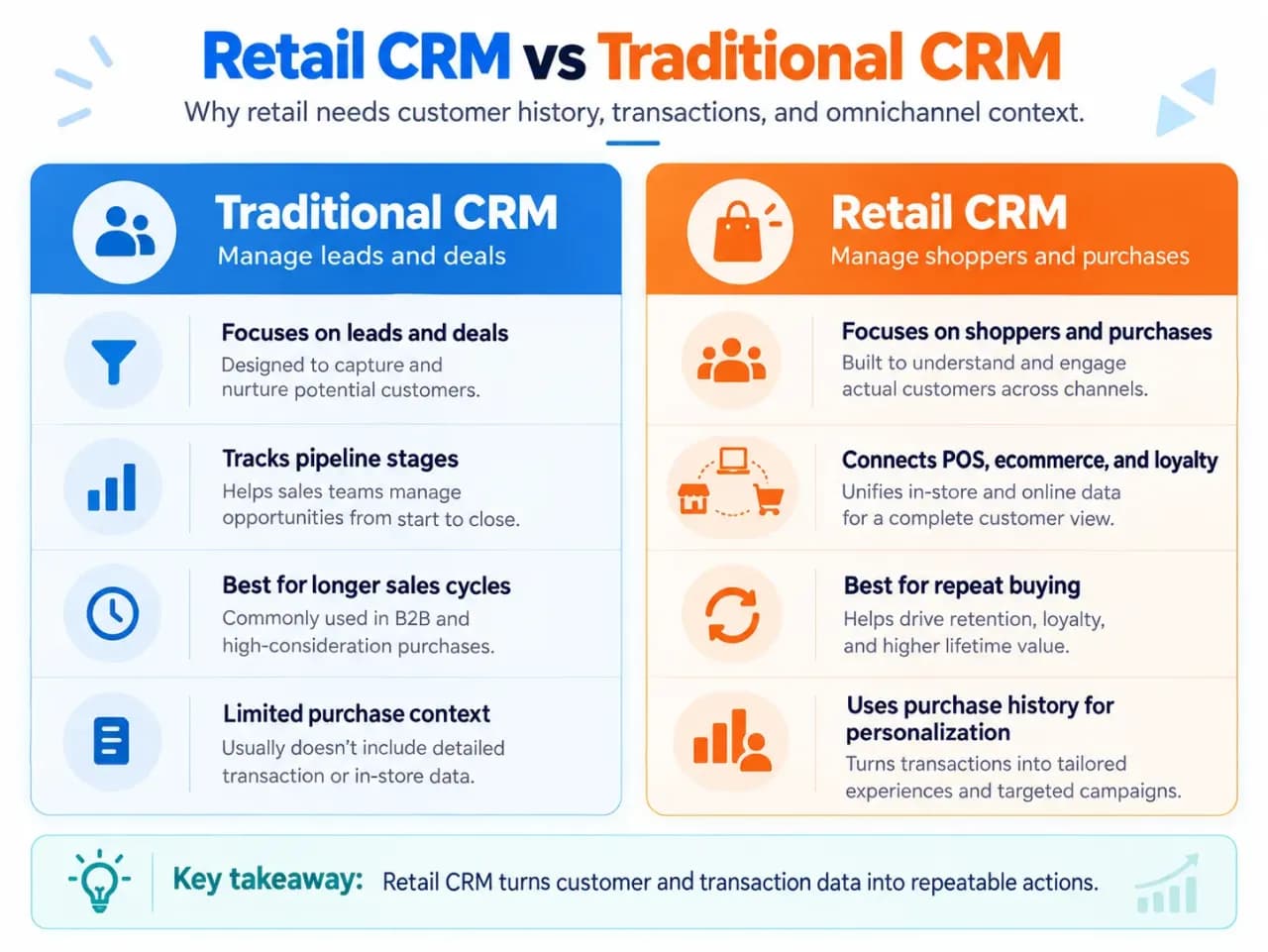
Traditional sales CRMs are often organized around leads, opportunities and deals. In high-velocity B2B inside sales, reps actively push prospects across sales pipeline stages over weeks or months.
Retail is usually different. One shopper can make many relatively quick transactions through a store, website or other channel. The useful question is therefore less often “What stage is this deal in?” and more often “Who is this shopper, what have they done before, and what interaction makes sense next?”
| Traditional sales CRM | Retail CRM |
|---|---|
| Often centered on leads and deals | Centered on shoppers and purchase behavior |
| Tracks sales pipeline stages | Tracks transactions and customer history |
| Commonly used for longer sales cycles | Designed for repeat, higher-frequency purchases |
| Rep activity is central | Store, ecommerce and marketing activity are central |
| Follow-up is often deal based | Follow-up can be triggered by customer behavior |
Some retailers still need conventional pipelines—for example, businesses selling high-value custom products—but the customer profile and transaction history remain central to the retail use case.
How Does Retail CRM Software Work?
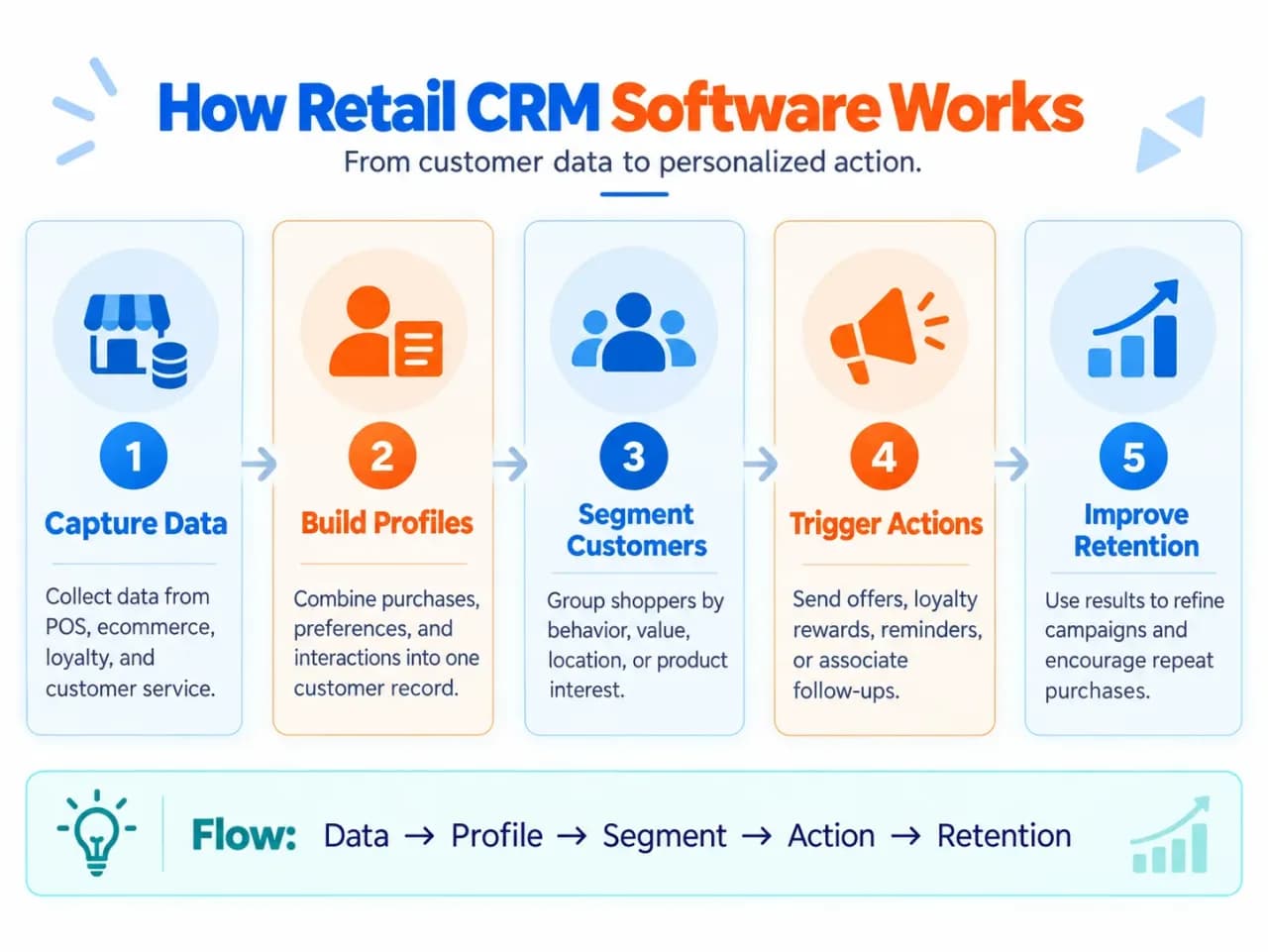
Retail CRM works as a data-to-action loop.
Customer activity enters the system, the CRM organizes it around the customer, and teams or automated workflows use that context to decide what should happen next.
1. Customer data is captured
The process starts where customers interact with the retailer.
Data may come from:
- a point-of-sale system;
- an ecommerce store;
- a loyalty program;
- email or SMS;
- customer service;
- in-store associates;
- returns and exchanges;
- customer accounts.
At checkout, for example, a customer might provide an email address or phone number. The transaction can then be associated with that customer's profile instead of remaining an anonymous sale.
Retail systems can also record communication preferences at this stage. Shopify's current POS documentation, for example, allows customer profiles to include marketing preferences and lets shoppers opt into marketing during profile creation.
2. Transactions and interactions are connected to the customer
Collecting data is only useful if the CRM knows which activity belongs to which person.
A properly connected system might associate the same customer with:
- a purchase made in a physical store;
- an order placed online;
- a product return;
- a loyalty account;
- a customer-service conversation.
This is why identity matching matters. Maintaining a high-quality CRM database requires proactive CRM data management to deduplicate phone numbers, sanitize email lists, and merge offline checkout receipts.
The goal is a usable customer record, not simply a large database.
3. The CRM builds a customer history
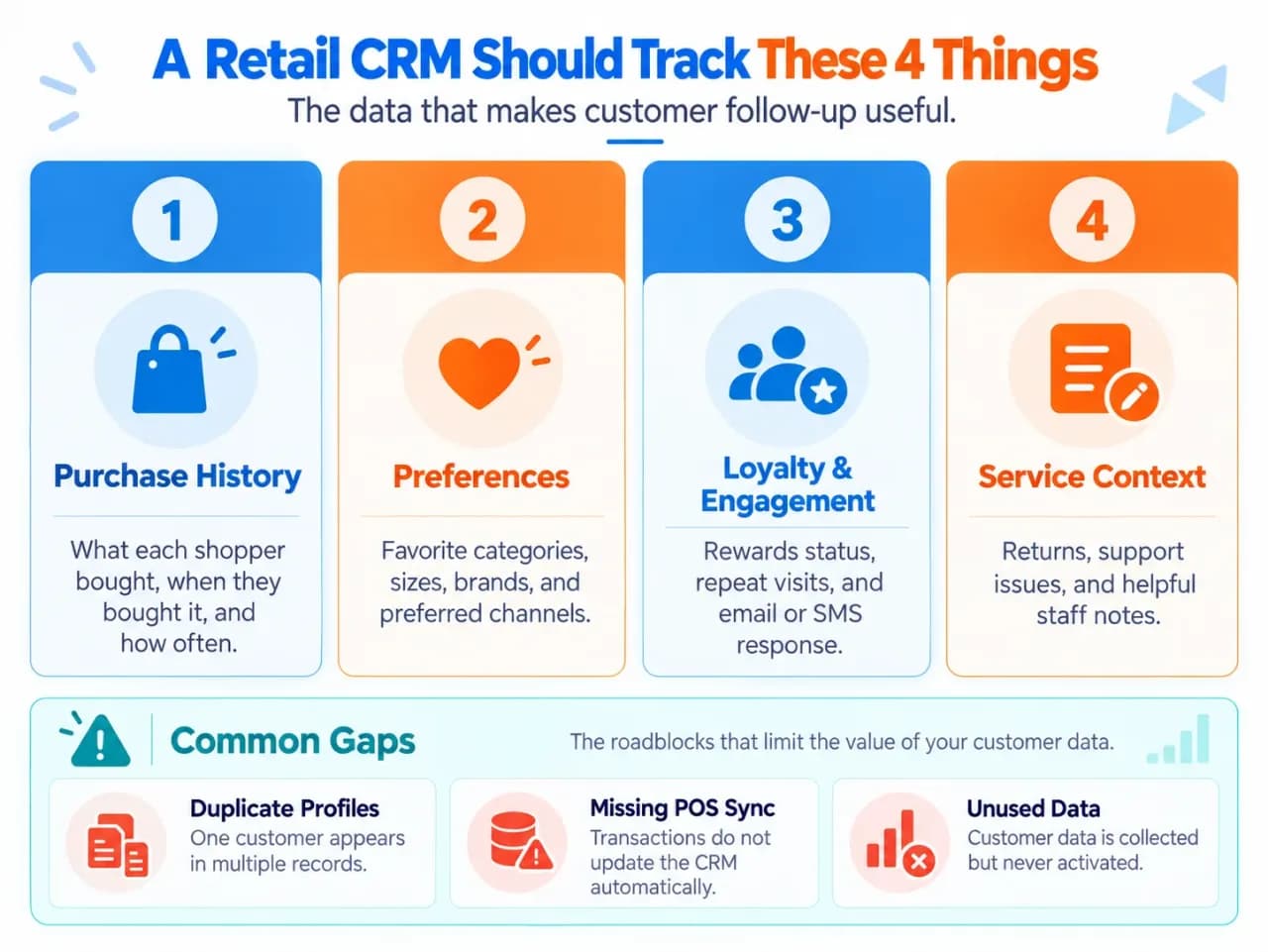
Once transactions and interactions are connected, the CRM develops a richer picture of the customer.
Instead of showing only contact information, a store associate or marketing team might see that a customer:
- bought from a particular category three times;
- normally shops at one location;
- belongs to a loyalty tier;
- returned a previous purchase;
- recently contacted support;
- has opted into email but not SMS.
Purchase history is especially important because it converts CRM from a contact list into a retail tool. Creatio, BSPK, Pipedrive and other retail CRM pages consistently identify purchase history, customer preferences and interaction history as central retail CRM data.
4. Customers are segmented
The CRM can then group customers using the information in their profiles.
Useful segments might include:
- first-time customers;
- repeat purchasers;
- customers who have not purchased recently;
- shoppers who frequently buy a particular category;
- high-value customers;
- customers near a particular store;
- loyalty members;
- customers who purchased in-store but never online.
These groups become more useful when they update from actual customer behavior rather than requiring employees to maintain them manually.
For example, current Shopify functionality can segment retail customers according to purchase activity, POS location and proximity to a store.
5. Customer data triggers an action
This is where the CRM starts creating practical value.
A segment or customer event can trigger:
- a post-purchase message;
- a relevant product recommendation;
- a loyalty reward;
- a reminder;
- a win-back campaign;
- an invitation to a local store event;
- a task for a sales associate;
- a customer-service follow-up.
The action does not always have to be automated. In relationship-driven retail, CRM data can simply give an employee better context before contacting or serving a customer.
That practice is often called clienteling: associates use customer history and preferences to provide more personalized service.
6. The next interaction updates the customer profile
Retail CRM should operate as a loop rather than a one-time database import.
If a shopper returns, purchases another product, redeems a reward or responds to a campaign, that activity becomes new customer context.
The sequence becomes:
customer interaction → customer profile → segment or insight → action → new interaction → updated profile
That loop is the simplest way to understand how retail CRM works.
A simple retail CRM example
Suppose a customer buys running shoes from a physical store and gives permission to receive marketing emails.
The POS associates the transaction with the customer's profile. The CRM now knows what was purchased, when it was purchased and where the sale occurred.
Several months later, the customer meets the retailer's criteria for a footwear follow-up segment. The CRM can trigger a relevant email or create a task for an associate.
If the customer buys again online, the second transaction should update the same profile.
The value is not the original email address. The value is that identity, transaction history and future customer actions remain connected.
What Features Matter Most in Retail CRM Software?
Retail CRM products vary widely, but the most useful retail-specific capabilities are those that support the workflow above.
Unified customer profiles
Employees should be able to see relevant customer information without searching separate systems.
The profile should connect identity with purchase and interaction history rather than functioning as a basic address book.
POS and ecommerce integration
For omnichannel retailers, this is one of the most important requirements.
But do not evaluate an integration by the presence of a connector logo alone. Ask what information actually moves between systems, how quickly it updates and whether online and offline activity lands in the same customer record.
Retail users repeatedly raise this concern in community discussions: when POS data does not flow cleanly into the CRM, employees fall back to manual entry and the system quickly becomes less useful.
Purchase history
The CRM should make transaction history usable for customer-facing work.
A purchase should contribute to customer context, segmentation, recommendations, loyalty or follow-up—not simply sit in an isolated order table.
Customer segmentation
Retailers need to group shoppers according to useful characteristics and behavior.
Purchase recency, frequency, product category, location and customer value can often be more useful than broad demographic categories.
Marketing and workflow automation
Automation helps customer data lead to action without requiring employees to remember every follow-up manually.
Useful retail workflows can include welcome messages, post-purchase communication, loyalty milestones and re-engagement of inactive customers.
Loyalty and clienteling context
If loyalty or clienteling matters to the business, employees should be able to access the relevant information from the customer relationship workflow.
This might include loyalty status, rewards, preferences, notes or previous associate interactions.
Service context
Retail relationships continue after checkout. Omnichannel retailers frequently integrate storefront customer records with a dedicated call center CRM or support desk so phone agents see recent in-store receipts.
Returns, complaints and support conversations can change what the next employee should say or recommend. Connecting this context helps avoid treating a returning customer like a stranger.
Reporting
Retail CRM reporting should answer customer-focused questions such as which segments are purchasing again, how customers respond to campaigns and how behavior differs between channels.
Detailed CRM metrics and analytics deserve separate treatment; the CRM's purpose here is simply to turn customer activity into information teams can act on.
Retail CRM vs POS: What Is the Difference?
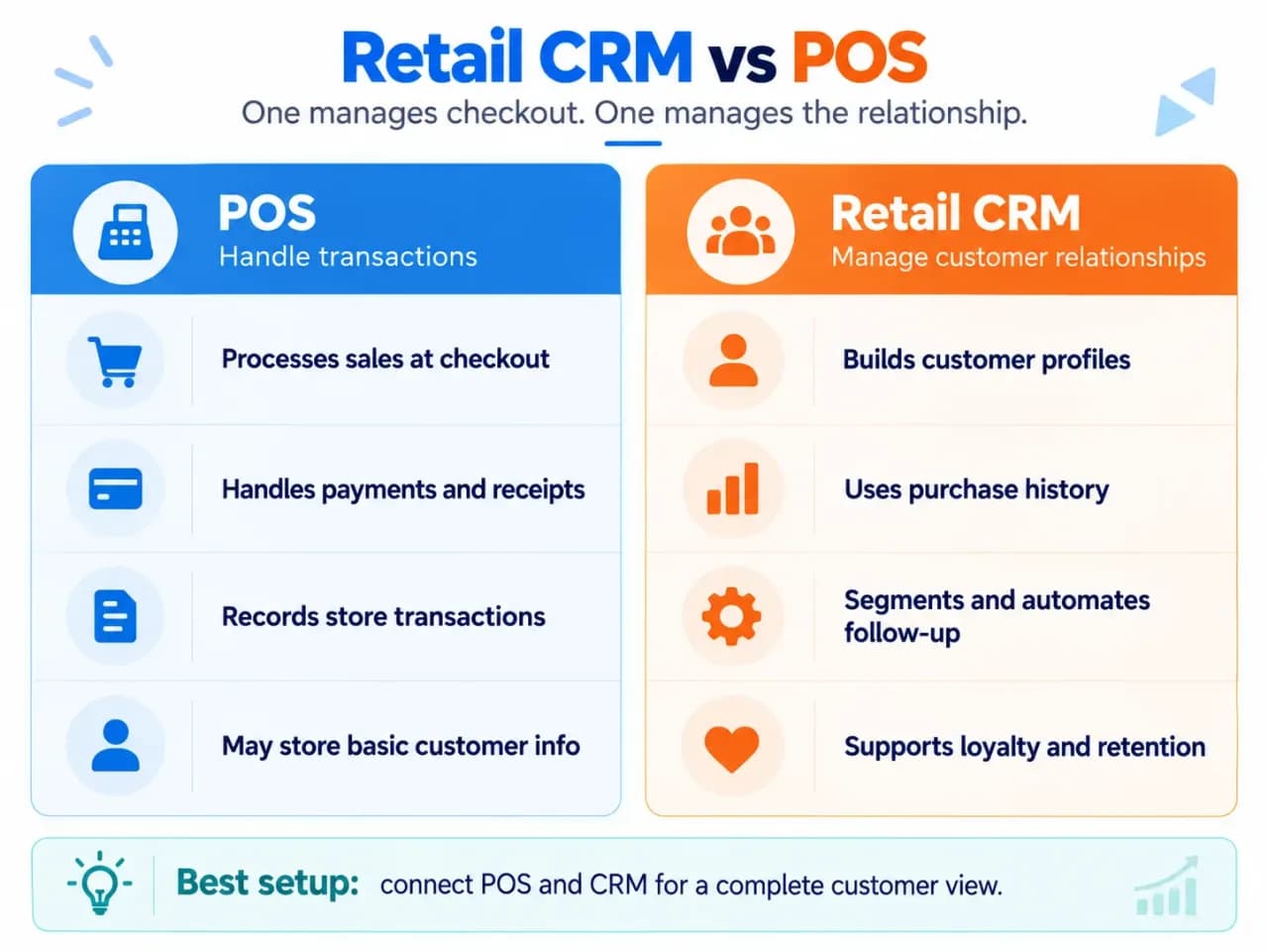
A POS and CRM can share data, but they have different primary jobs.
| POS | Retail CRM |
|---|---|
| Processes the transaction | Manages the ongoing customer relationship |
| Records what was sold | Connects purchases to customer history |
| Handles checkout/payment workflows | Supports segmentation and follow-up |
| Works primarily at the point of purchase | Works before and after purchases |
| May include basic customer profiles | Builds broader customer context across interactions |
A modern POS platform may already include useful CRM-like functions, so the boundary is not always clean.
The practical question is not whether a feature is labelled “CRM.” It is whether the retailer can maintain a useful customer profile and use transaction history across subsequent interactions.
What Does CRM Help Retailers Do?
The main benefits follow directly from the data-to-action workflow.
Preserve customer context. Staff can see relevant history instead of starting every interaction from zero.
Make follow-up more relevant. Promotions or recommendations can reflect what customers have actually purchased or done.
Connect physical and digital shopping. Online and store activity can contribute to the same customer relationship instead of remaining separate.
Support repeat purchases and retention. Retailers can identify customers who should receive a loyalty action, post-purchase message or re-engagement campaign.
Reduce manual work. When systems synchronize correctly, employees do not have to repeatedly copy transactions or customer information between spreadsheets, POS tools and marketing platforms.
Improve customer-level visibility. Retailers can move beyond store-wide sales totals and understand patterns among different groups of customers.
These are capabilities, not guaranteed outcomes. A CRM only becomes useful when the underlying customer data is accurate and employees or workflows actually use it.
How to Choose CRM for a Retail Business
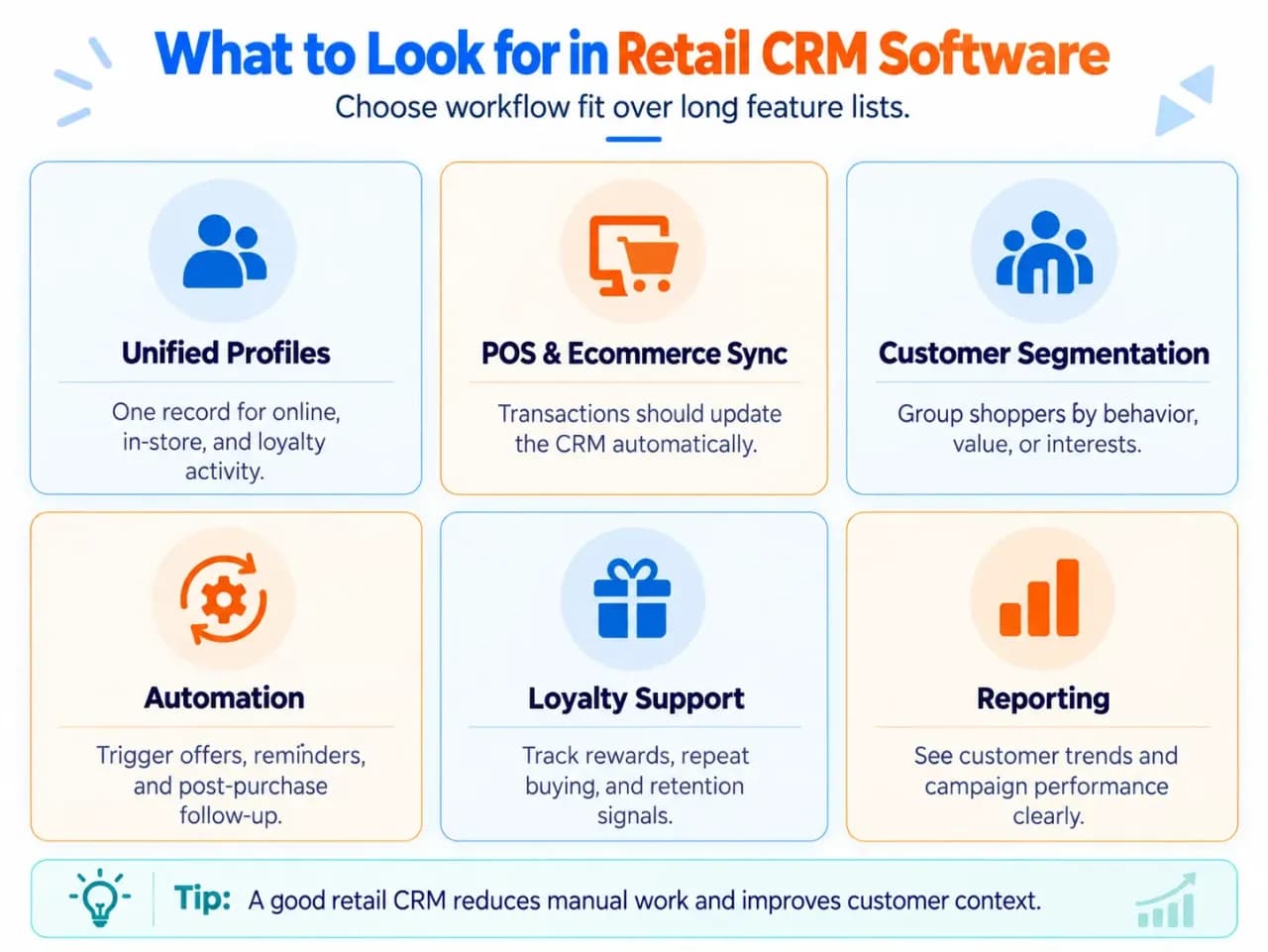
Start with your retail workflow rather than a software feature list. Before launching, developing a phased CRM implementation roadmap ensures store managers, cashiers, and marketers are properly onboarded.
First identify where customer and transaction information already lives. That might be your POS, ecommerce platform, loyalty system, spreadsheets or several systems at once.
Then evaluate the CRM around that reality.
Ask:
- Will our POS and ecommerce data enter the CRM automatically?
- Will one shopper have one usable customer profile across channels?
- What purchase, return and service information will employees see?
- Can we create useful customer segments without exporting data?
- Can customer behavior trigger follow-ups or tasks?
- Can store employees use the system quickly during real customer interactions?
- Are communication preferences and permissions preserved?
- How much manual data entry remains?
- Will costs change substantially as contacts, locations or users increase?
The staff workflow deserves particular attention. Community discussions repeatedly warn that retail CRM adoption suffers when floor employees must stop serving customers to maintain complicated records manually.
A feature is valuable only if the team can use it consistently.
Do You Actually Need Separate Retail CRM Software?
Not every retailer needs another platform. When off-the-shelf connectors fail to support custom POS protocols or proprietary inventory pipelines, enterprise retailers often consider custom CRM development to engineer a tailor-made data architecture.
If your existing POS or ecommerce system already gives you:
- usable customer profiles;
- online and offline purchase history;
- customer segmentation;
- marketing preferences;
- simple campaigns;
- loyalty information;
- sufficient reporting;
then a separate CRM could create more complexity than value.
A dedicated retail CRM becomes more useful when the business needs deeper capabilities such as:
- several stores or markets;
- complex omnichannel customer journeys;
- advanced segmentation;
- sophisticated loyalty programs;
- clienteling;
- associate follow-up workflows;
- centralized customer service;
- advanced automation;
- more detailed customer reporting.
Current Shopify guidance makes a similar distinction: native customer-management capabilities can cover simpler workflows, while dedicated CRM applications become useful for requirements such as deeper clienteling, associate task management, complex service and more advanced automation or reporting. For broader platform comparisons across different business models, explore our complete CRM software guides.
Common Retail CRM Mistakes
Choosing a CRM built around the wrong sales model. A strong B2B pipeline tool is not automatically a strong retail CRM. Similarly, automotive retailers rely on a specialized dealer management system rather than a general retail POS.
Assuming any POS integration is sufficient. Verify what synchronizes, how frequently it synchronizes and whether the integration produces one usable customer history.
Relying on manual transaction entry. If employees must repeatedly copy purchases into CRM, the data will become incomplete and the system will lose value.
Collecting more data without deciding how it will be used. Every important field should support a meaningful service, segmentation, reporting or follow-up use case.
Ignoring store-associate usability. A sophisticated system provides little value if frontline cashiers fail to develop everyday CRM system proficiency during fast-paced checkout shifts.
Expecting CRM to replace every retail system. Some CRM suites include inventory, orders, merchandising or ERP functionality, but those are not what defines a retail CRM. Its core job is to make customer relationships and customer history usable across interactions.
Frequently Asked Questions
Can retail CRM combine in-store and online customer records without creating duplicates?
Yes, if the system can match customer identities across POS, ecommerce, loyalty, and service channels. Good retail CRM setups use identifiers such as email, phone number, loyalty ID, or customer account data to merge activity into one profile rather than creating separate records for the same shopper.
What should a POS integration sync with a retail CRM?
At minimum, the integration should connect customer identities with purchases, returns, relevant order history, and loyalty or profile information needed for customer interactions. The exact fields vary by system, but the important test is whether transactions automatically improve the customer record instead of requiring staff to re-enter purchase data manually.
Can a retail CRM manage loyalty without separate loyalty software?
Sometimes. Some retail CRM platforms include points, tiers, rewards, and loyalty status directly, while others integrate with a separate loyalty application. The better choice depends on how complex the program is and whether loyalty activity needs to stay synchronized with customer profiles and purchase history.
What customer data should retailers track in a CRM?
Retailers typically need contact details, communication consent, purchase and return history, purchase frequency, product preferences, loyalty status, service interactions, and useful staff notes. Collect only data that supports a clear customer-service, segmentation, loyalty, reporting, or follow-up purpose rather than filling profiles with information the business never uses.
Can retail CRM reduce manual customer-data entry?
Yes, but only when it connects properly with the systems where retail activity already happens. POS and ecommerce integrations can automatically update customer and purchase records, while employee-entered notes or special follow-up details may still require manual input; recurring retail-user discussions identify excessive manual entry as a major adoption problem.
Does retail CRM also manage inventory?
Not necessarily. A retail CRM primarily manages customer relationships and customer history, while inventory is normally handled by a POS, inventory platform, ERP, or commerce system; some retail suites combine these capabilities or expose inventory information through integrations.