
Quick Summary
- Ecommerce CRM connects customer and commerce data: It brings together customer profiles, orders, purchase history, browsing behavior, engagement, and interactions so online stores can understand each shopper in context instead of managing disconnected records across multiple tools.
- Its value comes from turning data into action: The strongest ecommerce CRM workflow is data → customer profile → segment → automated action → measurable outcome, enabling more relevant follow-ups, personalization, cart recovery, post-purchase communication, and repeat-purchase campaigns.
- Integration depth matters more than an integration logo: Before choosing a CRM, check which customers, orders, products, custom fields, and historical records actually sync, whether data moves one or two ways, and how quickly updates become available for workflows.
- Not every online store needs a separate CRM: Native ecommerce and marketing tools may be enough for simpler stores. A dedicated CRM becomes more useful when customer data is fragmented, manual exports grow, important follow-ups are missed, or sales and support need richer customer context.
- Choose the CRM around your sales model and workflows: DTC stores usually need strong segmentation and lifecycle automation, while wholesale, B2B, or sales-assisted ecommerce may also require pipelines, notes, tasks, and human follow-up. Test real workflows rather than comparing feature counts alone.
What Is an Ecommerce CRM?
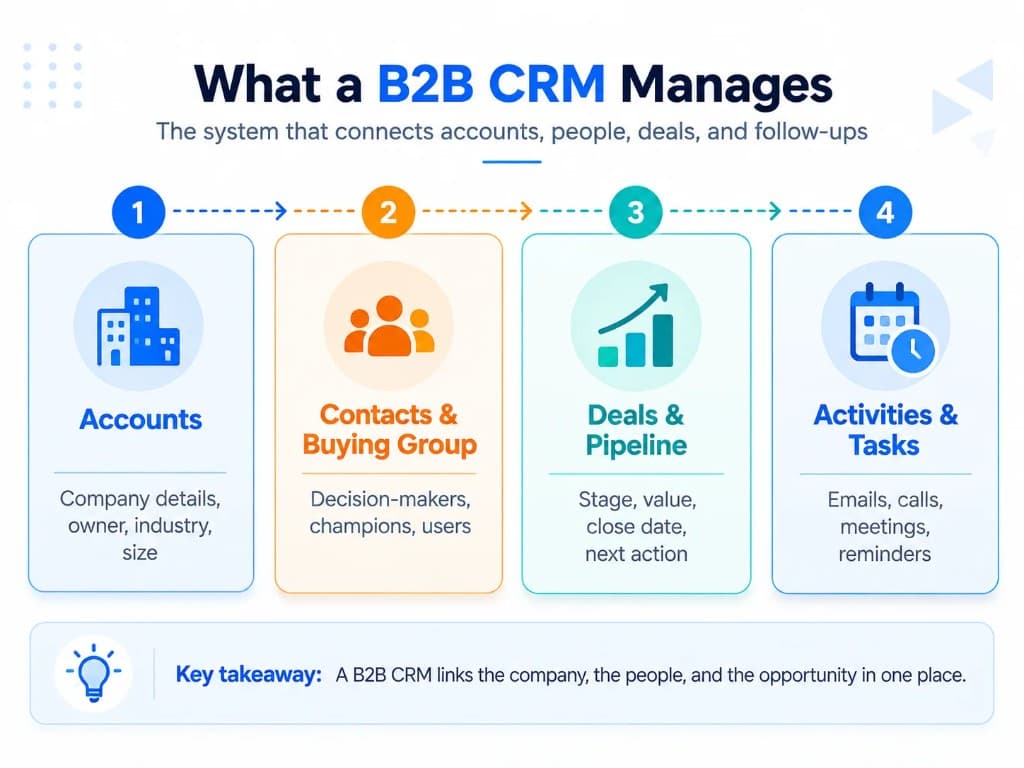
Traditional CRM systems were largely designed around contacts, companies, sales opportunities, conversations, and sales pipelines. Ecommerce creates a different relationship model. A store may serve thousands of individual shoppers who make purchases without ever speaking to a salesperson.
An ecommerce CRM therefore needs to understand more than who a customer is. It needs enough commerce context to understand what that customer has done. That is the same customer relationship management goal as a B2B CRM, but the records and journeys look different.
A useful customer profile can include:
- contact information and communication preferences;
- orders and purchase history;
- products or categories purchased;
- browsing and product-view behavior;
- carts or checkouts;
- email and SMS engagement;
- customer segments;
- support or sales interactions;
- loyalty or subscription information when relevant.
The difference is easiest to see in the underlying workflow.
| Traditional sales CRM | Ecommerce CRM |
|---|---|
| Often centered on leads, accounts and deals | Often centered on individual shoppers |
| Tracks calls, meetings and sales opportunities | Connects purchases, behavior and customer interactions |
| Commonly supports longer human-led sales cycles | Must handle large numbers of automated customer journeys |
| Pipeline activity is usually central | Segmentation, lifecycle activity and purchase behavior are often central |
| Sales reps frequently decide the next action | Customer behavior can automatically trigger the next action |
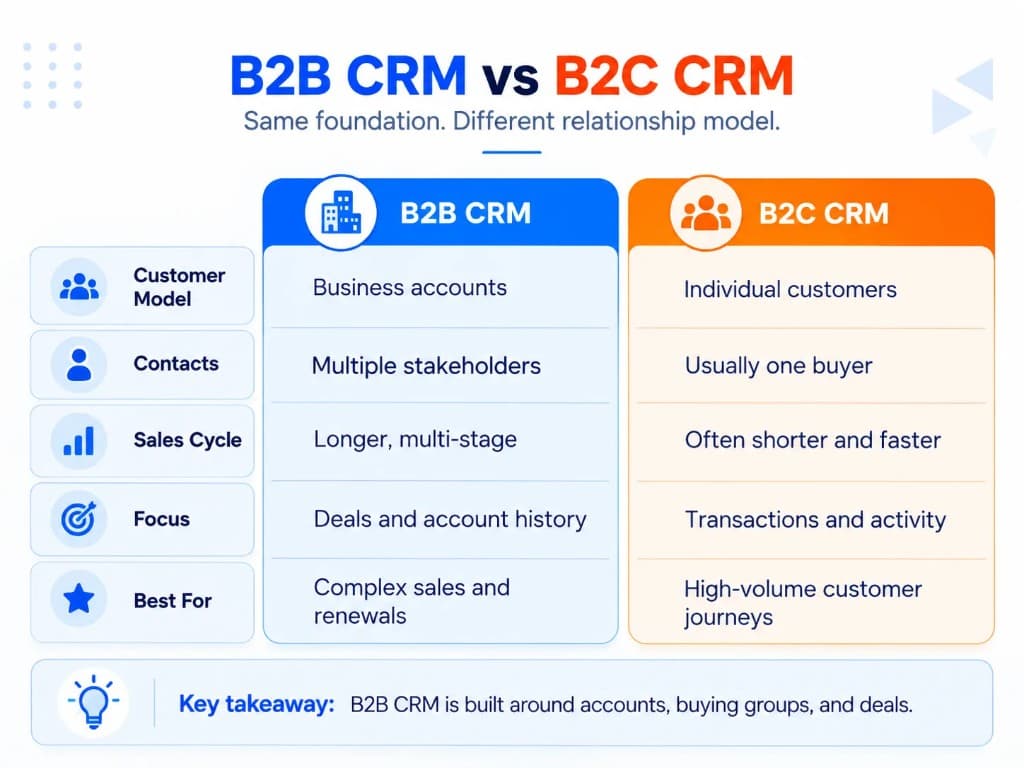
The categories can overlap. A wholesale ecommerce business, for example, may need both ecommerce behavior and a traditional sales pipeline. Stores that also run physical locations often compare this model with CRM for retail, because retail CRM similarly connects purchase history with ongoing customer communication.
How Does an Ecommerce CRM Work?
An ecommerce CRM is most useful when five things happen in sequence.
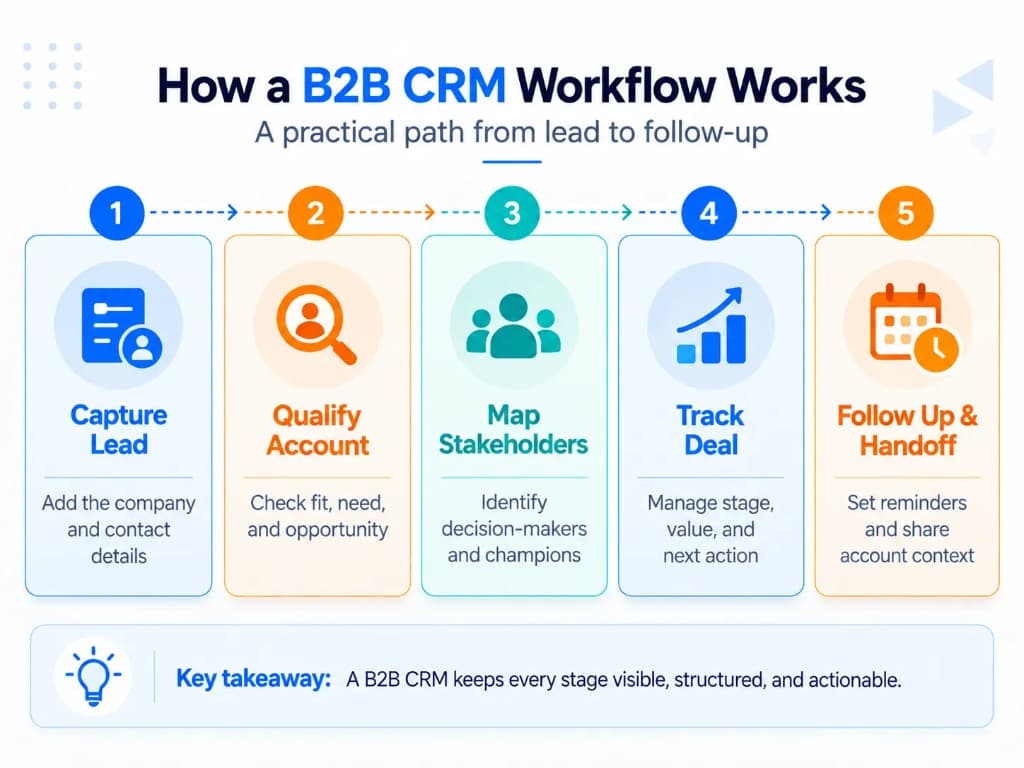
1. Customer and commerce data are connected
The CRM receives relevant information from the ecommerce stack.
Depending on the store, that can include data from the storefront, checkout, email platform, support system, subscription service, loyalty program, advertising tools, or physical retail locations.
The goal is not to connect every available application. It is to connect the information needed to understand and act on the customer relationship. Strong CRM data management matters here: if orders, identities, and consent records are messy, later segmentation and automation become unreliable.
2. The data becomes a usable customer profile
Instead of an order sitting in one system, an email click in another, and a support conversation somewhere else, the CRM associates useful activity with the customer.
This creates a more complete profile inside the CRM database.
For example, the business can see that a customer:
- made their first purchase 60 days ago;
- bought from a particular product category;
- recently viewed a related product;
- opened the last two emails;
- and has not made a second purchase.
Those facts are considerably more useful together than they are as disconnected records.
3. Customers are grouped into meaningful segments
The business can turn profile data into dynamic audiences such as:
- first-time customers;
- repeat buyers;
- high-value customers;
- recent purchasers;
- lapsed customers;
- customers interested in a specific category;
- subscribers who have not purchased;
- customers approaching a replenishment window.
Modern ecommerce platforms can already perform some of this segmentation themselves, so a separate CRM should add enough additional data, automation, coordination, or relationship management to justify another system. Marketing automation is only useful when those segments reflect real purchase and engagement behavior.
4. Behavior or segment changes trigger actions
A useful CRM does more than display information.
It can make the information actionable through sales automation and lifecycle workflows.
For example:
Customer behavior
→ shopper makes first purchase
CRM/profile update
→ order and products are added to the customer record
Segmentation
→ customer enters “first-time buyer” segment
Workflow
→ post-purchase education is triggered
Later behavior
→ no repeat order after the expected purchase interval
New segment/workflow
→ customer becomes eligible for a relevant replenishment or win-back message
This is the basic mechanism behind much of ecommerce CRM automation.
5. Results become new customer data
Purchases, clicks, replies and other relevant actions feed back into the customer profile.
The CRM can therefore use what happened previously to make later segmentation and follow-up more relevant.
That feedback loop is more important than having the longest possible feature list. Operational CRM captures the day-to-day activity; analytical CRM then helps teams understand which journeys and segments produce better outcomes.
How Does Ecommerce CRM Help Online Stores Grow?
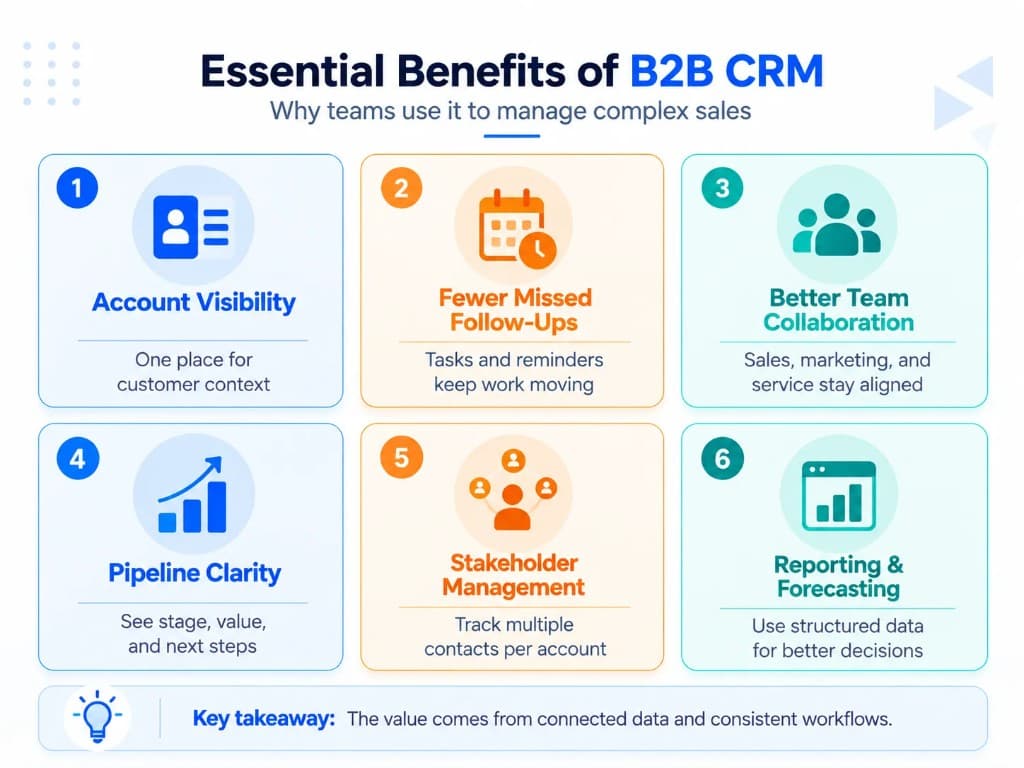
CRM does not create growth merely because customer data exists in one database. Growth comes from using better customer context to make better decisions and execute them consistently. The same idea shows up in CRM metrics and CRM analytics: the system should show whether recovered carts, repeat purchases, and retention workflows actually move the numbers that matter.
| Ecommerce problem | What the CRM enables | Potential business effect |
|---|---|---|
| High-intent shopper leaves without buying | Identify behavior and trigger relevant follow-up | More opportunities to recover intent |
| First-time customers rarely return | Build post-purchase and win-back segments | More repeat-purchase opportunities |
| Every subscriber receives similar campaigns | Segment by purchases, behavior and engagement | More relevant communication |
| Support or sales teams lack customer context | Show purchase and interaction history together | Faster, more informed conversations |
| Staff repeatedly export spreadsheets or build manual lists | Automate segment membership and workflows | Less repetitive work and fewer missed actions |
Recover high-intent shoppers
Cart and checkout recovery is one obvious ecommerce use case.
Baymard's current research puts the average documented online cart-abandonment rate at 70.22% across 50 studies. That does not mean every abandoned cart is recoverable, but it shows why identifying and responding to genuine buying intent matters.
A CRM can make the recovery more intelligent when it knows more than the contents of the cart. Purchase history, customer value, engagement and product preferences can influence who receives a follow-up and what that follow-up contains.
Increase repeat purchases
The first purchase should change what the business knows about the customer.
Instead of continuing to treat a buyer like an anonymous subscriber, the CRM can use the purchase to trigger onboarding, product education, cross-sell, replenishment or later win-back activity where appropriate.
The important distinction is that the workflow responds to the customer's lifecycle stage rather than sending the same campaign to everyone.
Personalize marketing with useful context
Personalization is not simply inserting a first name into an email.
Useful ecommerce personalization can be based on what someone bought, what they browsed, how recently they purchased, which categories interest them, how often they buy, or whether they respond to a particular channel.
Current ecommerce segmentation tools already illustrate this model: customer groups can update dynamically as purchasing and behavioral data change, then be used for targeted messaging and automations.
Give teams one customer history
A marketing platform may know which emails someone clicked. The store knows what they ordered. A helpdesk knows why they contacted support.
When the necessary context is connected, staff spend less time reconstructing the customer's history and can make the next interaction more relevant. That shared history also improves customer service when agents need order and engagement context in one place.
This is especially useful when a business has human sales, support, wholesale, subscription, or high-value customer relationships alongside normal ecommerce transactions.
Reduce repetitive customer-management work
Growing stores often create manual processes without deliberately choosing them:
- exporting customer lists;
- merging spreadsheets;
- adding tags;
- reminding staff to follow up;
- moving information between systems;
- recreating segments;
- checking several tools before answering a customer.
CRM automation is valuable when it removes those handoffs while preserving accurate customer context. Teams that still rely on spreadsheets for customer lists usually reach this stage first.
Which Ecommerce CRM Features Actually Matter?
The best feature set depends on how the store sells, but a useful ecommerce CRM should be evaluated around a few core jobs rather than a long list of CRM platforms and CRM systems with similar logos.
Ecommerce data integration
The CRM needs access to the commerce data required for its workflows.
At minimum, determine whether it can reliably associate customers with orders, products and the relevant customer activity from your existing stack.
Unified customer profiles
Each customer's important information should be understandable from one profile rather than reconstructed manually. Contact management alone is not enough if purchase history and engagement stay disconnected.
A larger profile is not automatically a better profile. The useful question is whether it contains the information employees and automations need to decide what happens next.
Flexible customer segmentation
Segments should be able to use meaningful ecommerce conditions, such as purchase behavior, product/category interest, engagement and lifecycle state.
Dynamic segments are particularly useful because customers can automatically enter or leave audiences as their circumstances change.
Workflow automation
Look for the ability to trigger the actions your business actually performs. Reliable CRM workflows matter more than having every possible trigger available.
Typical ecommerce workflows include:
- welcome sequences;
- browse or cart follow-up;
- post-purchase education;
- replenishment reminders;
- cross-sell;
- VIP treatment;
- reactivation or win-back;
- internal sales or service tasks.
You do not need every possible automation. You need reliable automation for the journeys that matter to your customers.
Appropriate activation channels
Some ecommerce CRM suites send email, SMS or other communications directly. Others mainly organize customer data and pass audiences or tasks to specialized tools.
Either model can work.
What matters is whether the complete workflow can run without unreliable manual steps.
Reporting
The system should show whether the workflows and customer groups you created are producing useful outcomes.
For an ecommerce team, that can include conversion, repeat purchase, customer value, engagement or other lifecycle measures appropriate to the workflow.
Advanced CRM analytics deserves its own treatment; the ecommerce CRM only needs enough measurement to close the loop between customer data and action.
Customer-service or sales features when your model requires them
A pure self-service DTC store may prioritize segmentation and lifecycle automation.
A store selling wholesale, custom products or high-consideration items may also need:
- deal pipelines;
- account ownership;
- sales tasks;
- quotes;
- notes;
- conversation history;
- human follow-up.
That is why choosing by business model is more useful than choosing by company size alone. Wholesale and sales-assisted stores often need pipeline management closer to an inside sales CRM, not only marketing segments.
Don't Confuse “Has an Integration” With “Integrates Deeply”
An integration logo tells you very little about the data that will actually be available.
Before choosing a CRM, ask four questions:
- What syncs?
- Customers, orders, products, refunds, subscriptions, custom fields, customer metafields, support activity and other objects are not necessarily treated equally.
- Which direction does the data move?
- A one-way import is different from a two-way synchronization.
- How quickly does it update?
- A workflow that depends on immediate behavior may not work properly with delayed synchronization.
- What happens to historical and duplicate data?
Find out whether old orders are imported, how customer identities are matched and how duplicate profiles are handled.
This test is more useful than simply checking whether the CRM's website says it “integrates with Shopify” or another ecommerce platform. When native connectors fall short, CRM development or custom CRM work is sometimes required to sync the fields your workflows actually need.
Does Every Ecommerce Store Need a CRM?
No.
Many ecommerce platforms now include customer records, segmentation, basic automation and marketing capabilities. A store with straightforward requirements may be able to manage its customer relationships without introducing another major system.
A separate CRM becomes more useful when operational complexity increases.
Common signals include:
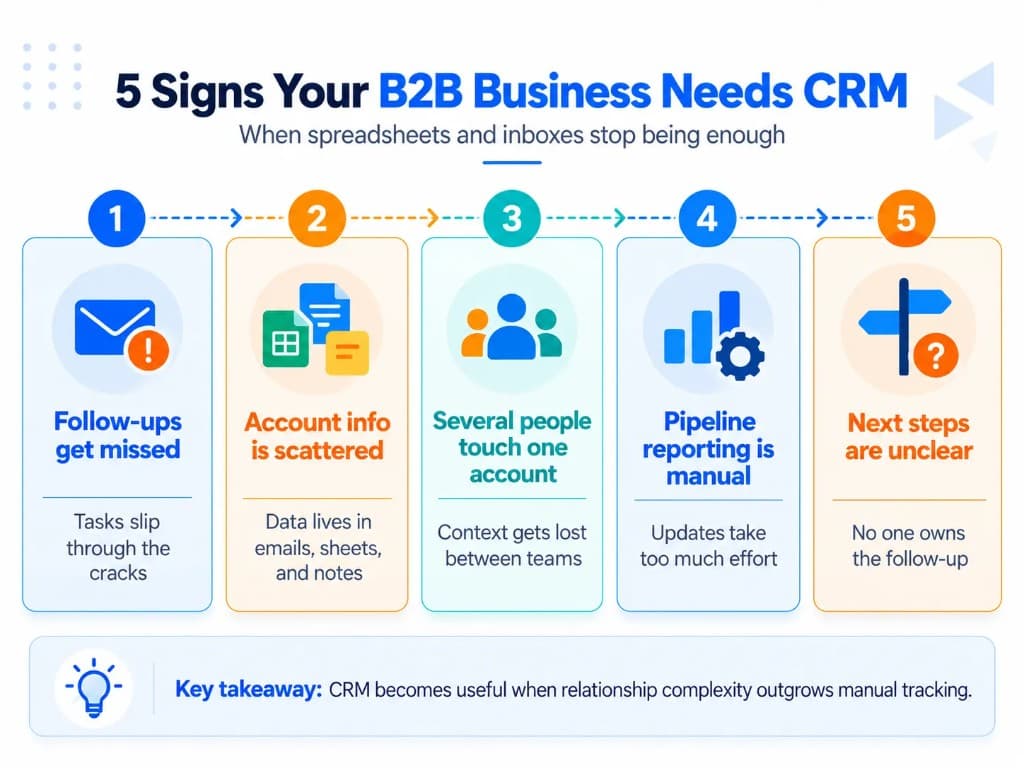
- customer information is scattered across several systems;
- employees repeatedly export and combine customer data;
- useful segments cannot be created from the available data;
- sales or support staff cannot easily see purchase context;
- important follow-ups depend on someone remembering them;
- marketing, support and sales maintain conflicting customer information;
- the business has wholesale, B2B or custom sales that require human follow-up;
- existing automation cannot use the customer information needed for relevant decisions.
The practical threshold is therefore not simply revenue, order volume or employee count.
It is the point where managing the customer relationship across the existing stack creates enough fragmentation or manual work to justify a dedicated system. At that stage, CRM implementation planning matters as much as the software shortlist, because poor user adoption turns another tool into another silo.
How to Choose an Ecommerce CRM for Your Store?
Start with the customer relationship you actually need to manage.
Match the CRM to your sales motion
For a primarily DTC store, prioritize:
- strong storefront and order-data integration;
- customer profiles;
- behavioral and purchase segmentation;
- lifecycle automation;
- retention workflows;
- relevant marketing activation.
For a hybrid ecommerce, wholesale or sales-assisted business, also consider:
- pipelines;
- company/account records;
- quotes;
- ownership;
- tasks;
- notes;
- forecasting;
- human follow-up.
The second business should not choose a CRM solely because it is popular with the first. Sales-assisted teams often need a workable sales pipeline and clear ownership, not only audience tools.
Test real workflows instead of watching a generic demo
Before committing, take several jobs your team actually performs and reproduce them in the CRM.
For example:
Find a customer's complete purchase and interaction history.
Build a segment combining purchase history with another useful customer signal.
Trigger a real lifecycle workflow from that segment.
Confirm that changes in the ecommerce platform reach the CRM correctly.
Confirm that the person responsible for the workflow can operate it without technical help.
This reveals far more than a long feature checklist.
Check whether your team will actually use it
A powerful CRM that employees avoid becomes another data silo.
Evaluate how easily the people responsible for marketing, customer service or sales can:
- find customer information;
- build segments;
- create or update workflows;
- record useful context;
- understand reports;
- correct bad data.
Model how the cost changes as you grow
CRM pricing can scale by users, contacts, profiles, messages, features or combinations of these.
Do not evaluate only the entry price. Estimate what your actual customer base, team and communication volume would cost after growth.
The right ecommerce CRM is not the platform with the longest feature list. It is the lightest system that gives your business a sufficiently complete customer record and reliably turns that information into the next useful action. Choose the setup that supports measurable business growth, not the one with the most unused modules. If you need deeper integrations than off-the-shelf connectors provide, plan for custom CRM development early rather than after launch.
Frequently Asked Questions
Is Shopify a CRM, or do I need a separate CRM?
Shopify is primarily an ecommerce platform, not a dedicated CRM, although it includes customer profiles, purchase history, segmentation, and automation features. A separate CRM becomes useful when you need deeper customer relationship tracking, cross-tool data, advanced workflows, sales follow-ups, or capabilities beyond Shopify's native customer tools.
Can I use a regular CRM for ecommerce?
Yes, a general CRM can work for ecommerce if it integrates deeply with your store and supports the workflows you need. Ecommerce-focused systems usually handle order history, shopper behavior, lifecycle segmentation, and automated retention workflows more naturally, while traditional CRMs can be better when wholesale, B2B, or sales-assisted relationships are important.
Is an ecommerce CRM the same as email marketing software?
No. Email marketing software primarily manages audiences, campaigns, and automated messages, while a CRM maintains broader customer data and relationship history that can support marketing, sales, and service workflows. Some ecommerce platforms combine both functions, which is why the categories often overlap.
What data should an ecommerce CRM sync from an online store?
At minimum, the CRM should sync the customer, order, product, and purchase-history data required for your workflows. Depending on your needs, useful data can also include carts, refunds, subscriptions, browsing behavior, marketing consent, support activity, and custom customer fields. CRM data quality depends on matching identities correctly across those objects.
Can an ecommerce CRM integrate with Shopify or WooCommerce?
Yes. Many ecommerce CRMs connect directly to platforms such as Shopify and WooCommerce or use connectors and APIs to exchange customer and order data. Before choosing one, verify exactly which objects and fields sync, how quickly updates appear, whether historical data is imported, and whether synchronization is one-way or two-way.
How much does ecommerce CRM software cost?
Ecommerce CRM pricing varies widely because platforms may charge by users, customer profiles, contacts, messages, features, or usage volume. Compare the cost at your expected customer and communication volume rather than judging a platform only by its introductory price.
Do small ecommerce businesses need a CRM?
Not necessarily. A small store can often rely on its ecommerce platform and basic marketing tools until customer data becomes fragmented, important follow-ups become manual, or existing segmentation and automation no longer support the business. A CRM becomes valuable when it solves those operational problems rather than simply adding another system.