
Quick Summary
- A CRM keeps insurance relationships actionable: It connects leads, policyholders, policy details, communication history, tasks, renewal dates, and next actions so agents can see who needs attention, why they need it, and what should happen next—the same customer relationship management goal that shows up in CRM for retail and CRM in finance, adapted to policies and renewals.
- The most valuable features support lead-to-renewal workflows: Prioritize lead capture, pipeline stages, follow-up tasks, renewal reminders, multiple-policy records, communication history, reporting, and integrations rather than choosing software simply because it offers the longest feature list.
- CRM and AMS serve different primary purposes: A CRM focuses on sales, relationships, communication, follow-up, and retention, while an agency management system handles deeper policy and operational administration. Some agencies use both systems together or choose platforms combining their functions.
- Good automation reduces missed work without replacing judgment: CRM should automate lead routing, reminders, routine tasks, approved communications, and renewal triggers while leaving coverage recommendations, client conversations, and other judgment-heavy decisions with the insurance agent. Sales automation helps with the repetitive steps; the agent still owns the advice.
- Workflow fit matters more than an “insurance-specific” label: A general CRM can work if it supports insurance fields, renewals, multiple policies, integrations, and clear next actions. Community discussions also show agents value simplicity, low maintenance, and avoiding duplicate data entry.
What Is a CRM for Insurance Agents?
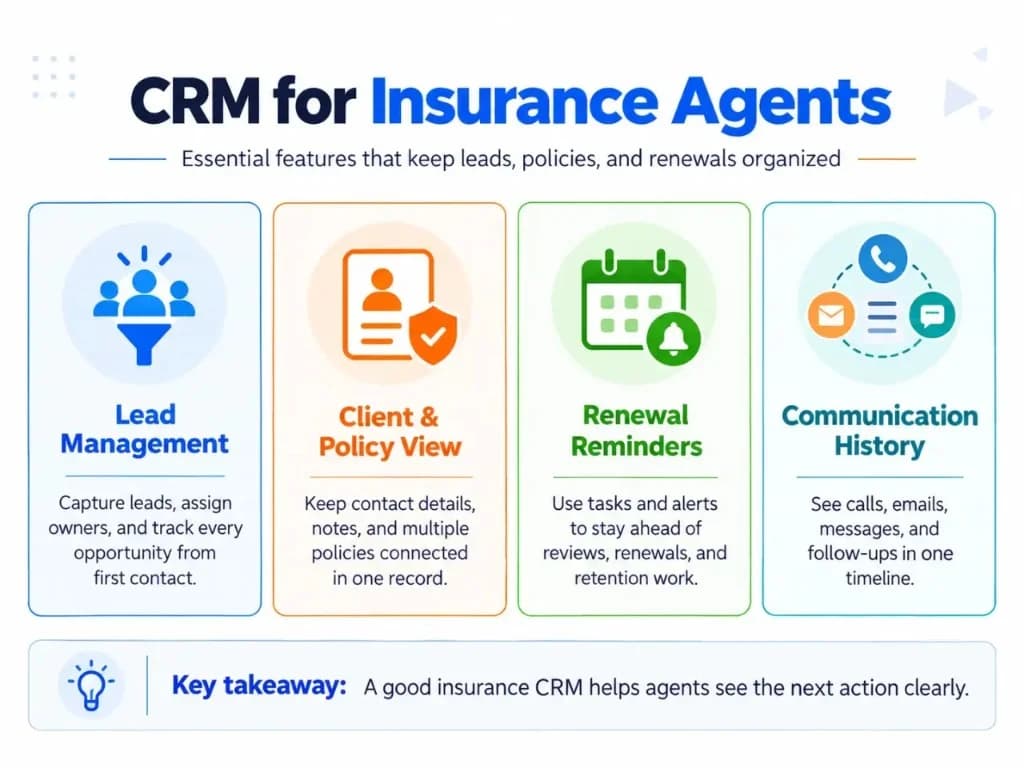
CRM stands for customer relationship management. For an insurance agent, a CRM is software used to manage the relationship around a prospect or policyholder—from the first inquiry and quote through follow-up, ongoing communication, policy reviews and renewals.
That makes it more than a digital address book. Like CRM for service businesses, the value comes from connecting people, work, and history in one place—not from storing names alone.
A useful insurance CRM can connect:
- the client or prospect;
- the policies associated with that client;
- lead source and assigned agent;
- current sales or service stage;
- calls, emails and other interactions;
- tasks and follow-up dates;
- policy renewal or review dates;
- the next action someone needs to take.
The important distinction is that the CRM manages the relationship and work around the relationship. It does not necessarily have to perform every insurance transaction. Strong CRM data management still matters, because incomplete policy or contact records make renewals and follow-ups unreliable.
CRM vs. AMS: What's the Difference?
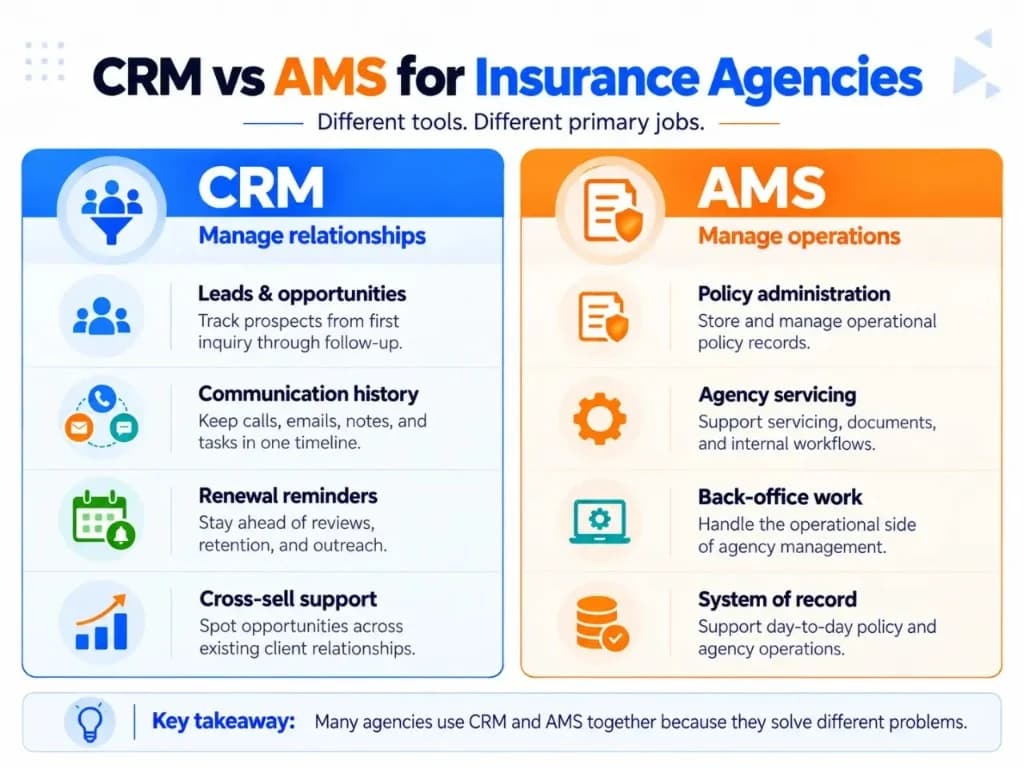
A CRM and an agency management system can overlap, but their primary jobs are different.
| CRM | Agency Management System (AMS) |
|---|---|
| Manages leads and relationships | Manages agency and policy operations |
| Tracks sales opportunities | Handles deeper policy administration |
| Records communication | Supports servicing/back-office workflows |
| Automates follow-up | May manage carrier downloads, billing or commissions |
| Tracks tasks and renewals | Acts as an operational policy system |
| Helps producers know the next action | Helps the agency administer the book of business |
EZLynx describes the distinction similarly: CRM is primarily oriented toward the sales pipeline and prospect outreach, while AMS software is focused more heavily on the policy lifecycle and back-office work.
Some insurance platforms combine CRM and AMS functions. Others integrate the two. The right setup depends on how much policy administration the agency expects the CRM itself to handle. In many agencies, CRM workflows stay focused on relationship work while the AMS remains the operational system of record.
CRM Features Insurance Agents Actually Need
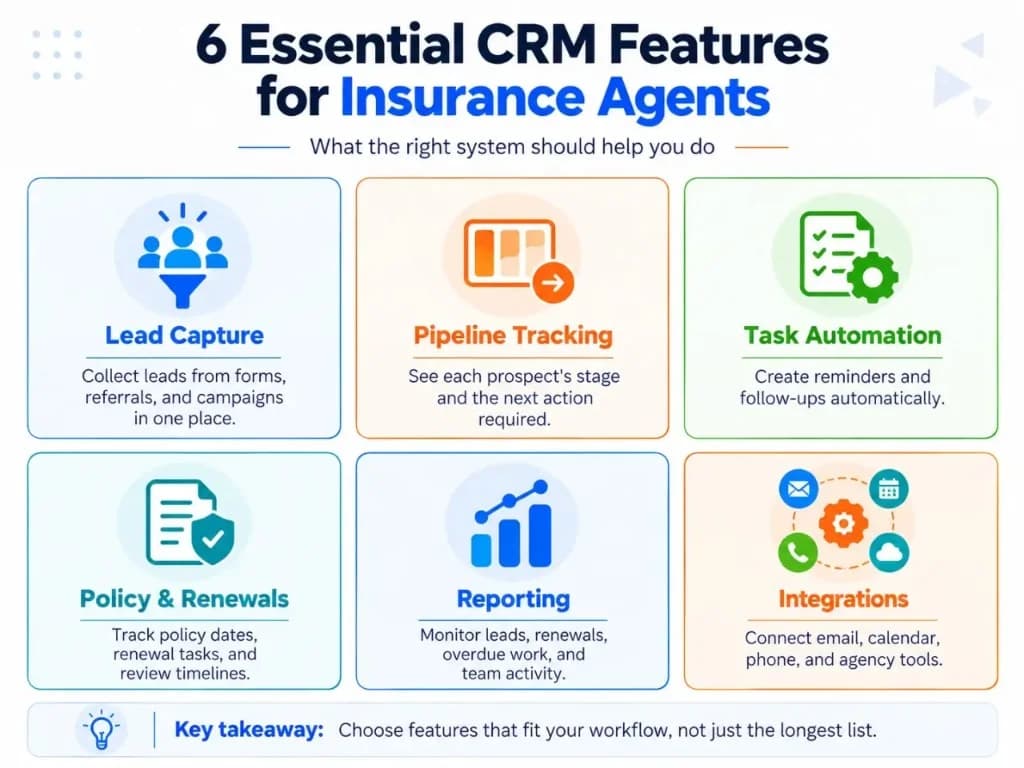
The best feature set is not the one with the longest list. It is the one that supports the agency's actual lead, client and renewal workflow. Comparing CRM platforms only by feature count usually hides that difference.
| Feature | What It Should Do for an Insurance Agent | Why It Matters |
|---|---|---|
| Client and policy view | Keep contact details, relevant policy information, notes and interaction history together | An agent can understand the relationship without searching several systems |
| Multiple-policy support | Associate more than one policy or coverage line with the same person, household or account | The relationship is usually broader than one transaction |
| Lead capture and routing | Bring leads from forms, campaigns, referrals or other sources into the CRM and assign an owner | New inquiries become actionable records instead of disappearing into inboxes |
| Insurance-specific pipeline | Track stages such as inquiry, contacted, quote in progress, quote sent, follow-up, bound or lost | Agents can see where each opportunity stands |
| Tasks and next actions | Give every active opportunity a dated follow-up or next step | The CRM becomes a work queue rather than a passive database |
| Renewal automation | Trigger reminders, tasks or outreach before a policy's renewal or review date | Renewal work becomes proactive rather than memory-dependent |
| Communication history | Log calls, emails, notes and permitted message activity against the relationship | Anyone serving the client has the latest context |
| Workflow automation | Automate routing, reminders, task creation and routine acknowledgements | Agents spend less time performing repeat administrative steps |
| Integrations | Connect forms, email, calendar, calling tools and, where necessary, the AMS or other insurance systems | It reduces duplicate data entry and fragmented records |
| Reporting | Show leads by source, pipeline stages, overdue work, conversion and upcoming renewals | Managers and agents can see what needs attention |
| Access and audit controls | Limit access appropriately and retain useful activity history | Insurance agencies handle sensitive customer information and need accountable data handling |
Current insurance CRM pages consistently emphasize policyholder/contact management, renewals, lead capture, pipeline visibility, communications, reporting and AMS integration. Clean CRM integrations matter as much as any single feature because they reduce the duplicate entry agents complain about most.
Security deserves particular attention rather than being treated as a checkbox. The NAIC Insurance Data Security Model Law, for example, establishes risk-based information-security requirements for covered insurance licensees and includes safeguards such as monitoring and audit trails. Exact legal obligations vary by jurisdiction and entity.
How Does a CRM Fit an Insurance Agent's Daily Workflow?
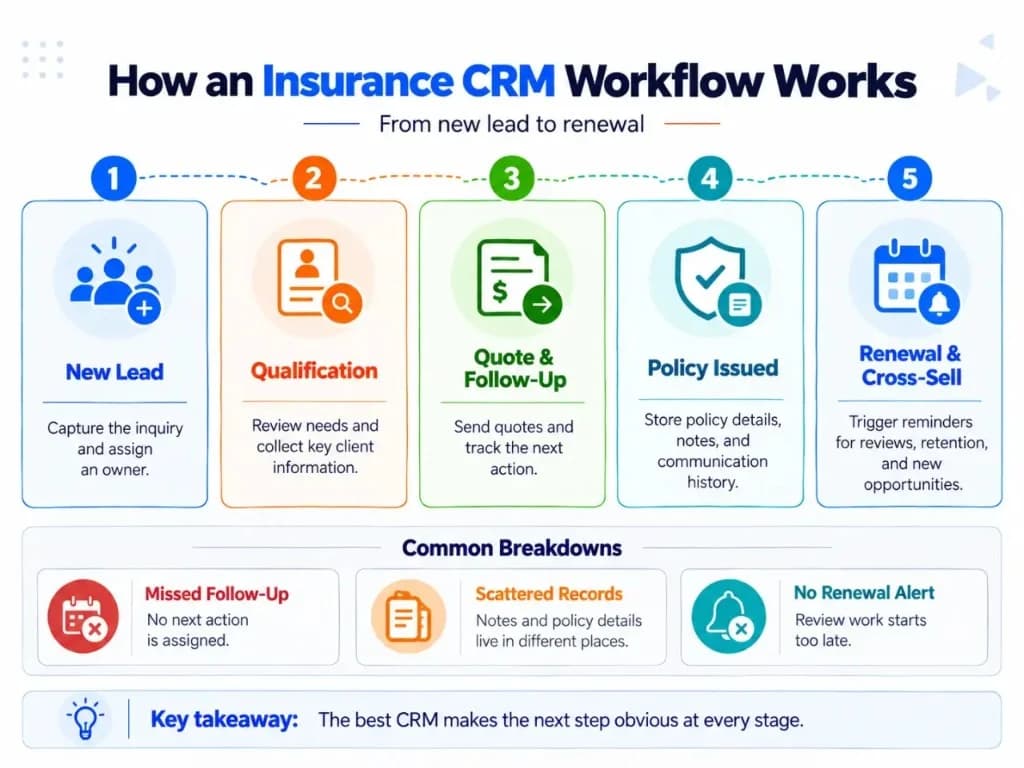
Feature lists become useful only when the software makes real work easier. That is the same principle behind operational CRM: the system should support the day-to-day actions that move an opportunity forward.
1. New Lead → First Contact
Trigger: Someone submits a quote form, responds to a campaign or arrives through another lead source.
CRM action: The system creates or updates the record, captures the source, assigns an owner and creates the initial follow-up task. It can also send an appropriate acknowledgement when configured to do so.
Agent action: The assigned agent reviews the inquiry, contacts the prospect and records the outcome.
Result: The lead has an owner, stage and next action instead of sitting unnoticed in an inbox.
This is exactly the kind of requirement that appears in insurance-agent community discussions: agents frequently ask for simple lead capture plus automatic follow-up rather than enterprise-scale functionality. Teams that also run a CRM for call centers often want the same first-contact discipline when inbound calls create new opportunities.
2. Quote → Follow-Up → Decision
Once the agent begins quoting, the opportunity moves through defined stages.
A useful CRM might show:
Contacted → Information Collected → Quote in Progress → Quote Sent → Follow-Up → Bound / Lost
The names can vary. The important part is that each open opportunity has a clear state and next action inside the sales pipeline.
After a quote is sent, the CRM can create a follow-up task instead of requiring the agent to remember it. If the prospect does not proceed, recording the reason also gives the agency better information than simply leaving the deal open indefinitely.
3. New Policy → Organized Client Relationship
When a prospect becomes a client, the relationship changes from a one-time sales opportunity into ongoing account management.
The CRM should preserve the previous interaction history while adding the relevant policy information, important dates and future actions. That history is also useful for customer service when another team member answers a later call.
If a client holds several policies, avoid creating disconnected customer records for each one. The CRM should make it possible to see the broader relationship while still distinguishing individual policies.
That matters because the agent often needs to understand the client's overall situation before a service, renewal or coverage-review conversation.
4. Renewal Date → Proactive Review
Renewals are one of the clearest uses of CRM automation—and a workflow ecommerce CRM teams also recognize when subscription or replenishment dates drive outreach.
Trigger: A renewal or scheduled review date approaches.
CRM action: The system creates a task, places the account in a renewal workflow or initiates approved outreach.
Agent action: The agent reviews the client's current information, makes contact and determines what needs to happen next.
Result: The renewal outcome and next action return to the client record.
The exact timing should reflect the agency's line of business and process rather than relying on one universal 30-, 60- or 90-day rule.
5. Existing Client → Coverage or Cross-Sell Review
CRM can also surface an appropriate conversation with an existing client—similar to how inside sales teams use timed tasks to reopen warm opportunities.
For example, the system may identify clients who hold one relevant product but not another or whose account is due for a periodic review.
The CRM's job is to surface the context and create the action. The agent still determines whether another product or coverage discussion is appropriate.
That distinction matters: automation should handle reminders, routing and repetitive administration—not replace professional judgment.
Benefits of CRM for Insurance Agents
Fewer Missed Leads and Follow-Ups
Every active lead can have an owner, stage and dated next action. That reduces dependence on memory, spreadsheets and individual inboxes.
More Consistent Renewal Management
Renewal and review dates can trigger work automatically, allowing agents to identify upcoming accounts before the deadline arrives.
One Client History
Calls, notes, emails, policy context and tasks can remain tied to the same relationship inside a reliable CRM database. This becomes especially useful when several people work with the same account.
Less Repetitive Administrative Work
Lead routing, reminders, routine task creation and certain communications can be automated. The objective is not “automation everywhere”; it is removing repetitive work that does not require the agent's judgment. That is where sales automation earns its keep.
Better Pipeline Visibility
A CRM can show how many opportunities are at each stage, which leads have no next action, where prospects came from and which renewals are approaching.
For a deeper treatment of reporting measures, this is better handled in a dedicated CRM Metrics & Analytics guide rather than expanding the insurance page into a general analytics article. CRM metrics and CRM analytics help agencies measure whether follow-ups and renewals are actually improving outcomes.
More Structured Retention and Cross-Sell Work
Policy context and scheduled reviews make it easier to identify accounts that warrant a renewal, service or additional-coverage conversation.
The CRM does not create the relationship by itself. It creates a system that makes the relationship work harder to forget.
A Good Insurance CRM Should Reduce Work, Not Create More of It
This is easy to overlook when comparing feature lists.
Insurance agents discussing CRM repeatedly mention wanting lead tracking, reminders, renewals and communication without spending hours maintaining the system. Weak user adoption turns even a capable platform into another silo—the same failure mode CRM for retail teams hit when clerks will not update the system after each visit.
A feature is therefore valuable only if the team can use it consistently.
For example, requiring agents to manually enter the same client information into a lead form, CRM and agency system can turn the CRM into additional administrative work. Integration or reliable data synchronization becomes more valuable than another dashboard the team rarely opens.
The same principle applies to automation. Automated communication should not create competing versions of the client conversation across email, text and phone. The CRM should preserve the interaction history and any relevant communication preferences.
For U.S. commercial email, businesses also need to account for requirements such as providing and honoring opt-out mechanisms under CAN-SPAM. Other channels and jurisdictions have their own requirements.
How to Choose a CRM for an Insurance Agency?
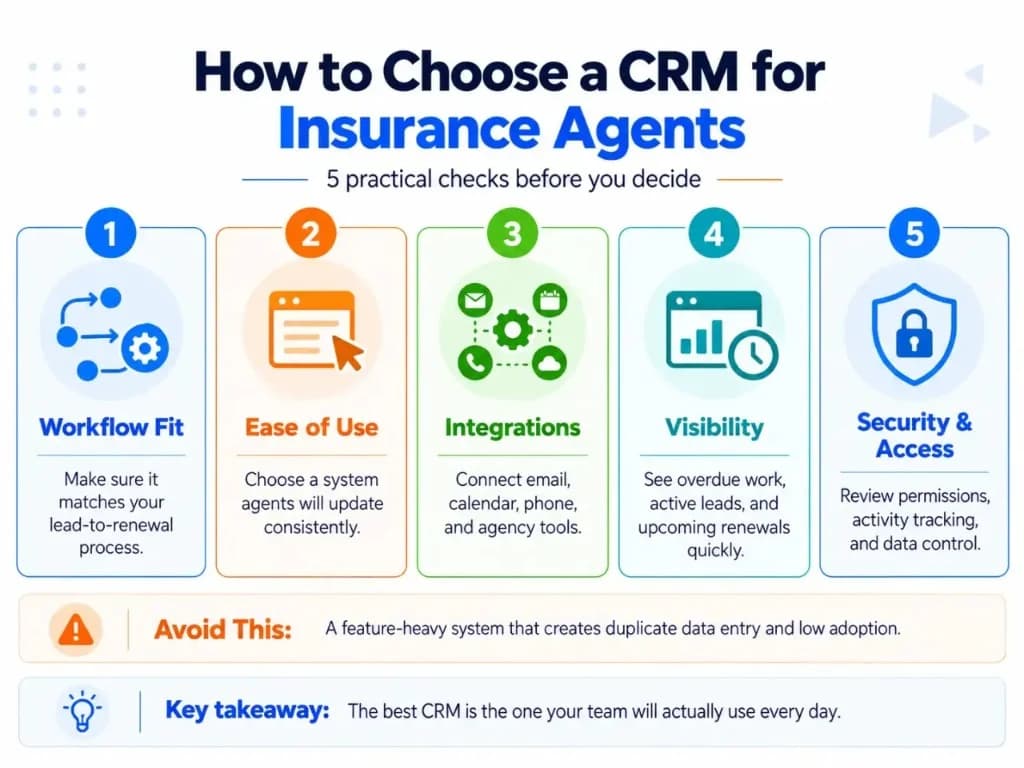
Instead of asking which product has the most features, test each CRM against the work your agency actually performs. That practical test matters more during CRM implementation than any marketing demo.
Does It Match Your Lead-to-Renewal Workflow?
Map a real case:
- Lead → contact → quote → follow-up → policy → review/renewal
- Then check whether the CRM can represent each important stage and automatically create the next useful action.
Can It Represent the Client Relationship Properly?
Look beyond contact fields.
Can one client have multiple relevant policies, dates and opportunities without producing a confusing collection of duplicate records? Agencies that already use B2B CRM patterns for commercial accounts often need the same multi-contact and multi-policy clarity.
Can Leads and Activity Enter the CRM Without Constant Re-Entry?
Consider the sources you actually use:
- website forms;
- advertising leads;
- referral forms;
- email;
- calendars;
- telephone systems;
- quoting or agency-management software.
A useful integration should reduce manual work rather than simply add another connection.
For a deeper technical treatment, see dedicated coverage of CRM development and CRM integrations rather than treating every connector logo as equal.
Will Agents Actually Use It?
Evaluate:
- number of clicks needed for common work;
- mobile access if agents work away from a desk;
- how much information must be entered manually;
- whether overdue work is obvious;
- whether the interface makes the next action clear.
A sophisticated CRM with weak adoption can provide less value than a simpler system agents update consistently. CRM systems only help when the people responsible for renewals and follow-ups keep them current.
Does It Provide Appropriate Data Controls?
Review access permissions, authentication, activity/audit history, backup/export options and how integrations handle sensitive data.
The exact compliance requirements depend on the agency, jurisdiction, line of business and information being processed, so software marketing claims should not substitute for a proper compliance assessment.
Can You See the Work That Is Being Missed?
A useful insurance CRM should make questions such as these easy to answer:
- Which new leads have not been contacted?
- Which opportunities have no next action?
- Which follow-ups are overdue?
- Which policies are approaching renewal or review?
- Which lead sources are producing qualified opportunities?
If basic operational questions require spreadsheet work every time, the CRM is not solving enough of the problem.
Start With a Minimum Viable Setup
For a solo agent or small agency, the first version does not need dozens of custom fields and automations.
For each active lead, start by making sure the system can answer:
- Who owns it?
- Where did it come from?
- What stage is it in?
- What is the next action?
- When should that action happen?
As the relationship develops, add the relevant policy information and renewal or review dates.
Then automate only the obvious repetitive work: new-lead routing, initial tasks, overdue follow-up alerts and renewal reminders.
That creates a CRM agents can actually operate before complexity is added. If off-the-shelf tools still force awkward workarounds, plan for custom CRM development only after the core workflow is clear. The lightest system that supports measurable business growth is usually better than the heaviest one.
Frequently Asked Questions
What is the best CRM for insurance agents?
The best CRM is the one that fits your actual lead-to-renewal workflow, not necessarily the platform with the most features. Prioritize lead tracking, follow-up tasks, renewal reminders, client and policy context, communication history, useful integrations, and an interface agents will consistently update.
Is a free CRM good enough for an insurance agent?
A free CRM can be enough for a solo agent who mainly needs contact management, a simple pipeline, tasks, notes, and basic follow-up. Check limits on automation, custom fields, integrations, communication tools, storage, and users before relying on it long term, because those are often where free plans become restrictive.
Do I need an insurance-specific CRM, or can a general CRM work?
A general CRM can work well if it can be configured for policy details, renewal dates, multiple policies, insurance sales stages, and your existing tools. An insurance-specific CRM becomes more valuable when built-in insurance workflows or integrations significantly reduce manual setup and duplicate data entry.
When should a solo insurance agent move from spreadsheets to a CRM?
Move to a CRM when follow-ups start depending on memory, leads arrive through several channels, renewal dates are difficult to track, or client information becomes scattered across spreadsheets, email, and messages. A solo agent does not need an enterprise system, but the process should reliably show each active lead's stage, owner, next action, and due date.
Should an insurance CRM have a built-in dialer, SMS, and email?
Not necessarily, but those tools should integrate cleanly if calling and messaging are central to your sales process. A separate dialer or email platform can work just as well if interactions synchronize with the CRM so agents can see communication history and avoid fragmented records.
Can the same CRM work for life, health, and P&C insurance agents?
Yes, if the CRM has flexible fields, pipelines, renewal workflows, and integrations that can be adapted to each line of business. The core relationship-management functions are similar, but policy data, sales stages, renewal cycles, compliance needs, and external systems can differ, so the configuration may need to change.