
Quick Summary
- Pharmaceutical CRM is built around regulated HCP relationships: It manages healthcare professional and organization data, interaction history, territory activity, approved content, samples, follow-ups, and other pharma-specific workflows that a standard CRM may not support natively—the same customer relationship management goal as CRM in finance or B2B CRM, but with stricter controls and a different customer model.
- The core workflow is prepare, engage, document, coordinate, and analyze: Teams use CRM data before an HCP interaction, record outcomes afterward, manage required follow-ups, and turn accumulated engagement history into better-informed future actions. That loop is closer to operational CRM than to a passive contact list.
- Compliance is workflow-specific, not a universal checklist: Pharma CRM may support sample records, consent, approved communications, audit trails, role permissions, and reporting obligations, but requirements such as HIPAA or 21 CFR Part 11 apply only when the relevant legal conditions are met.
- Pharma CRM supports more than sales representatives: Field sales, medical affairs, marketing, commercial operations, and governance teams may use the same HCP context differently, with distinct permissions and objectives for promotional, scientific, operational, or compliance-related activities.
- Usability and data quality matter as much as feature depth: Mobile access, simple field data entry, reliable HCP information, useful integrations, and low-friction workflows determine whether teams actually use the CRM; overly complex systems often produce delayed, incomplete, or fragmented data and weak user adoption.
A pharmaceutical CRM, or pharma CRM, is a customer relationship management system designed around the way pharmaceutical companies engage healthcare professionals (HCPs), healthcare organizations (HCOs), and other industry stakeholders.
Its core job is simple: give pharmaceutical teams one reliable record of who they engage, what happened, what is permitted next, and what action should follow. Strong CRM data management matters here because nearly every later workflow depends on trustworthy HCP and HCO records.
How Does Pharmaceutical CRM Work?
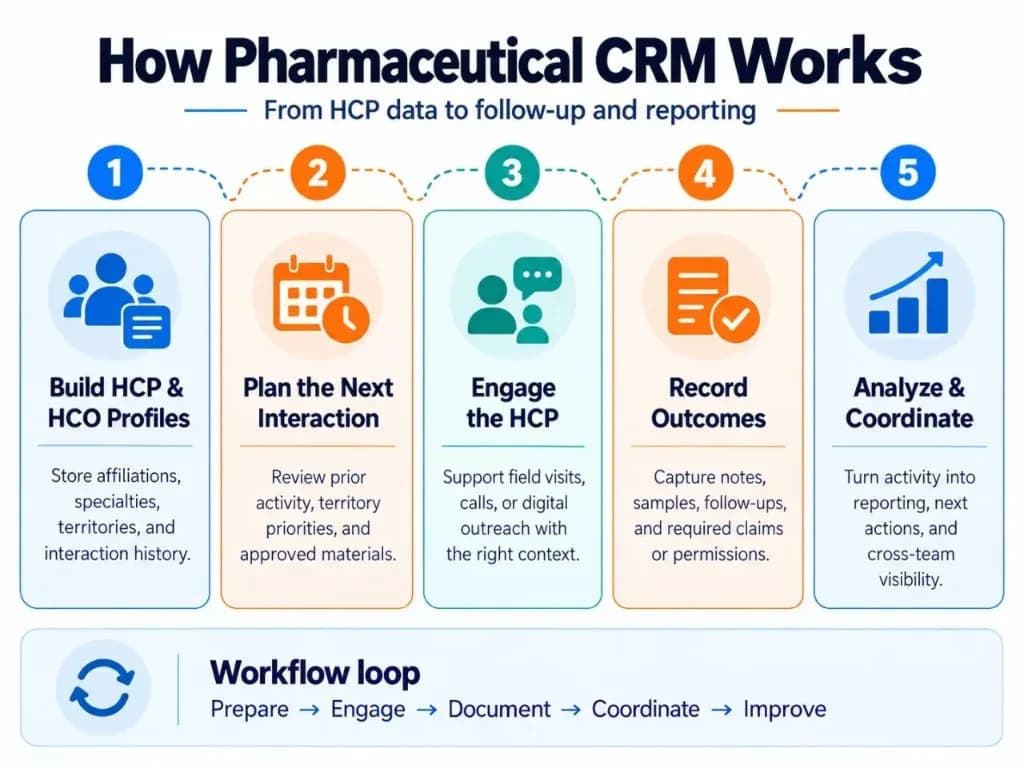
A pharmaceutical CRM connects customer data with the activities that happen before, during, and after an HCP interaction. Like CRM for service businesses, the value comes from keeping context and next actions connected—not from storing names alone.
1. Build the HCP or HCO record
The CRM starts with structured records for healthcare professionals and organizations.
An HCP profile may include information such as specialty, organization affiliations, territory, interaction history, communication preferences, segmentation, events attended, previous discussions, and other data the organization is permitted to use.
HCO records can connect individual professionals to hospitals, clinics, health systems, pharmacies, or other accounts.
This creates the customer context that field, medical, marketing, and commercial-operations teams work from inside the CRM database.
2. Plan the next interaction
Before meeting an HCP, a field representative can use the CRM to see previous interactions, outstanding follow-ups, account information, territory priorities, and relevant approved materials.
Territory and call-planning functions help teams decide which accounts require attention and organize field activity—similar to how inside sales teams use a sales pipeline to prioritize who gets contacted next.
Mobile and offline access are particularly important in pharmaceutical sales because representatives often update the CRM between visits rather than from a desk.
3. Conduct a controlled HCP engagement
During an interaction, the CRM can help the representative access current, approved materials and record the engagement against the correct HCP or account.
This is one reason pharmaceutical CRM differs from an ordinary sales CRM. The system may need to consider factors such as approved content, role permissions, communication preferences, local rules, and whether a particular activity can be performed or recorded.
Medical-affairs users may work with the same HCP but for a different purpose. For example, an MSL may document scientific exchange or field insights rather than a promotional sales interaction.
4. Record outcomes, samples, and follow-ups
After the interaction, the user records what happened while the information is still useful.
Depending on the workflow, this may include:
- meeting notes and outcomes;
- topics or products discussed;
- content presented;
- questions requiring follow-up;
- next activities;
- samples requested or distributed;
- required signatures or acknowledgements.
Sample management is especially important where prescription drug samples are distributed. In the United States, FDA rules include requirements around written requests, receipts, practitioner information, quantities, and sample-distribution records.
The CRM can make these controls part of the normal workflow instead of leaving them in separate spreadsheets or paper processes.
5. Coordinate the next touchpoint
The information from one interaction becomes context for the next.
A field visit might create a follow-up task. An HCP may subsequently receive an approved email. A medical question may need to move to an appropriate medical team. Marketing may use permitted engagement data to coordinate the next communication.
This is where omnichannel CRM becomes useful: email, face-to-face visits, remote meetings, events, and other interactions can refer back to the same customer history rather than operating as disconnected activities. Teams that also run CRM for call centers face a similar need to keep multichannel contact history attached to one record.
The objective is not simply to contact an HCP through more channels. It is to prevent teams from acting without knowing what has already happened.
6. Turn activity into insight
The CRM also aggregates individual interactions into reports and dashboards.
Commercial teams can examine territory activity, HCP coverage, follow-ups, content usage, sample activity, engagement trends, and other relevant metrics. CRM metrics and CRM analytics help leaders see whether coverage, follow-ups, and engagement quality are improving—not just whether visits were logged.
More advanced platforms can use AI to summarize notes, prepare representatives for meetings, identify patterns, or recommend possible next actions.
AI does not replace the underlying CRM workflow, however. Recommendations are only as useful as the customer data, permissions, interaction history, and business rules behind them.
What Makes Pharmaceutical CRM Different From a Standard CRM?
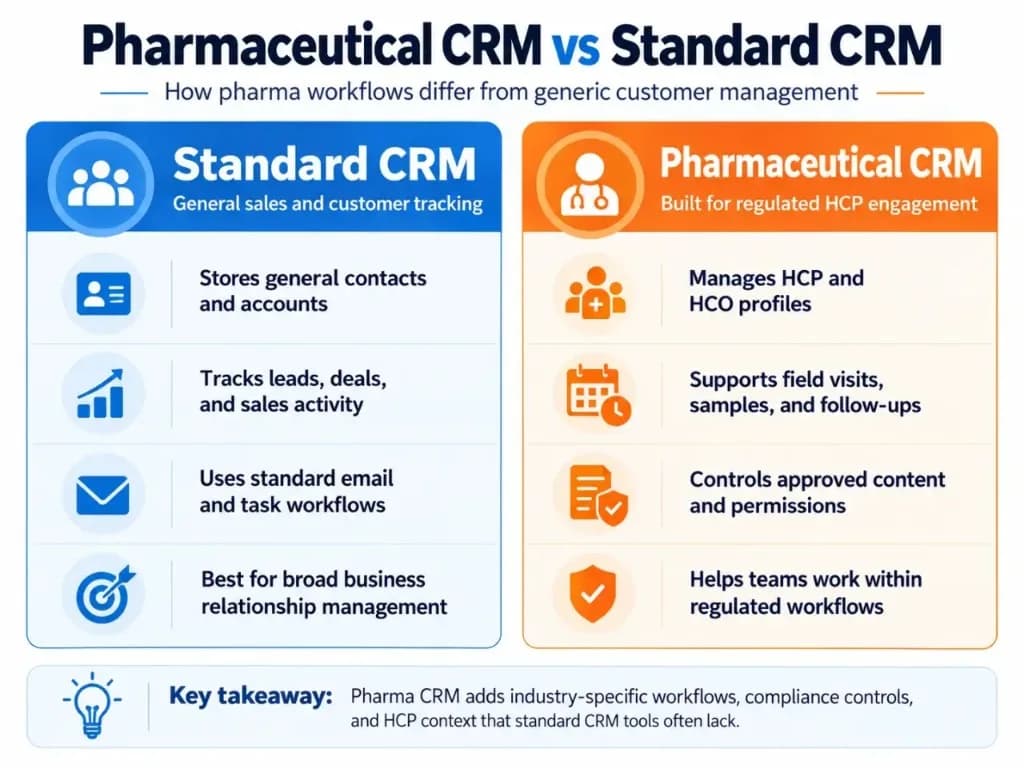
Both systems manage relationships, but pharmaceutical CRM is organized around a different customer model and a more controlled operating environment.
| Standard CRM | Pharmaceutical CRM |
|---|---|
| Generic contact and account records | HCP/HCO profiles and affiliations |
| Traditional sales opportunities | HCP/account engagement and territory activity |
| General email and campaign activity | Controlled multichannel HCP engagement |
| Basic meeting notes | Structured call and interaction reporting |
| Standard document storage | Access to current approved content |
| General inventory information | Sample requests, distribution and accountability where needed |
| Sales-user workflows | Sales, medical, marketing and compliance-related workflows |
| Basic user permissions | More granular role and visibility controls |
| General reporting | Territory, HCP engagement, sample and other pharma-specific reporting |
A general CRM can sometimes be configured for pharmaceutical use. The important question is not simply whether a platform carries a “pharma CRM” label, but whether it can reliably support the workflows, data structures, controls, integrations, and reporting the organization actually requires. Comparing CRM platforms only by feature count usually hides that difference—the same lesson that shows up in CRM for insurance agents and ecommerce CRM selection.
Core Capabilities of a Pharmaceutical CRM
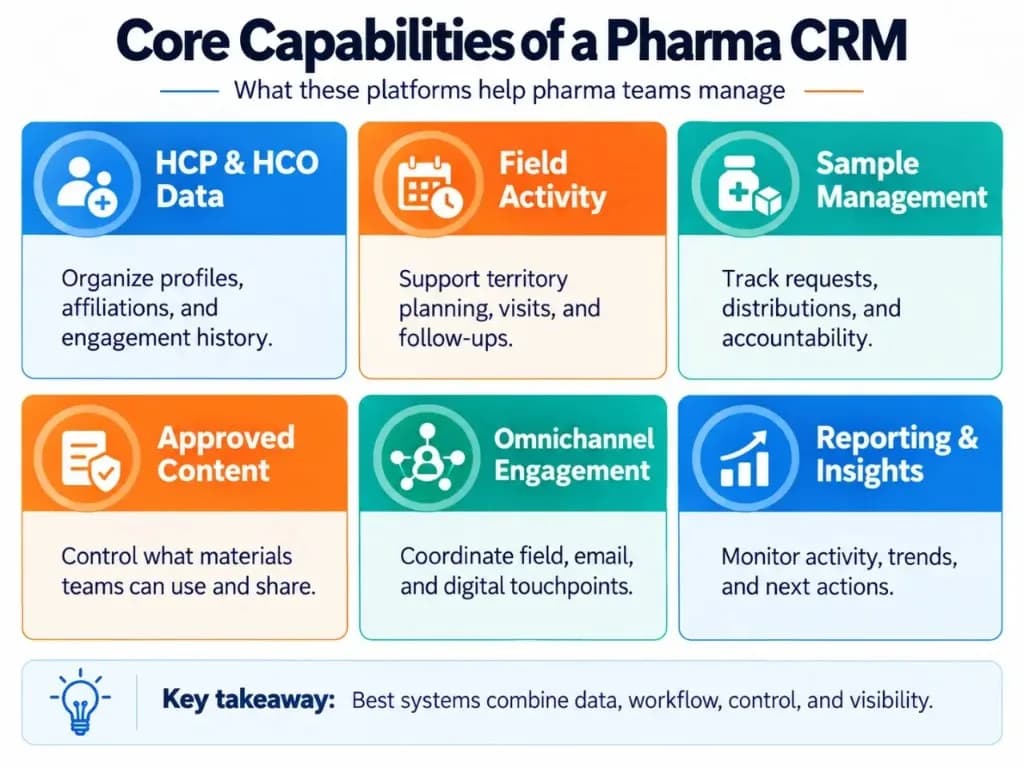
HCP and HCO data management
The CRM should provide a reliable view of HCPs, healthcare organizations, affiliations, interaction histories, preferences, segmentation, and account relationships.
Good customer data matters because nearly every later CRM function depends on it. Bad or duplicated HCP data affects planning, targeting, reporting, and user trust in the system. That is why CRM data management deserves as much attention as any single feature.
Field-force and territory management
Pharma field teams commonly need call planning, territory assignments, visit reporting, scheduling, follow-ups, account plans, and mobile access.
A system that technically contains every feature but takes too long to update in the field can produce worse data because users delay entries or fall back to spreadsheets.
Sample and controlled-distribution workflows
Where organizations distribute product samples, CRM can connect sample activity directly to the HCP interaction and maintain the required request, receipt, quantity, inventory, and audit information.
The exact requirements depend on the product, market, and workflow rather than on the CRM category alone.
Approved content and omnichannel engagement
Pharmaceutical teams may need to control which materials are available to particular users, brands, regions, or audiences.
Connecting content use with engagement history also helps teams understand which information has already been presented and coordinate later communication across channels.
Medical-affairs engagement
Pharmaceutical relationships are not exclusively commercial.
Medical science liaisons and other medical users may need to document scientific interactions, capture field insights, manage relationships with KOLs, and coordinate appropriate follow-ups.
A well-designed system can give teams useful shared context while maintaining appropriate role separation—closer to regulated CRM in finance than to a simple retail CRM checkout profile.
Reporting, integrations, and AI
CRM rarely operates alone. It may exchange information with HCP reference data, content-management systems, marketing tools, analytics platforms, ERP systems, event platforms, or other enterprise applications. Clean CRM integrations matter because they reduce duplicate entry and fragmented records.
Reporting turns this connected activity into operational visibility.
AI can then add capabilities such as note summarization, meeting preparation, contextual recommendations, data-quality assistance, and next-best-action suggestions. These are useful additions, but they depend on a sound CRM data model and usable workflows. Sales automation can help with reminders and routing, but judgment-heavy medical or promotional decisions stay with authorized people.
Who Uses Pharmaceutical CRM?
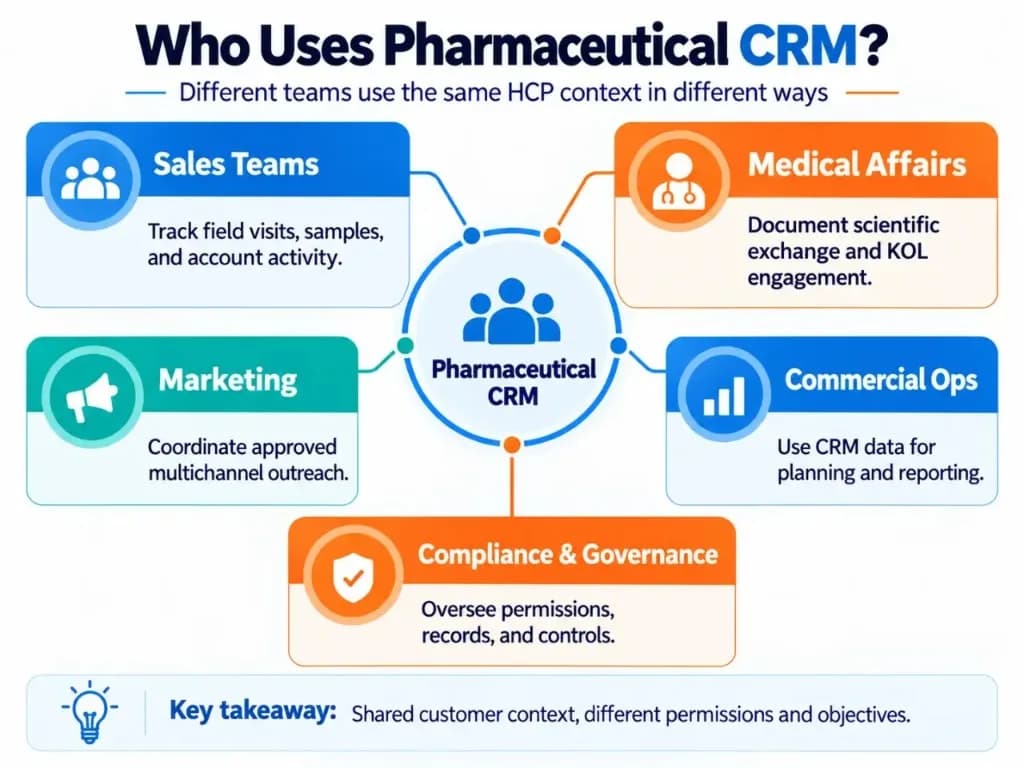
Although field representatives are among the most visible CRM users, pharmaceutical CRM can support several functions:
- Sales and field teams use it for HCP history, territory planning, visits, samples, follow-ups, and account activity.
- Medical-affairs teams may use it for scientific engagement, medical insights, KOL relationships, and follow-up documentation.
- Marketing teams can use CRM information to coordinate permitted digital engagement and understand how campaigns relate to field activity.
- Commercial operations use the resulting data for planning, segmentation, reporting, territory analysis, and performance oversight.
- Compliance and governance teams may rely on permissions, records, approval status, audit trails, and reporting generated from relevant workflows.
The important point is that these teams may interact with the same HCP while having different responsibilities and access rights. CRM systems only help when each role can see the right context without exposing the wrong actions.
Example: One HCP Visit From Start to Finish
Consider a representative preparing to visit a physician.
Before the appointment, the CRM shows the physician's specialty, organization, previous interactions, outstanding follow-up, account priority, and approved materials available to the rep.
During the meeting, the representative uses the appropriate approved content and records the main interaction.
If product samples are provided, the required sample information is captured in the same workflow.
After the visit, the rep records the outcome and schedules a follow-up.
That activity becomes part of the HCP's engagement history. Other authorized users can see the context appropriate to their roles, while managers receive updated activity and territory reporting.
When the next interaction is planned, the team is not starting from memory. The CRM provides the accumulated context.
That closed loop—prepare, engage, document, coordinate, analyze, repeat—is how pharmaceutical CRM works in practice. The same principle appears in CRM implementation: the system must make the next action obvious or teams will invent workarounds.
What Does “Compliance” Mean in a Pharma CRM?
“Compliant pharma CRM” should not be treated as one universal checklist.
Different requirements apply depending on the country, organization, data, product, and activity involved.
For example, U.S. prescription-drug sample regulations require specific request, receipt, distribution, and recordkeeping processes.
CMS's Open Payments program also requires applicable manufacturers and group purchasing organizations to report certain payments or transfers of value to covered recipients.
HIPAA is more contextual than many CRM articles imply. HHS states that the HIPAA Rules apply to covered entities and business associates; an organization that does not meet those definitions is not automatically subject to HIPAA simply because it handles healthcare-related relationships.
Similarly, FDA's 21 CFR Part 11 applies to qualifying electronic records and signatures maintained or submitted under FDA record requirements. It is not automatically applicable to every field inside every pharmaceutical CRM.
For CRM evaluation, the practical requirement is therefore to map the organization's actual workflows and jurisdictions to the controls the system must support rather than looking for a generic “pharma compliant” label.
What Should You Look for in a Pharmaceutical CRM?
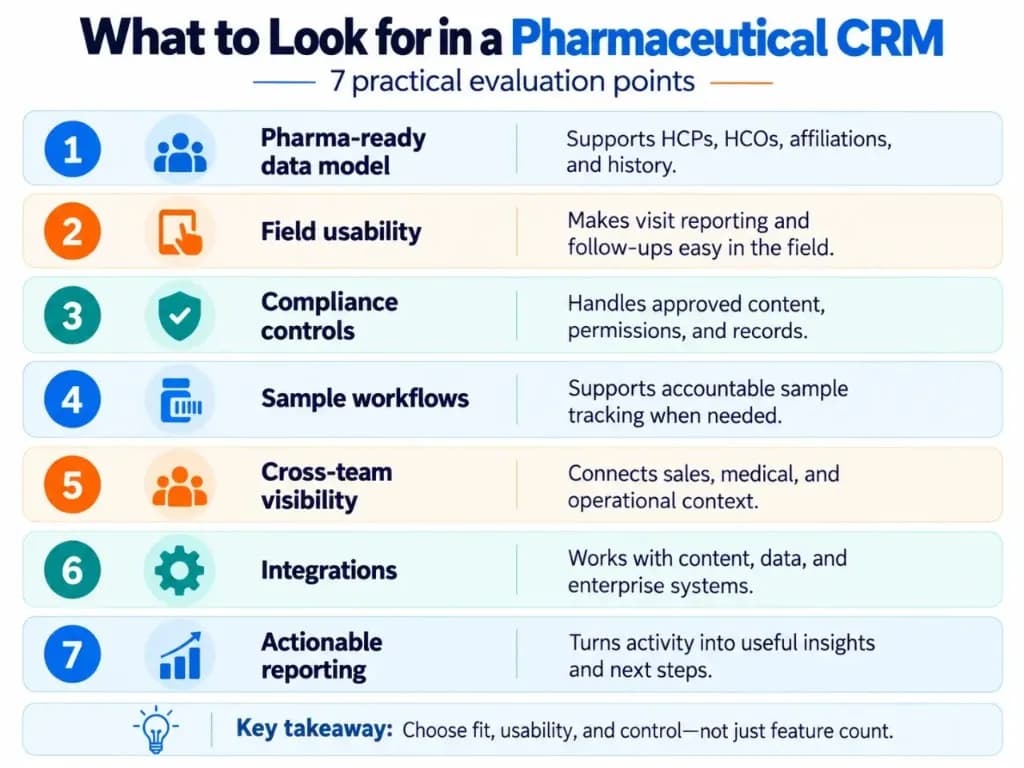
Start with operational fit rather than the longest feature list.
A strong pharma CRM should support the HCP/HCO data model and field workflows your teams actually use, along with the applicable compliance controls, role permissions, approved content, sample processes, integrations, and reporting.
Pay particular attention to the mobile experience. Field users create much of the interaction data that makes the system useful, so cumbersome data entry can become a data-quality problem as much as a user-experience problem.
Also evaluate how easily the CRM fits existing data and systems. A platform should reduce fragmentation rather than simply becoming another place employees need to update. If off-the-shelf tools force awkward workarounds, plan for custom CRM development only after the core workflow is clear.
Finally, distinguish between capabilities you need now and capabilities that merely sound impressive in a demonstration. AI, sophisticated analytics, and advanced orchestration are valuable when they solve a defined problem, but they cannot compensate for inaccurate HCP data or a workflow people avoid using.
Pharmaceutical CRM works best when it becomes the reliable operational record connecting HCP context, engagement, compliance, follow-up, and decision-making without making those activities harder for the people responsible for carrying them out. The lightest system that supports measurable business growth is usually better than the heaviest one.
Frequently Asked Questions (FAQs)
What does CRM stand for in the pharmaceutical industry?
CRM stands for customer relationship management. In pharma, it refers to the systems and processes used to manage relationships and interactions with healthcare professionals (HCPs), healthcare organizations (HCOs), and other relevant stakeholders.
What type of CRM is used in the pharmaceutical industry?
Pharmaceutical companies typically use a pharma-specific or life sciences CRM designed for HCP engagement, field activity, territory management, approved content, samples, and regulated workflows. A general CRM can also work if it can be configured to support the company's required pharma data model, controls, integrations, and reporting.
Can a pharmaceutical company use a general CRM instead of a pharma-specific CRM?
Yes, provided the general CRM can support the company's actual pharmaceutical workflows and regulatory requirements. The key issue is not the “pharma CRM” label but whether the platform can handle HCP/HCO data, field activity, permissions, approved content, sample processes, auditability, and relevant integrations without excessive customization. CRM development and CRM platforms both matter when configuration depth becomes the deciding factor.
What HCP data should a pharmaceutical CRM store?
A pharma CRM commonly stores an HCP's professional details, specialty, organization affiliations, territory, interaction history, communication preferences, segmentation, follow-ups, and other permitted engagement data. The exact fields should be limited to information the organization genuinely needs and is permitted to collect and use.
Why is mobile access important for pharma CRM?
Pharmaceutical representatives often need to review HCP information and record visit outcomes while working in the field. A mobile-friendly CRM—and offline capability where connectivity is unreliable—reduces delayed data entry and makes it easier to capture notes, follow-ups, samples, and other activity soon after an interaction.
Why do pharma sales reps sometimes stop using a CRM and return to spreadsheets?
The most common problem is excessive workflow friction: too many required fields, clicks, screens, or irrelevant tasks make routine updates difficult. When CRM data entry takes longer than the work it supports, users may create parallel spreadsheets or postpone updates, which then reduces data quality and management visibility.
How is AI used in pharmaceutical CRM?
AI can help summarize field notes, prepare representatives for HCP meetings, identify missing data, surface relevant interaction history, and suggest possible next actions. Its usefulness still depends on accurate CRM data, appropriate permissions, clear business rules, and human review—especially for regulated or externally facing activities.