
Quick Summary
- A CRM system administrator manages and maintains CRM software: The role involves configuring, securing, troubleshooting, and optimizing CRM systems such as Salesforce, HubSpot, Microsoft Dynamics 365, and Zoho CRM to ensure employees can manage customer information and business processes effectively—core work that underpins everyday customer relationship management.
- Core responsibilities go beyond basic system maintenance: CRM administrators manage user accounts and permissions, configure automated workflows, maintain data quality, create reports and dashboards, support employees, monitor integrations, and test system changes to keep the CRM reliable and secure during and after CRM implementation.
- Technical expertise and business understanding are equally important: Essential skills include CRM configuration, access control, CRM data management, reporting, troubleshooting, and communication. Coding is not always required, but knowledge of APIs, SQL, or advanced automation can be valuable for more technical positions and deeper CRM development work.
- CRM administrators have distinct responsibilities from managers and developers: Administrators primarily maintain the system, while CRM managers oversee business objectives and developers build custom functionality. Administrators establish data-quality controls but are not automatically responsible for routine CRM data entry or every IT-related task.
- Practical experience and measurable performance define success: Employers value hands-on CRM experience, problem-solving, and relevant platform certifications. Effective administrators are evaluated through system reliability, data accuracy, secure access, workflow performance, user support, and their ability to translate business requirements into working CRM configurations—outcomes that also show up in trustworthy CRM metrics.
What Does a CRM System Administrator Do?
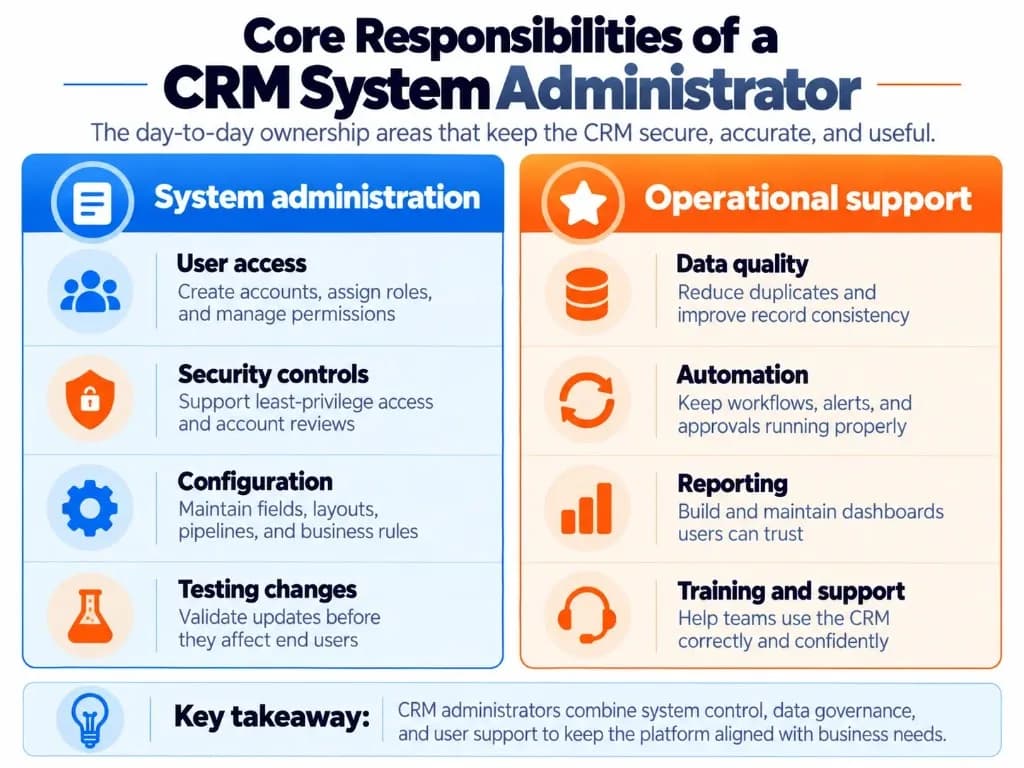
A CRM system administrator manages the technical and operational functions that allow employees to use the CRM effectively. Responsibilities vary by platform and company size, but generally fall into seven areas that support CRM system proficiency across sales, service, and operations teams.
1. Manage User Accounts, Permissions, and Security
CRM administrators control how employees access the system and which records or features they can use.
Typical responsibilities include:
- Creating, updating, and deactivating user accounts.
- Assigning roles, permission sets, and appropriate access levels.
- Restricting access to sensitive customer information.
- Reviewing user access when employees change positions or leave.
- Coordinating with IT and security teams on authentication and security requirements.
Administrators should follow the principle of least privilege, granting users only the access necessary for their responsibilities—especially important for B2B CRM teams that share accounts, deals, and contact management across territories.
For example, a sales representative may need access to their assigned accounts, while a sales manager requires visibility across the team's pipeline. The administrator configures the appropriate permissions according to company policy.
2. Configure CRM Features and Automate Workflows
Administrators customize the CRM's built-in functionality to match established business processes.
This may involve creating custom fields, modifying record layouts, configuring pipelines, establishing validation rules, and maintaining automated workflows for sales automation and marketing automation sequences.
For instance, a business might require new sales leads to be assigned automatically according to geographic territory. The administrator translates the approved assignment rules into CRM configuration and tests whether leads reach the intended teams—practical lead management that CRM for inside sales teams depend on every day.
These changes often use built-in configuration tools rather than custom programming. When standard tools are not enough, the admin usually partners with specialists on custom CRM development rather than building everything alone.
3. Maintain CRM Data Quality
CRM administrators help protect the accuracy, consistency, and usability of customer records inside the CRM database.
Their responsibilities include monitoring duplicates, identifying incomplete records, maintaining validation rules, reviewing imports, and coordinating corrective action with data owners—core CRM data management ownership.
However, CRM administration is not the same as routine CRM data entry.
Sales and customer service employees typically remain responsible for recording their own interactions and writing useful CRM notes. The administrator maintains the rules, permissions, and tools that help them enter accurate information.
For example, rather than manually correcting every incomplete customer record, an administrator might introduce a required field, provide guidance to users, and create an exception report.
4. Create and Maintain CRM Reports and Dashboards
CRM administrators configure reports and dashboards that help departments monitor business activity and CRM metrics leaders actually trust.
They may build reports showing sales pipeline activity, lead assignments, unresolved support cases, or user activity. They also troubleshoot reporting problems caused by incorrect filters, inconsistent fields, or incomplete records.
Business stakeholders usually determine which performance measures matter. The administrator translates those requirements into appropriate reports and ensures the underlying data and configuration are reliable—especially for CRM for digital marketing attribution and pipeline reviews.
5. Provide User Support and Training
Administrators are often the first point of contact when employees encounter CRM-related problems.
Common requests include missing records, permission errors, unexpected workflow behavior, reporting difficulties, and questions about system functionality.
The administrator diagnoses the problem, resolves issues within their authority, or escalates technical failures to the appropriate vendor, developer, or IT team.
They also onboard new users, prepare instructions, explain changes, and encourage correct CRM usage—habits that raise CRM system proficiency across the organization.
6. Monitor Integrations, Updates, and System Issues
Many CRM systems exchange information with email platforms, marketing tools, customer service applications, accounting software, and other business systems—especially after teams learn how to connect a CRM to those apps.
The administrator may monitor synchronization errors, review CRM integration behavior, coordinate troubleshooting, and test changes after vendor updates on a cloud-based CRM.
For example, if contacts stop synchronizing between a marketing platform and the CRM, the administrator investigates whether the cause is a field-mapping problem, an access issue, or a failed integration.
Complex API development or infrastructure changes may require a specialist. The CRM administrator typically coordinates the resolution rather than personally writing every integration—handing deeper CRM development work to engineers when needed.
7. Test, Document, and Control CRM Changes
Changes to a CRM can affect users, reports, permissions, and automated processes—risks that grow during CRM implementation rollouts and ongoing releases.
Administrators therefore help manage change requests by documenting requirements, assessing dependencies, testing configurations, and coordinating deployment.
For higher-risk changes, they may use a sandbox or another controlled testing environment before production deployment.
They also maintain documentation such as configuration notes, change logs, workflow descriptions, and user instructions.
This helps other team members understand why a feature exists, how it works, and what could be affected by modifying it. Nonprofit teams running constituent CRM systems still need the same change discipline for gifts, memberships, and program records.
What Does a CRM Administrator Do Daily?
A CRM administrator's daily work usually combines routine maintenance, employee support, and planned system improvements that keep operational CRM processes running for the business.
| Activity | Example |
|---|---|
| User management | Give a new employee the correct access |
| Troubleshooting | Investigate why a user cannot view a record |
| Data quality | Review duplicate or incomplete records |
| Automation | Fix a workflow that is assigning leads incorrectly |
| Reporting | Update a sales dashboard after an approved field change |
| User support | Help employees use a recently introduced feature |
| System maintenance | Check integration errors and prepare for updates |
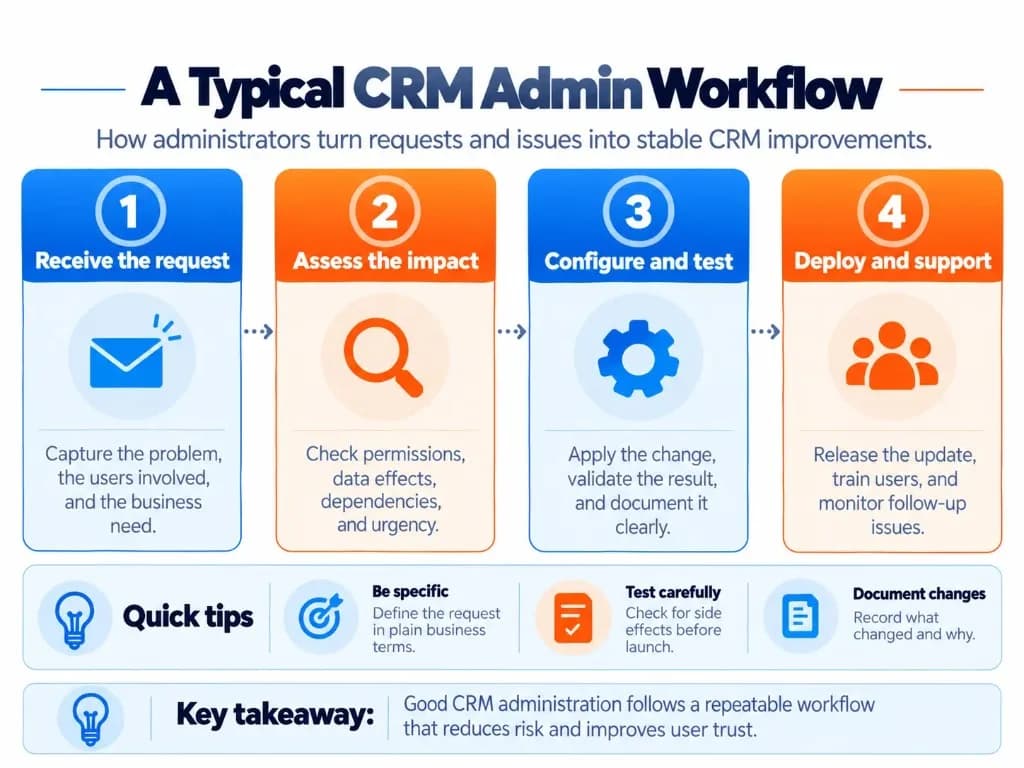
Not every administrator performs all these activities every day. A small organization may have one person handling the entire CRM, while a larger organization may divide responsibilities among administrators, developers, analysts, and support teams—especially when CRM for digital marketing, sales, and service share one CRM database.
Example: Resolving a Lead Assignment Problem
Suppose a sales manager reports that incoming leads are remaining unassigned.
The administrator would typically:
- Investigate the affected records and existing assignment rules.
- Confirm the intended process with the sales manager.
- Identify whether the problem involves configuration, data, permissions, or an integration.
- Correct the issue and test the proposed change.
- Release the approved fix, document it, and monitor subsequent assignments.
This example illustrates the core nature of CRM administration: understanding a business problem, maintaining the supporting system, and confirming that the solution works for lead management and downstream reporting.
Essential CRM Administrator Skills
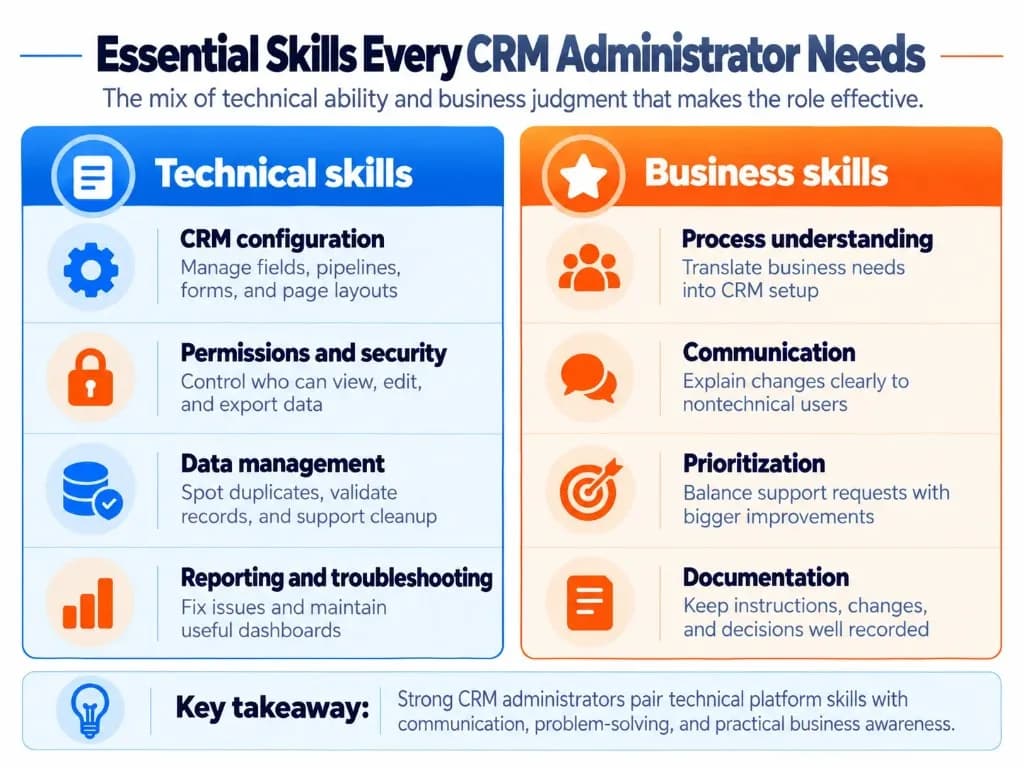
Effective CRM administrators need both technical capabilities and an understanding of how employees use the platform—skills that overlap with CRM system proficiency but go deeper into governance and change control.
Technical Skills
Skill
Why it matters
CRM platform configuration
Maintain fields, layouts, pipelines, and system settings
User and security administration
Apply appropriate permissions and access controls
Data management
Identify duplicates, validate records, and manage data quality
Workflow automation
Configure and troubleshoot automated processes
Reporting and dashboards
Deliver accurate, usable business reports
Troubleshooting
Diagnose system errors and user problems
Integration knowledge
Understand data synchronization and connected applications
Testing and documentation
Make changes safely and maintain system knowledge
Additional knowledge of SQL, APIs, advanced automation, or programming can be valuable in technically demanding roles, but these are not universal requirements. Teams that need heavy customization often combine admin skills with CRM development or custom CRM development support.
Business and Interpersonal Skills
Communication is essential because administrators regularly explain technical issues to employees who may have little software administration experience.
Problem-solving helps them distinguish between a system failure, an incorrect configuration, and a misunderstanding of business processes—including when sales automation behaves differently than users expect.
Business-process understanding allows administrators to configure the CRM around real requirements rather than simply adding features whenever someone requests them.
Organization and prioritization are necessary when balancing user support, maintenance, and ongoing improvements that support long-term business growth.
Attention to detail is particularly important when modifying permissions, importing records, or changing automated processes that touch CRM data entry rules and CRM notes templates.
Does a CRM Administrator Need Coding Skills?
Coding is not required for every CRM administrator position. Many routine responsibilities can be completed using built-in administrative tools.
For example, Salesforce offers declarative configuration and automation tools, while HubSpot and Zoho CRM also provide visual administration and workflow capabilities.
However, some advanced positions require SQL, scripting, API knowledge, or collaboration on custom code. Job requirements depend on the platform and how much CRM development responsibility the employer assigns.
A strong foundation in configuration, data relationships, permissions, and troubleshooting is generally more important for an entry-level administrator than expertise in several programming languages—especially when learning how to connect a CRM safely without breaking matching rules.
Which CRM Systems Do Administrators Work With?
The underlying responsibilities are similar across CRM products, but the specific interfaces, permissions, and tools differ. Cloud-based CRM platforms make remote administration more common, while on-premises setups may involve closer IT collaboration.
| CRM platform | Relevant administration capabilities |
|---|---|
| Salesforce | User access, security, objects, fields, reports, dashboards, and Flow automation |
| Microsoft Dynamics 365 | Security roles, Dataverse configuration, business processes, and related Power Platform tools |
| HubSpot | Users and teams, permission sets, properties, workflows, and reporting |
| Zoho CRM | Profiles, roles, sharing permissions, modules, workflows, and reports |
An important distinction is that CRM system administrator can refer to a professional job title or a specific permission level inside a software platform.
For example, Microsoft Dataverse has a built-in System Administrator security role, while HubSpot uses Super Admin permissions for certain account-level capabilities.
Having an administrator permission does not automatically mean someone's official job is CRM system administrator. Similarly, a person employed as a CRM administrator should receive only the system privileges their responsibilities require—another application of least privilege for secure contact management.
CRM Administrator vs CRM Manager, Developer, and IT
CRM administrators regularly collaborate with other technical and business professionals, but their responsibilities are not identical. Comparisons such as CRM vs CXM or CMS vs CRM differences help clarify product boundaries; role comparisons clarify who owns configuration day to day.
| Role | Primary responsibility |
|---|---|
| CRM System Administrator | Configure, maintain, secure, and support the CRM |
| CRM Manager | Oversee CRM-related business objectives, operations, or strategy, depending on the organization |
| CRM Developer | Build custom functionality and software integrations |
| Sales Operations / RevOps | Improve sales or revenue processes, reporting requirements, and operational performance |
| IT Administrator | Manage broader organizational technology, infrastructure, identities, and security |
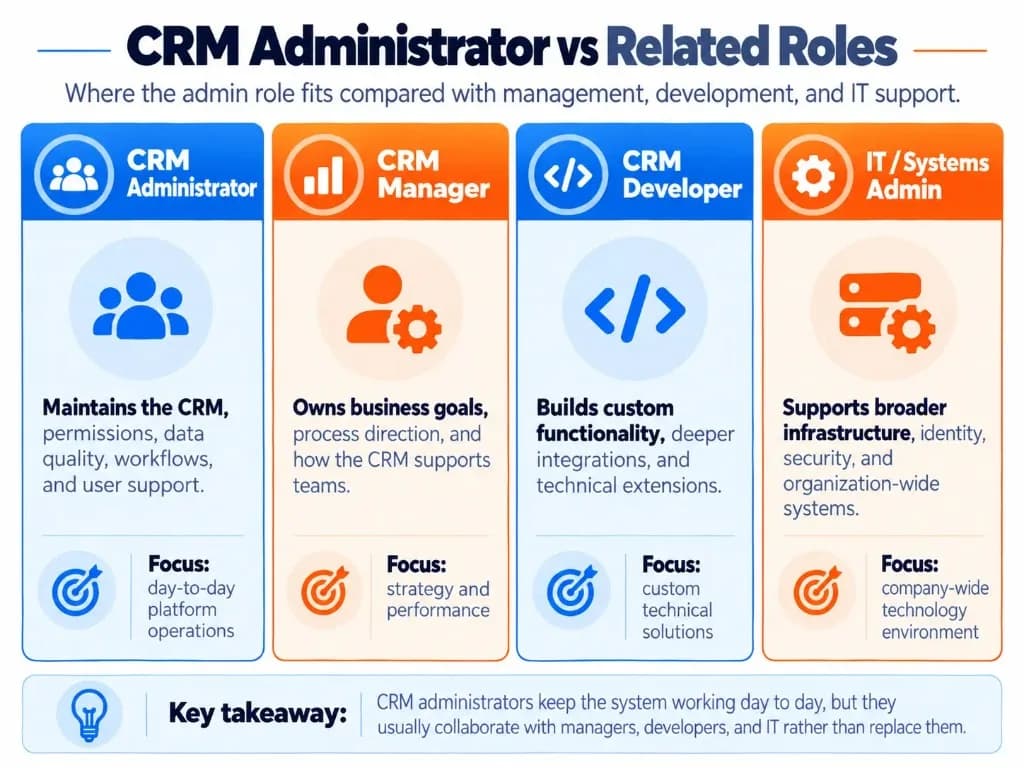
For example, a CRM manager might approve a change to the sales process, the CRM administrator configures the corresponding fields and workflows, and a developer implements custom functionality if the standard CRM tools cannot meet the requirement—often via CRM development or custom CRM development.
In smaller businesses, one employee may perform several of these functions. Larger organizations are more likely to separate them so administrators can focus on reliability, CRM data management, and user support.
Qualifications and How to Become a CRM Administrator?
There is no single educational qualification required for every CRM administrator job. Employers may accept relevant degrees, professional experience, certifications, or a combination of these.
A practical pathway into CRM administration is to:
- Learn one CRM platform. Understand contacts, accounts, permissions, data relationships, reporting, and workflows.
- Practice administrative tasks. Create test users, configure custom fields, build reports, and troubleshoot automations in an authorized learning environment.
- Understand business processes. Learn how sales, marketing, or customer service teams use CRM records and workflows—including CRM for digital marketing handoffs and CRM data entry standards.
- Develop evidence of practical ability. Complete training projects, work with an organization's CRM under supervision, or gain related experience in IT support, operations, or data management.
- Consider platform-specific credentials. Choose qualifications that match the CRM technology employers require.
Relevant learning resources include the Salesforce Certified Platform Administrator credential, the HubSpot Systems Administrator learning path, and Microsoft Learn's Dynamics 365 training.
A certification can help demonstrate platform knowledge, but it does not replace hands-on problem-solving and business understanding—especially when diagnosing CRM integration failures or CRM metrics mismatches.
CRM Administrator Salary in the United States
According to Indeed's US salary data, the average reported CRM administrator base salary was $77,502 per year as of October 16, 2026, based on 113 salary observations sourced from job postings over the preceding 36 months.
Actual compensation varies by experience, employer, location, CRM platform, and the technical scope of the position, including whether the role includes marketing automation ownership or deeper CRM development duties.
How Is a CRM Administrator's Performance Measured?
Effective CRM administration means maintaining a usable, secure, and reliable system—not simply completing configuration requests.
Organizations may evaluate the role using operational measures such as:
| Performance area | Example measure |
|---|---|
| Data quality | Percentage of required fields completed; duplicate-record rate |
| Workflow reliability | Number of automation errors and unresolved failures |
| User support | Support response times and outstanding requests |
| Security | Timely account deactivation and completed access reviews |
| Change quality | Failed releases, change-related incidents, or rework |
| User adoption | Active usage and training completion, interpreted alongside team responsibilities |
Not every measure is under the administrator's exclusive control. Business teams also influence data quality, adoption, and process compliance—including how carefully users follow CRM notes and CRM data entry standards.
The strongest evaluation combines technical reliability with whether employees can perform their work correctly and efficiently, which ultimately supports business growth.
Frequently Asked Questions
Can you become a CRM administrator without experience?
Yes, but securing your first CRM administrator job without professional experience can be challenging. Employers often prefer candidates who have worked with live CRM systems. Building practical projects, gaining CRM-user experience, or starting in sales operations, data support, or IT support can help demonstrate the skills needed for an entry-level position—especially if you can show CRM system proficiency and basic CRM data management practice.
Is a CRM administrator certification enough to get a job?
No. Certification demonstrates platform knowledge but does not guarantee employment. Employers may also evaluate your ability to configure permissions, troubleshoot workflows, maintain data quality, and support users. Practical experience and documented projects can strengthen your application, especially when competing for entry-level positions after CRM implementation projects.
How long does it take to become a CRM administrator?
Learning basic CRM administration can take several months, depending on your existing technical knowledge, chosen platform, and available study time. Becoming job-ready may take longer because employers often expect practical troubleshooting and configuration experience. A certification course alone does not establish a fixed timeline for securing employment.
How many CRM users can one administrator support?
There is no universal administrator-to-user ratio. One administrator may support hundreds of users in a relatively simple, stable CRM, while a smaller system with complex automations, integrations, and frequent changes may require additional support. Staffing should reflect system complexity, support requests, security requirements, and ongoing CRM development needs.
Should CRM administration belong to IT or Sales Operations?
Either department can oversee CRM administration, depending on how the organization uses the system. IT ownership may be appropriate when security, integrations, and organization-wide infrastructure are central responsibilities—especially for cloud-based CRM identity and access. Sales Operations may be suitable when administration primarily supports sales processes and lead management, provided appropriate coordination with IT and other business teams exists.
Who decides which CRM change requests should take priority?
A designated business owner, CRM product owner, or governance team should normally approve and prioritize competing requests. The CRM administrator assesses technical feasibility, security implications, dependencies, and implementation effort. A documented request process helps prevent urgent but low-value changes from repeatedly displacing important maintenance or improvements during CRM implementation and ongoing releases.
Who is responsible if a CRM report contains incorrect information?
Responsibility depends on the cause. The CRM administrator should investigate technical issues such as incorrect filters, field mappings, permissions, or report configuration that distort CRM metrics. Business stakeholders remain responsible for defining metrics and validating their intended meaning. Both parties may need to collaborate when inconsistent source data or conflicting definitions affect reporting accuracy—often tracing back to CRM data entry quality.
Can a CRM system administrator work remotely?
Yes. Many CRM administration responsibilities, including system configuration, user management, troubleshooting, and reporting, can be performed remotely through cloud-based CRM platforms. However, some employers require on-site attendance for training, security procedures, or collaboration. Remote opportunities may also have geographic or time-zone restrictions.