
A cloud-based CRM is customer relationship management software hosted on remote servers and accessed through the internet. Instead of installing and maintaining a CRM system on company-owned servers, businesses use an online application while the provider manages its underlying infrastructure, maintenance and software updates.
Cloud CRM gives authorised employees access to shared customer information through a web browser or mobile app. Its main advantages include lower upfront infrastructure costs, easier remote access, simpler scaling and reduced server-maintenance requirements. However, businesses must also consider ongoing subscription costs, internet dependency and data security responsibilities—the same care that guides CRM implementation for any deployment model.
What Is Cloud-Based CRM?
Cloud-based customer relationship management (CRM), also called cloud CRM or online CRM, is software delivered over the internet rather than hosted on a company's own infrastructure.
Most commercial cloud CRM platforms use the Software as a Service (SaaS) model. Businesses subscribe to the application, and the provider operates the servers and software needed to make it available.
SaaS describes how software is delivered; cloud CRM describes a CRM application using that model. NIST defines SaaS as provider-hosted applications that customers access without managing the underlying cloud infrastructure.
Cloud CRM serves the same fundamental purpose as other CRM systems: managing customer information, interactions and business relationships. The main difference is where the system runs and who maintains its infrastructure. For a broader terminology comparison, see our guide to CMS vs CRM differences.
How Does Cloud-Based CRM Work?
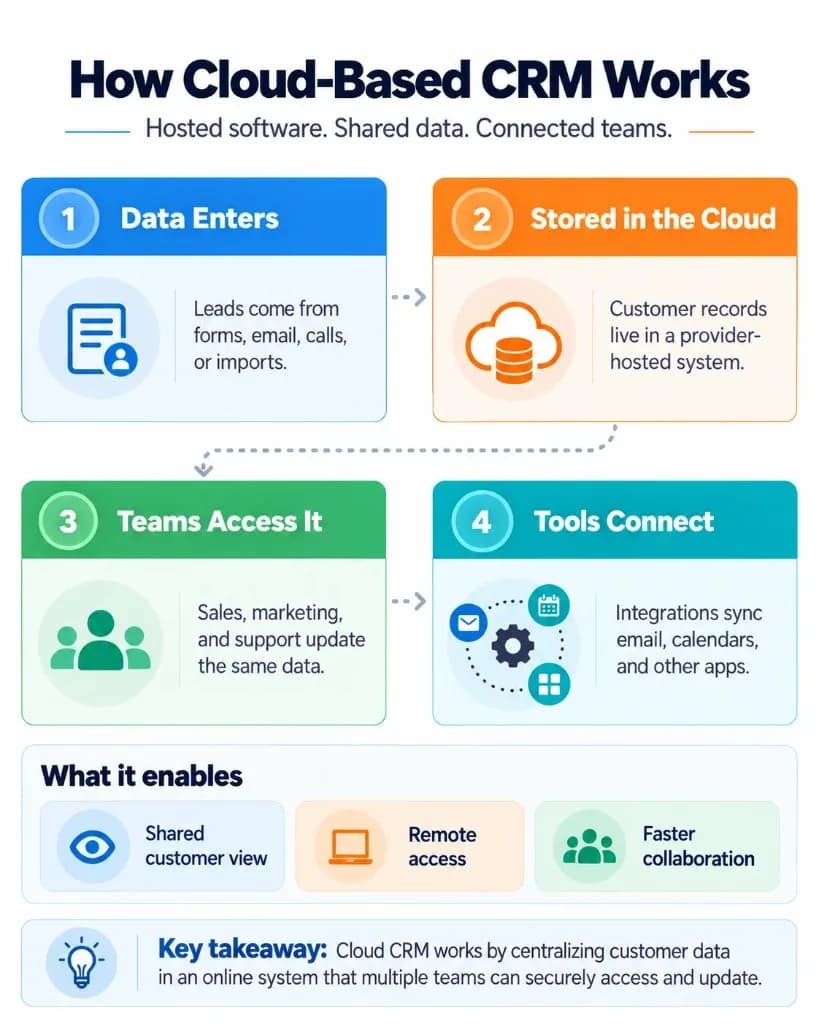
A cloud-based CRM operates through a remotely hosted application connected to a shared customer database. Authorised users access the application over the internet, and their changes are stored centrally rather than remaining on individual computers—typically inside a reliable CRM database the whole team can use.
The process typically works as follows:
1. The provider hosts the CRM
The software, database and underlying infrastructure run in a provider-managed cloud environment.
2. Employees access the system
Users sign in through a browser or mobile application. Access permissions determine which records and functions they can use.
3. Information is stored and updated centrally
When an employee adds a contact, updates a deal or records a conversation, the CRM saves those changes so other authorised users can access the updated information.
4. Connected applications exchange information
Supported integrations can link the CRM with email, calendars, website forms, accounting software and other business applications. How quickly information synchronises depends on the integration. Strong CRM integrations keep that connection usable without duplicate systems of record.
5. The provider maintains the service
The provider handles infrastructure operation, application maintenance and platform updates according to its service arrangements.
For example, when a customer submits an enquiry through a connected website form, the CRM may create a lead record automatically. A sales representative can review that lead on a laptop, while a manager checks its progress from another location. Sales automation can help with reminders and routing, but judgment stays with the people responsible for the relationship.
Both users work with the same hosted system, without needing a locally managed CRM server. That shared view is what operational CRM is designed to support day to day.
What Are the Benefits of Cloud-Based CRM?
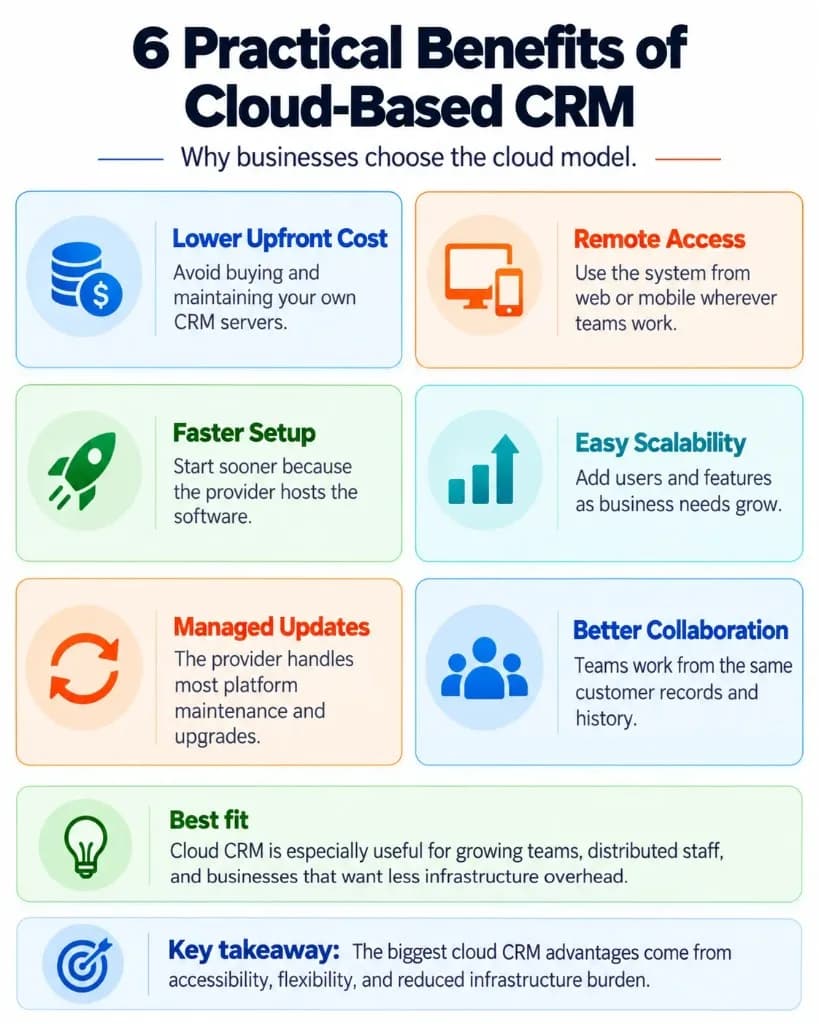
Cloud CRM offers several advantages arising from its internet-based delivery and provider-managed infrastructure.
1. Lower upfront infrastructure costs
Cloud-based CRM reduces the need to purchase and maintain physical servers, supporting infrastructure and locally installed CRM systems.
Businesses typically pay subscription fees instead of making a large initial infrastructure investment. This can make cloud CRM easier to adopt for organisations with limited IT resources.
However, lower upfront costs do not always mean lower long-term expenses. Subscription tiers, user licences, integrations and additional services affect total costs.
2. Access from different locations and devices
Employees can access cloud CRM from offices, homes or other locations with suitable internet connectivity.
Sales teams can retrieve customer information before meetings, while managers can review updates without needing to connect to an office server. Inside sales and CRM for call centers rely on that same anywhere access to customer history.
This is especially useful for businesses with remote employees, multiple offices or staff who regularly work in the field.
3. Faster initial setup
Businesses do not need to purchase, install and configure their own servers before accessing the software.
For a straightforward use case, employees may begin working after an account is created and basic settings are configured.
However, activating a cloud CRM is different from completing its implementation. Migrating existing customer records, setting up workflows, connecting applications and training employees may still require substantial effort. Weak user adoption turns even a capable platform into another silo.
4. Easier scalability
Cloud CRM makes it possible to adjust subscriptions, user licences and available capabilities as business requirements change.
For example, a growing company may add sales representatives without expanding its own server infrastructure.
The exact flexibility depends on the provider's pricing structure, user limits and available plans. CRM for service businesses and B2B CRM teams often scale seats this way as headcount grows.
5. Provider-managed updates and maintenance
Cloud CRM providers manage the software infrastructure and generally deliver application updates without requiring customers to maintain a local installation.
This reduces routine infrastructure work for internal IT teams and can simplify access to newly released capabilities.
Updates may still affect workflows, integrations or user interfaces, so businesses should review major changes when they are announced.
6. Easier collaboration and business connectivity
A cloud CRM allows authorised teams to work with customer information stored in one accessible system.
Sales, marketing and customer service employees can use shared records rather than relying on separate spreadsheets or disconnected customer lists.
Many cloud platforms also support integrations with other online business tools.
These capabilities are not exclusive to cloud CRM, but internet-based delivery can make access and connectivity easier to manage. Clean CRM data management keeps those shared records usable as volume grows.
Cloud-Based CRM vs On-Premise CRM: What's the Difference?
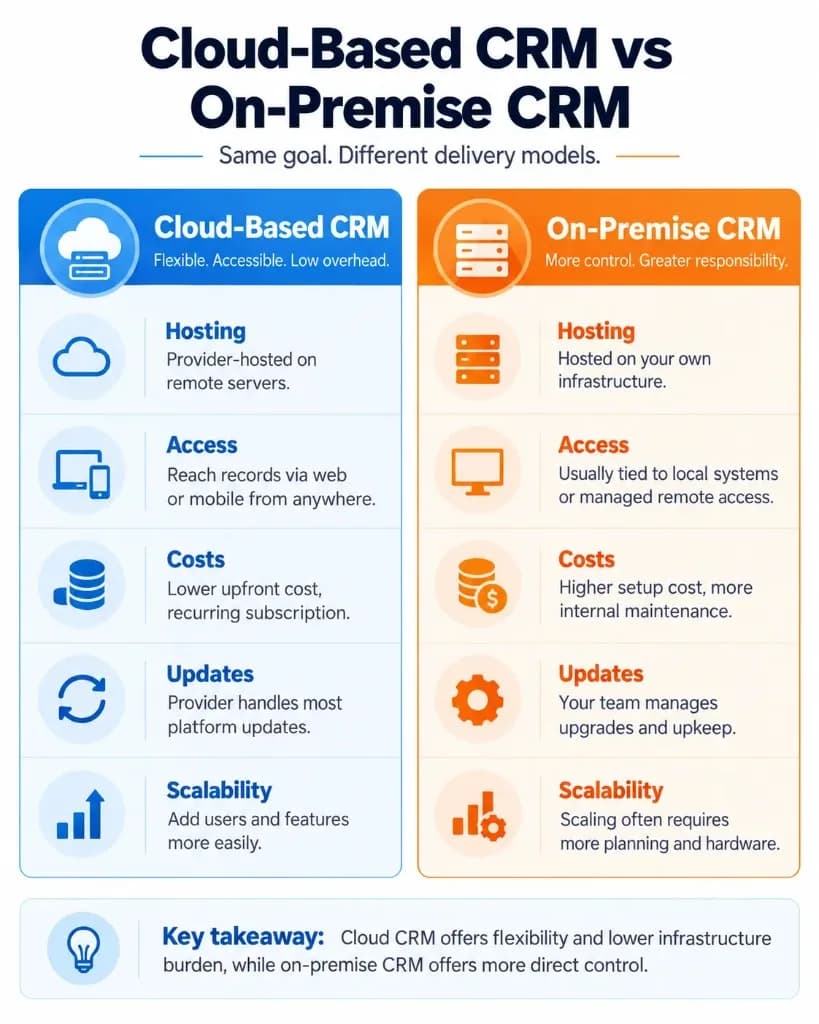
The primary difference between cloud-based and on-premise CRM is where the software runs and who manages the infrastructure.
| Factor | Cloud-based CRM | On-premise CRM |
|---|---|---|
| Hosting | Provider-managed cloud infrastructure | Company-managed or privately operated infrastructure |
| Access | Internet-based application or mobile app | Local network or configured remote access |
| Maintenance | Provider manages underlying infrastructure and software updates | Organisation manages maintenance and upgrades |
| Initial costs | Typically lower infrastructure investment | Usually higher setup and infrastructure costs |
| Ongoing costs | Often recurring subscriptions | Licensing, infrastructure and maintenance costs |
| Scalability | Capacity and licences can often be adjusted through the provider | Expansion may require infrastructure planning |
| Infrastructure control | Limited by provider's available options | Greater direct control |
| Security responsibilities | Shared between provider and customer | Primarily managed by the organisation |
Cloud CRM generally suits businesses that want flexible access and do not wish to operate their own CRM infrastructure.
On-premise CRM may suit organisations with specific infrastructure-control requirements, restricted operating environments or legacy systems that are difficult to move. CRM for government and Pharmaceutical CRM sometimes face that control trade-off when compliance rules shape hosting decisions.
On-premise does not necessarily mean employees cannot access the CRM remotely. Likewise, cloud deployment does not automatically guarantee better security, lower lifetime costs or unrestricted customisation. Comparing CRM platforms only by feature count usually hides whether the hosting model fits how the team actually works.
What Are the Limitations of Cloud-Based CRM?
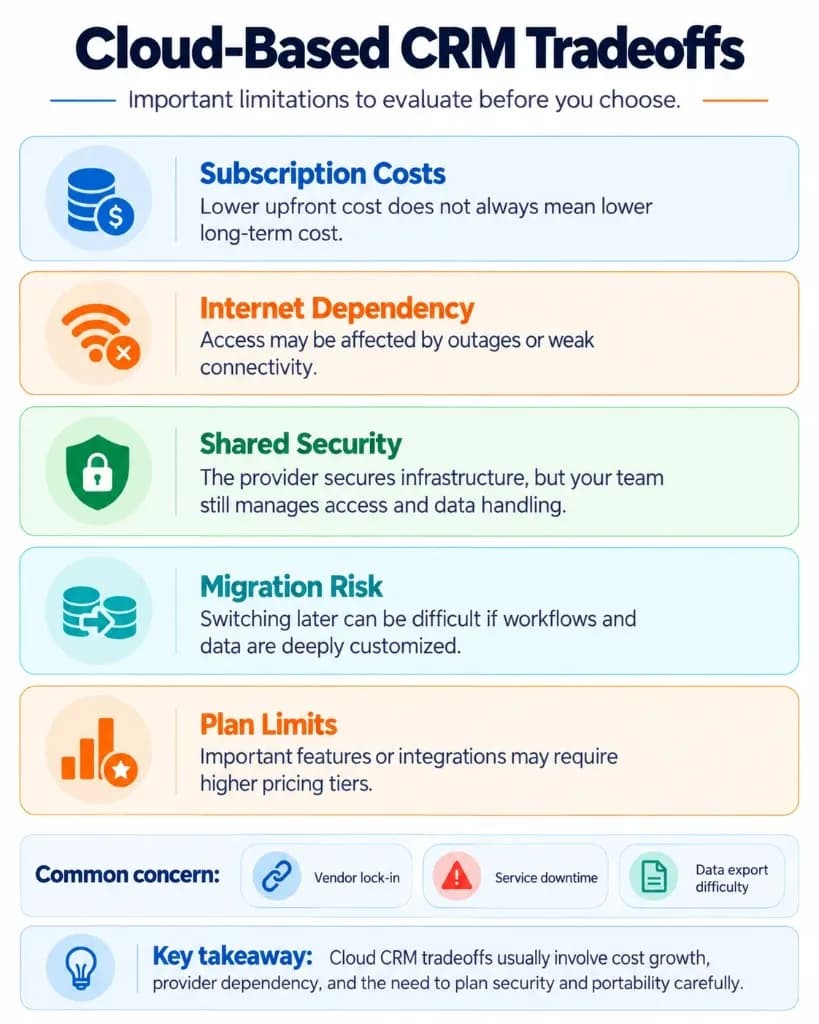
Cloud CRM reduces the responsibility of maintaining software infrastructure, but it introduces dependencies and limitations that businesses should understand.
Internet and service availability
Cloud CRM normally requires an internet connection to access current information.
Internet interruptions, provider outages or other service issues can temporarily prevent employees from working with the system.
Some platforms offer limited offline mobile capabilities, but these vary. Businesses that regularly operate without reliable connectivity should verify exactly which functions work offline and how changes are synchronised afterwards.
Recurring subscription costs
Cloud CRM usually operates through monthly or annual subscription plans.
Costs may increase as a company adds employees, requires more storage or needs functionality available only in higher-priced tiers.
Businesses should consider the total cost of licences, onboarding, integrations, support and future upgrades—not just the advertised entry price.
Data security and privacy responsibilities
A cloud provider normally manages infrastructure security, but the customer still needs to protect accounts, configure permissions and govern its information.
Security is therefore a shared responsibility.
For example, businesses should use appropriate authentication controls, restrict access to sensitive records, remove access when employees leave and review how the provider stores and processes customer information.
Microsoft's cloud security guidance explicitly distinguishes provider-managed infrastructure from customer responsibilities involving data, identities and access controls.
Where personal data regulations apply, businesses must also assess their own legal responsibilities. Under the GDPR, an organisation acting as a data controller does not transfer all compliance obligations to a cloud service provider. CRM in finance and CRM for insurance agents often treat those access and retention rules as non-negotiable requirements.
Provider dependency and data portability
Businesses rely on their cloud CRM provider for service availability, maintenance and supported functionality.
Changing providers can become difficult when customer records, custom fields, workflows and integrations are deeply connected to the current platform.
Before choosing a provider, check how customer information can be exported, whether related records remain connected, and what happens when the subscription ends.
Being able to download contacts does not necessarily mean the entire CRM configuration can be transferred to another system. If off-the-shelf tools force awkward workarounds later, plan for custom CRM development only after the core workflow is clear.
Examples of Cloud-Based CRM in Practice
Consider a business that receives enquiries from its website and uses a cloud CRM to manage potential customers.
A visitor submits a contact form. A connected CRM automatically creates a lead record and assigns it to a sales representative.
The representative reviews the enquiry, contacts the customer and records the conversation. A manager working from another office can see the latest lead status without requesting an emailed update. A clear sales pipeline still matters even when every record lives in the cloud.
If the customer contacts support later, an authorised support employee may be able to access the relevant customer history, depending on the CRM's permissions and connected service tools—similar to how Telecom CRM and CRM for retail keep interaction history available across teams.
This example demonstrates the value of centrally hosted customer information: multiple employees can access and update records without maintaining separate copies on their devices. ecommerce CRM and CRM for real estate show the same pattern when digital channels create work that several people must continue.
Established cloud CRM examples include Salesforce Sales Cloud, HubSpot CRM, Zoho CRM and Pipedrive.
These products differ in their capabilities, pricing and target customers, but all illustrate provider-hosted CRM delivery.
How to Decide Whether Cloud CRM Is Right for Your Business
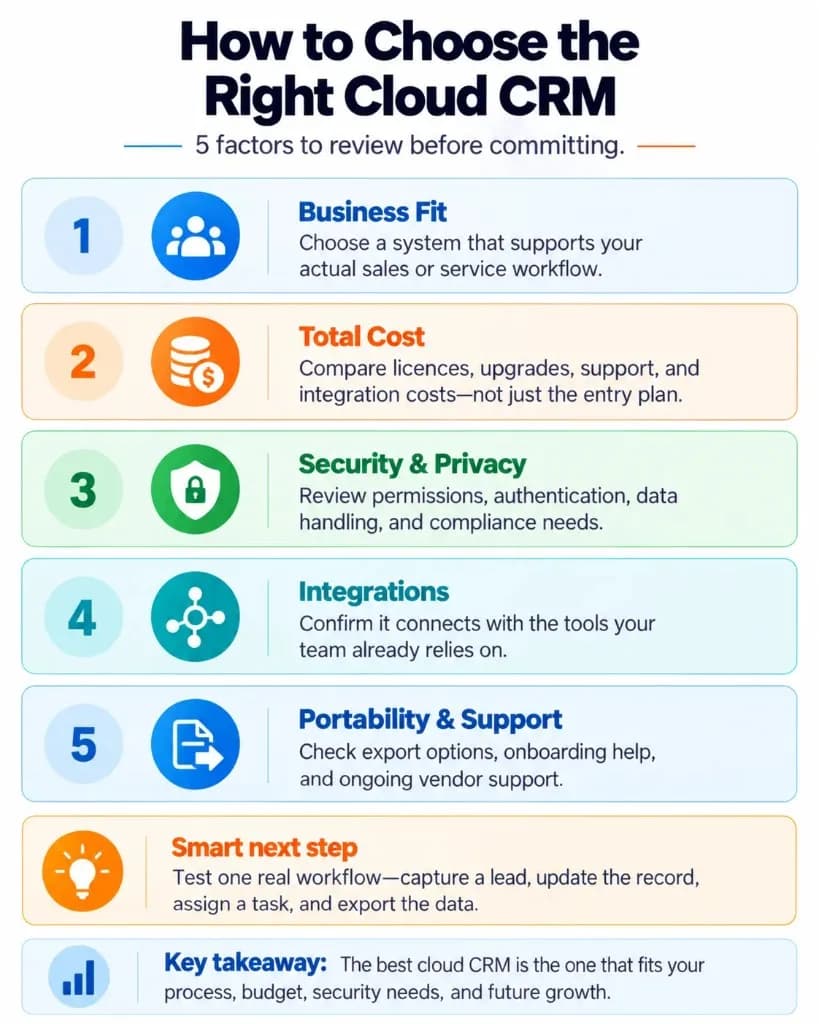
Cloud CRM is generally worth considering when a business needs shared customer information, remote access and an application that does not require managing its own CRM servers.
Before selecting a platform, evaluate six practical requirements.
1. Business requirements
Identify which customer-management activities employees need to perform. Avoid purchasing capabilities that do not support a defined workflow.
2. Total cost
Compare subscription plans using the expected number of users, required features, integration expenses and anticipated growth.
3. Security and privacy
Review authentication, access permissions, data location, relevant assurance reports and the provider's contractual data-handling arrangements.
4. Connectivity and reliability
Review service availability commitments, support arrangements, incident communication and offline functionality where necessary.
5. Integration compatibility
Confirm that the CRM connects with essential applications and that required integrations support the correct direction and frequency of data transfer.
6. Data portability
Check export options, termination procedures and potential difficulties transferring custom records or workflows to another provider.
A practical way to test cloud CRM is to trial one complete business workflow: capture a lead, update its details, assign a task, review the record from another device and export the information.
This reveals more about a platform's suitability than comparing feature lists alone. For a broader rollout methodology, see our CRM implementation guide. CRM metrics and CRM analytics help leaders see whether adoption and outcomes improve after go-live. CRM development depth also matters when configuration becomes the deciding factor.
Cloud-based CRM is a strong option when accessibility, flexibility and reduced infrastructure maintenance matter. The right choice is the system that supports your actual processes at a sustainable cost while meeting your security, availability and data-management requirements. The lightest setup that supports measurable business growth is usually better than the heaviest feature list.
Frequently Asked Questions
What happens to my customer data if I cancel a cloud CRM subscription?
Your customer data may remain accessible for a limited period after cancellation, depending on the provider's retention policy. Some platforms restrict access or delete records after account closure. Export your contacts, activity history, attachments and other important information before cancelling, and verify that the exported files are usable.
Can I create my own backups of data stored in a cloud CRM?
Yes, many cloud CRM platforms support data exports or backups, but the available options vary. Some allow scheduled exports, while others require manual downloads or API access. Check whether backups include notes, attachments, tasks and relationships between records, as these may not all be included in a standard CSV export.
Can a cloud-based CRM work without an internet connection?
Most cloud CRM systems require an internet connection, although some provide limited offline functionality through mobile applications. Depending on the platform, users may be able to view cached records or enter information offline and synchronise changes after reconnecting. Offline access is not universal, so confirm the supported features before choosing a provider.
Can cloud-based CRM software be customised for specific business needs?
Yes, many cloud CRM platforms allow businesses to customise fields, pipelines, dashboards, permissions and automated workflows. More complex requirements may need APIs, third-party integrations or paid features. However, provider-hosted software generally offers less control over its underlying infrastructure and source code than a self-hosted CRM.
Where is customer data physically stored in a cloud CRM?
Customer information is stored in data centres operated by the CRM provider or its cloud infrastructure partners. The physical location depends on the provider's infrastructure and available hosting regions. Businesses with data residency or regulatory requirements should verify storage locations, backup regions and international data-transfer arrangements before subscribing.
Are there any free cloud-based CRM systems?
Yes, some cloud CRM providers offer free plans for basic customer management. For example, HubSpot CRM offers free contact, deal and pipeline management tools. Free plans may restrict user numbers, automation, storage or advanced functionality, so check the limits and possible upgrade costs before adopting one.
Do small businesses need an IT team to use cloud-based CRM?
No, small businesses can often use cloud CRM without a dedicated IT team because the provider manages hosting, infrastructure maintenance and software updates. Basic setup typically involves creating accounts, importing contacts and configuring permissions. More complex integrations, data migrations or security requirements may still benefit from technical assistance.