
Quick Summary
- CRM manages customers, while project management software manages work: CRM systems track leads, customer relationships, sales pipelines, and communication history. Project management software focuses on tasks, deadlines, milestones, dependencies, and team responsibilities to ensure projects are completed efficiently—the same customer relationship management goal that CRM for service businesses pursue, versus delivery coordination.
- The biggest difference lies in workflows and outcomes: CRM software helps businesses convert prospects into customers and maintain relationships, while project management tools coordinate work from planning to delivery. CRM measures sales performance, whereas project management software tracks project progress and resource utilization. CRM metrics help with the first view; delivery boards help with the second.
- Both systems share features but cannot always replace each other: CRM platforms may offer task management, reminders, and basic project tracking, while project management tools can support simple customer records. However, complex sales pipelines and projects requiring advanced scheduling or dependencies often need specialized capabilities. Comparing CRM platforms only by feature count usually hides that gap.
- Choose software based on your business's biggest operational challenge: Use CRM when missed follow-ups, disorganized customer information, or poor sales visibility are the main problems. Choose project management software for delayed projects, unclear responsibilities, or workload issues. Businesses managing both complex sales and delivery may need both. That practical test also guides CRM implementation decisions.
- Connecting CRM and project management improves sales-to-delivery coordination: When a deal closes, customer details, agreed scope, and deadlines can transfer into a project workflow. Clear data ownership and well-defined CRM integrations help prevent duplicate records, lost information, and unnecessary manual work. Strong user adoption matters more than unused connectors.
CRM vs Project Management Software: Comparison at a Glance
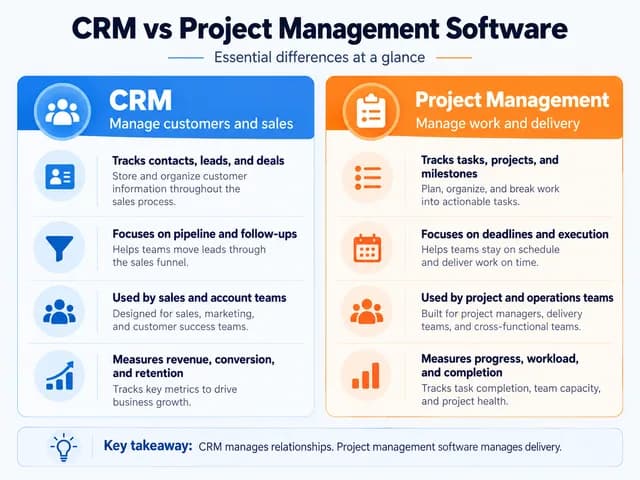
| Feature | CRM Software | Project Management Software |
|---|---|---|
| Primary purpose | Manage customer relationships and sales | Plan, coordinate, and deliver work |
| Core records | Contacts, accounts, leads, deals | Projects, tasks, milestones |
| Primary workflow | Lead to sale, renewal, and retention | Planning to execution and completion |
| Main users | Sales, account management, customer-facing teams | Project managers, operations, delivery teams |
| Task management | Usually customer- or deal-related activities | Detailed tasks, subtasks, assignments and deadlines |
| Communication | Customer interactions, calls, emails and meetings | Project discussions, updates and collaboration |
| Reporting | Pipeline value, conversion and sales performance | Progress, overdue tasks, workload and delivery performance |
| Automation | Lead routing, follow-ups, deal updates | Task assignment, status changes and project handoffs |
| Scheduling | Follow-up dates and meetings | Timelines, milestones and dependencies |
| Examples | HubSpot, Salesforce, Pipedrive | Asana, Jira, Trello |
| Best suited for | Managing people and commercial opportunities | Managing work and delivery responsibilities |
Some modern platforms combine these capabilities. Therefore, the distinction is not whether software contains a particular feature, but what its workflows are designed to manage. CRM systems only help when the people responsible for deals and communications keep them current—whether the product is a traditional suite or a cloud-based CRM.
What Does Each System Actually Manage?
CRM manages customer relationships and opportunities
A customer relationship management (CRM) system organizes information around contacts, companies, and business opportunities inside a reliable CRM database.
For example, when a potential customer requests a website development quote, a CRM can record their contact details, previous conversations, quoted amount, next follow-up, and current deal stage.
The sales team can see whether the opportunity is new, qualified, awaiting approval, won, or lost. A clear sales pipeline keeps that commercial progress visible.
CRM systems typically support lead management, communication history, follow-up tasks, and pipeline reporting. HubSpot, for instance, allows tasks to be associated with contacts, companies, or deals and uses pipeline stages to track commercial opportunities. Sales automation can help with reminders, but judgment stays with the people responsible for the relationship.
The central question a CRM answers is: What is happening with this customer or opportunity, and what should happen next? That is closer to operational CRM than to a project schedule.
Project management software manages work and delivery
Project management software organizes the activities required to complete an agreed outcome.
Continuing the website example, once the customer approves the proposal, the team may need to complete wireframes, design pages, develop the website, conduct testing, secure approval, and launch.
A project management system helps assign those activities to team members, set deadlines, track progress, and identify tasks that cannot begin until others are completed.
Platforms such as Asana support task dependencies, project milestones and workload visibility, helping teams coordinate more complex delivery processes. CRM for call centers and Inside sales teams still need relationship context even when delivery work lives elsewhere.
The central question project management software answers is: What needs to be completed, who is responsible, and when will the work be finished?
The difference becomes especially clear in a shared Kanban-style interface. A CRM board might show a deal moving from Proposal Sent to Closed Won. A project board might show a design task moving from In Progress to Awaiting Approval. Both use stages, but the stages represent different kinds of progress.
Where Do CRM and Project Management Software Overlap?
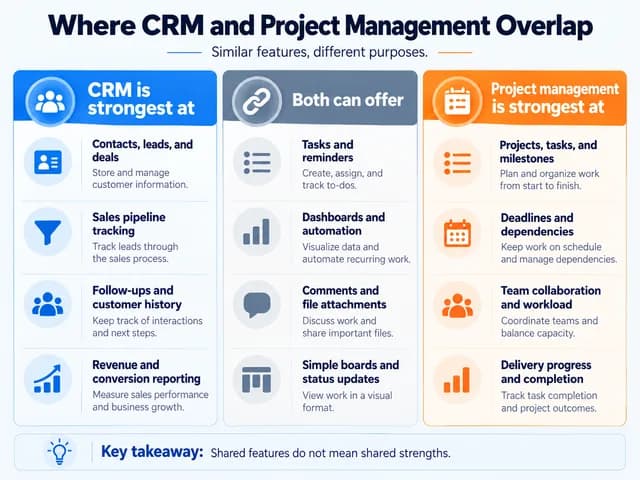
Both categories can support tasks, reminders, file attachments, team comments, dashboards and automation.
For example, a CRM might assign a task to call a prospect on Friday. A project management tool might assign a task to submit a design for review on Friday.
The similarity ends when the work becomes more specialized.
CRM task management is generally organized around relationships and sales activities. Project management software is designed to coordinate work across multiple people, deadlines and dependencies. For a terminology comparison with other relationship systems, see our guide to CMS vs CRM differences.
Can a CRM replace project management software?
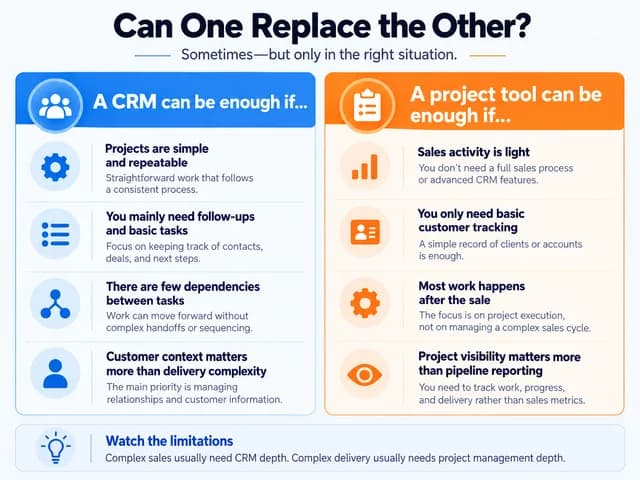
Yes, for relatively simple workflows, provided the CRM has suitable task or project features.
A consultant managing a handful of client activities may only need task assignments, due dates, notes, and status tracking within a CRM—similar to how CRM for service businesses often start with light task tracking before adding delivery tools.
However, a team delivering projects involving multiple phases, dependent tasks, parallel workstreams, or resource scheduling may require dedicated project management capabilities.
For example, a website launch might depend on final design approval before development starts, with testing dependent on development completion. Basic CRM reminders do not necessarily provide the scheduling and dependency controls needed to manage that sequence.
The important question is whether the CRM can manage the actual delivery process, not simply whether it offers a task board. If off-the-shelf CRM tools force awkward delivery workarounds, plan for custom CRM development only after the core sales workflow is clear.
Can project management software replace a CRM?
A project management platform can handle basic customer tracking if it supports contacts, custom fields, pipeline stages and follow-up activities.
This may be sufficient for a small team with few sales opportunities and uncomplicated customer communication. Spreadsheets sometimes fill that gap temporarily, but they rarely preserve relationship history well.
It becomes less suitable when the business needs detailed relationship histories, multiple contacts per account, structured sales forecasting, lead management and coordinated customer follow-ups—areas where B2B CRM and CRM for retail are usually stronger.
A task board can record that a proposal needs attention, but it may not provide the complete customer context or sales reporting that a CRM is designed to support. CRM analytics still matter when revenue questions are the real bottleneck.
Some hybrid platforms offer deeper functionality in both areas, so capabilities should be evaluated product by product rather than assumed from the software category.
When Should You Use CRM, Project Management Software, or Both?
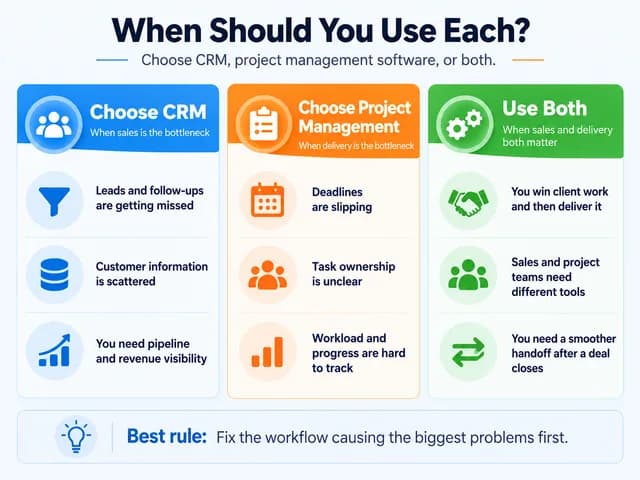
The best starting point is the business problem that needs solving.
Choose CRM when sales and customer relationships are the bottleneck
Prioritise CRM if you frequently lose track of new enquiries, miss customer follow-ups, struggle to understand deal progress, or lack a shared record of customer conversations.
For example, a consulting company receiving frequent enquiries but managing all prospect communication through individual employee inboxes may benefit more immediately from CRM than from a sophisticated project planning system. CRM for insurance agents and CRM for real estate face the same “missed follow-up” risk when relationship context is scattered.
Choose project management software when delivery is the bottleneck
Prioritise project management software if your team already has a manageable flow of customers but struggles to deliver work consistently.
Typical signs include missed deadlines, unclear task ownership, delayed approvals, duplicated work, and poor visibility into staff availability.
A creative agency with several active campaigns might need clearer assignment, milestones, approval processes, and task dependencies before investing in additional CRM functionality. Telecom CRM and CRM for government show a similar split: relationship systems do not automatically replace structured case or delivery workflows.
Use both when sales and delivery need different capabilities
Businesses that manage substantial sales pipelines and complex client delivery often benefit from both systems.
This does not necessarily require two separate products. A suitable integrated platform may cover both requirements, while businesses with more demanding processes may prefer specialized tools connected through integrations. Clean CRM data management keeps the customer side usable when those tools share identifiers.
| Your main problem | Starting recommendation |
|---|---|
| Leads and customer follow-ups are being missed | CRM |
| Project tasks and deadlines are being missed | Project management software |
| Both sales and delivery need coordination | Both capabilities |
| Simple projects follow a small number of steps | CRM with suitable task tracking may suffice |
| Complex projects require dependencies and resources | Dedicated project management capabilities |
| Separate sales and delivery teams lose information during handoff | Connected CRM and project workflows |
Choose according to workflow complexity and operational needs, not business size alone.
How Do CRM and Project Management Software Work Together?
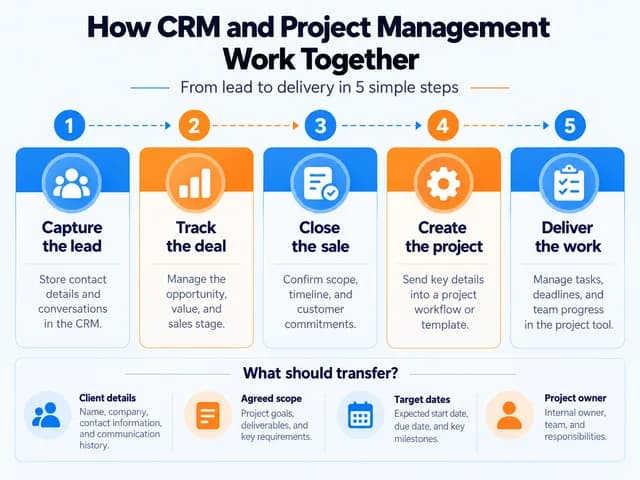
CRM and project management software complement each other when a customer opportunity turns into work that must be delivered.
Consider a digital agency developing a website for a new client.
CRM: Before the project begins
The agency records the enquiry, qualifies the prospect, sends a proposal, tracks negotiations, and marks the deal Closed Won.
Sales-to-delivery handoff
Won-deal details move into a delivery plan so the project team inherits client context, agreed scope, and target dates without rebuilding the record from scratch.
Project management: During delivery
A project is created with the agreed scope, responsible team members, milestones, deadlines and tasks for design, development, testing and launch.
Connected client visibility
The project team tracks delivery while the account manager retains customer history and can access the project status needed for client updates. ecommerce CRM and Pharmaceutical CRM teams use a similar handoff idea when ordered work must continue after the commercial stage.
The handoff should preserve the information delivery teams actually need: client and project identifiers, key contacts, agreed scope, commitments, target dates, and the person responsible for delivery.
Each system should also have clear ownership. The CRM can remain the authoritative source for customer and deal information, while the project system owns task completion and delivery schedules.
Connecting the two does not require every field to be synchronized in both directions. A smaller, well-defined transfer can be easier to maintain and less likely to create conflicting records. CRM in finance faces the same ownership question when transaction systems stay authoritative beside the CRM.
How to Choose the Right Software Setup?
There are two main approaches.
An all-in-one platform can reduce the number of systems employees use and keep customer and project information closely connected. It may work well when both sales and delivery requirements are straightforward enough for the platform's capabilities.
Separate but integrated systems allow each team to use software specialized for its work. This can be preferable when sales processes are sophisticated or projects require advanced scheduling, dependencies and resource planning. The tradeoff is the additional cost and responsibility of maintaining the connection.
Before choosing, test one real workflow rather than relying solely on feature lists.
Create a customer record and track an enquiry through proposal approval.
Convert the accepted deal into a project without unnecessarily re-entering information.
Assign delivery tasks with deadlines, responsible people, and at least one dependency.
Check whether the account manager can access the customer information and delivery status they need.
Confirm which system owns each record, how errors are handled, and whether the required functionality is included in the proposed subscription.
A platform that completes this workflow reliably may be sufficient on its own. If it cannot, identify the missing capabilities before deciding whether to integrate a second system. For a broader rollout methodology, see our CRM implementation guide. CRM development depth also matters when configuration becomes the deciding factor.
The deciding factor is the work your team needs to manage. Choose CRM to organize customer relationships and commercial opportunities, project management software to coordinate delivery, or both capabilities when the business depends on a reliable connection between sales and execution. The lightest setup that supports measurable business growth is usually better than the heaviest feature list.
Frequently Asked Questions
How do I prevent duplicate customer records between CRM and project management software?
Keep the CRM as the primary source for customer information and link projects using a shared customer or account ID. Configure integrations to update existing records rather than create new contacts each time a project starts. Check field mapping and duplicate-detection settings before enabling automatic synchronization.
Can I manage multiple projects for the same client in a CRM?
Yes, many CRM platforms allow multiple projects to be associated with one customer account, either natively or through an integrated project management system. Each project can have separate tasks, deadlines, and progress tracking while sharing the same customer information. The exact setup depends on the platform.
Can clients see project progress without accessing internal tasks or CRM data?
Yes, project management platforms with client portals, guest access, or configurable permissions can provide limited project visibility. Clients may be able to view milestones, deliverables, and approved updates without accessing internal discussions or confidential sales information. Check the platform's permission controls before inviting external users.
Can a CRM automatically create a project when a deal is closed?
Yes, some CRM systems can automatically create a project when a deal reaches the Closed Won stage. Native integrations or automation tools can transfer customer details, agreed scope, and deadlines into a project template. For example, Zoho supports automated project creation through its CRM and Projects integration, subject to configuration.
Which software is better for managing employees working on multiple client projects?
Project management software is generally better because it can provide workload, task assignment, deadline, and resource-capacity views across multiple projects. These features help managers identify overloaded employees and scheduling conflicts. A CRM may show customer-related activities, but it may not provide sufficient visibility into overall delivery capacity.
Can I connect CRM and project management software without coding?
Yes, many platforms offer native integrations or no-code automation tools such as Zapier and Zoho Flow. These can transfer customer details, create projects from won deals, or share selected status updates. Available actions, subscription requirements, and synchronization capabilities vary between platforms, so test the required workflow before relying on it.